 Shopify developer Atlanta
 searches have surged dramatically in 2026 — and for good reason. Atlanta has quietly become one of the Southeast’s most dynamic ecommerce hubs, with Shopify itself investing in Georgia infrastructure and a thriving local tech ecosystem producing world-class digital talent. But hiring a developer is only half the battle. Knowing
how to work with one — and what to demand from your ecommerce web design — is what separates Atlanta businesses that scale from those that stagnate.
This guide gives you seven concrete, battle-tested strategies to get maximum ROI from your website development Atlanta investment. Whether you’re launching a new store, migrating from another platform, or optimizing an underperforming site, these actionable steps will transform how you approach Shopify development.
Table of Contents
Why Atlanta Is a Rising Ecommerce Powerhouse
Atlanta’s digital economy is booming. The city’s startup ecosystem — highlighted by outlets like
Hypepotamus — is rapidly producing tech-forward companies that understand how to win online. Local agencies like The Commerce Shop, Inspry, and Soda Web Media have built reputations for delivering high-converting Shopify stores for brands across the country.
More notably, Shopify’s decision to establish its
first U.S. distribution center in Georgia signals the platform’s confidence in the region’s commercial potential. For Atlanta-based brands, this creates a rare alignment: world-class logistics infrastructure paired with a growing pool of elite Shopify developers who understand local market dynamics.
Atlanta’s The Scale Tech recently identified what they call the
“Digital Blueprint” — treating your website not as a marketing afterthought but as a
core business asset. This mindset shift is exactly what separates seven-figure Atlanta ecommerce brands from those stuck in the five-figure range.

Strategy 1: Define Your Project Scope Before You Hire
The single biggest mistake Atlanta business owners make when seeking a Shopify developer is approaching agencies without a clear brief. Vague requests lead to bloated timelines, scope creep, and wasted budgets.
Here’s how to build a project brief that gets results:
- List your must-have features — custom checkout, subscription functionality, multi-currency support, loyalty programs, B2B pricing tiers
- Document your current pain points — slow load times, poor mobile UX, low conversion rates, broken integrations
- Define your success metrics — target conversion rate, page speed score, revenue per visitor
- Set a realistic budget range — Atlanta Shopify developers typically range from $150–$200/hr for senior specialists; project costs range from $5,000 for basic builds to $50,000+ for complex Shopify Plus implementations
- Establish a timeline — account for discovery, design, development, QA, and launch phases
“A well-defined brief is the difference between a project that ships on time and one that drags on for months — burning budget and momentum.” — Common wisdom among Atlanta’s top ecommerce agencies
| Project Type |
Typical Budget Range |
Timeline |
| Theme customization |
$2,000 – $8,000 |
2–4 weeks |
| Custom Shopify store build |
$10,000 – $30,000 |
6–12 weeks |
| Shopify Plus enterprise build |
$30,000 – $100,000+ |
12–24 weeks |
| Migration (WooCommerce/Magento) |
$5,000 – $20,000 |
4–8 weeks |
| App/integration development |
$3,000 – $15,000 |
3–6 weeks |
Strategy 2: Vet Your Shopify Developer Atlanta Like a Pro
Not all developers are created equal. Atlanta has a competitive market, which means there are excellent agencies — and some that will overpromise and underdeliver. Here’s a rigorous vetting checklist to protect your investment.
Technical Skills to Verify
- Liquid templating language — Shopify’s proprietary templating engine; fluency is non-negotiable
- JavaScript, HTML5, CSS3 — for custom frontend development
- Shopify APIs and webhooks — for third-party integrations and custom app builds
- Shopify Plus experience — if you’re scaling past $1M in annual revenue
- Performance optimization — ask specifically about Core Web Vitals scores on past projects
Portfolio Red Flags to Watch For
❌ Generic template builds with no customization
❌ No case studies showing measurable results (conversion rate lifts, speed improvements)
❌ Inability to explain
why design decisions were made
❌ No post-launch support plan
❌ Unwillingness to provide client references
The Right Questions to Ask
- “Can you show me a Shopify store you built where you improved conversion rates — and by how much?”
- “What’s your process for mobile-first design?”
- “How do you handle post-launch bugs and ongoing maintenance?”
- “Have you worked with businesses in my industry?”
- “What’s your experience with Shopify’s checkout extensibility?”
“Agencies should demonstrate comfort working with performance optimization, data-heavy catalogs, and scalable architectures”
— WeFame Tech – Top Shopify Agencies in Atlanta 2026
Strategy 3: Demand Mobile-First Ecommerce Web Design
Here’s a statistic that should reframe every ecommerce web design conversation you have with a developer:
over 65% of global ecommerce transactions now happen on mobile devices. Yet mobile conversion rates (averaging 1.0%) still lag dramatically behind desktop (2.3%).
That gap is your opportunity — if your Atlanta Shopify developer builds mobile-first.
The Mobile-First Design Checklist
Navigation:
- Hamburger menus that open smoothly with large tap targets (minimum 44x44px)
- Sticky header with cart icon always visible
- Search bar prominent and functional on small screens
Product Pages:
- Swipeable image galleries with pinch-to-zoom
- Sticky “Add to Cart” button that follows the user as they scroll
- Size guides and product specs in collapsible accordions to reduce scroll length
Checkout:
- One-tap payment options (Shop Pay, Apple Pay, Google Pay)
- Auto-fill enabled for shipping and billing fields
- Progress indicator showing steps remaining
- Guest checkout option — never force account creation
Performance:
- Images compressed and served in WebP format
- Lazy loading for below-the-fold content
- Target Largest Contentful Paint (LCP) under 2.5 seconds
📊
Mobile converts at 1.0% vs desktop at 2.3% — closing this gap is the single largest CRO opportunity for most Shopify stores – Mobile ecommerce gap
Strategy 4: Build for Conversion, Not Just Aesthetics
Beautiful ecommerce web design that doesn’t convert is an expensive hobby. Your Shopify developer in Atlanta should be as fluent in
conversion rate optimization (CRO) as they are in design. Here’s how to ensure your build is engineered to sell.
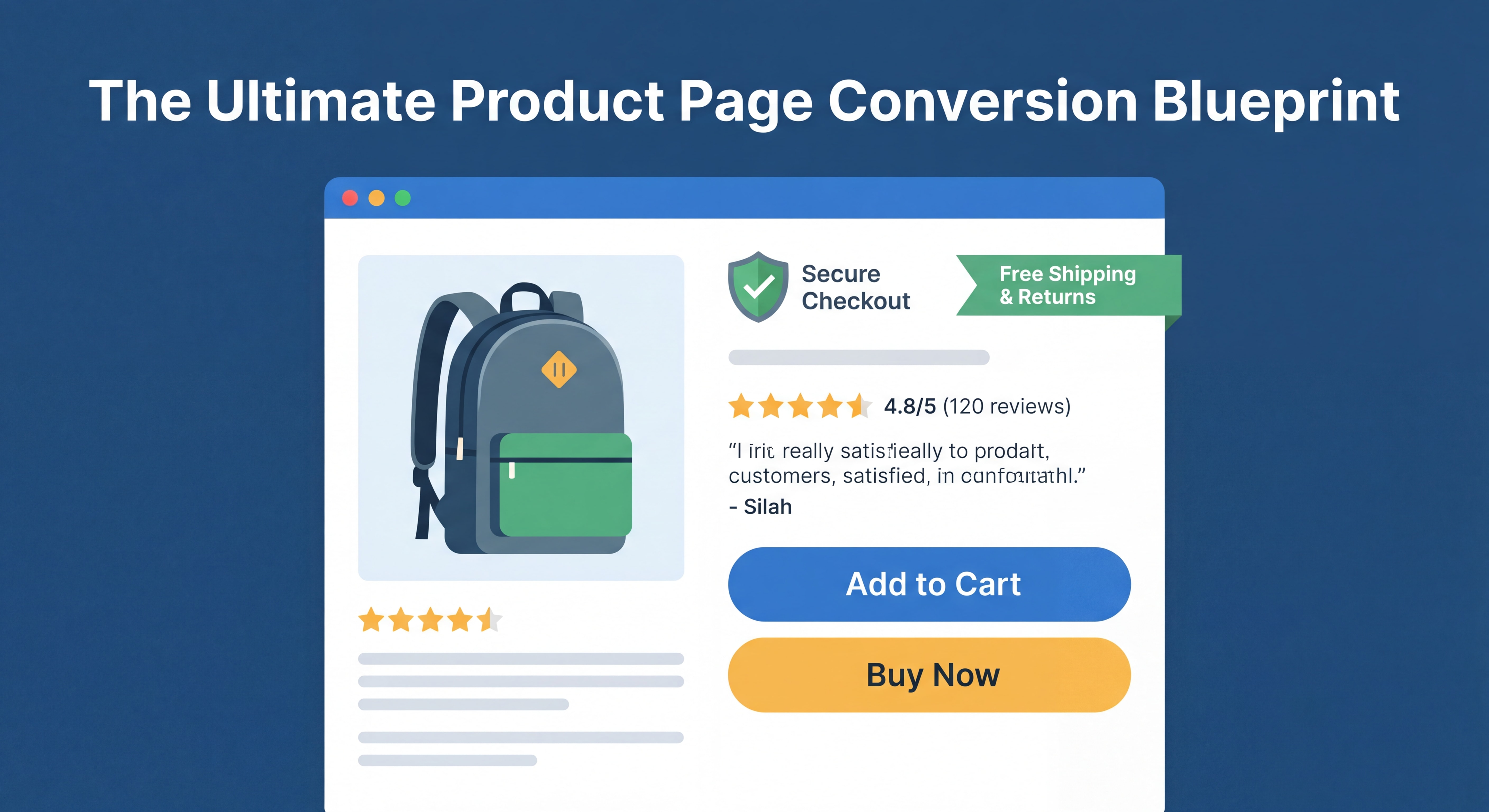
The Conversion-Optimized Homepage Structure
According to 2026 ecommerce design research, the highest-converting homepage layouts follow this sequence:
| Section Order |
Element |
Conversion Purpose |
| 1 |
Hero with UVP + primary CTA |
Immediate value communication |
| 2 |
Featured categories (Bento Grid) |
Navigation to purchase intent |
| 3 |
Bestsellers / trending items |
Social proof via popularity |
| 4 |
Reviews, ratings, press mentions |
Trust and credibility |
| 5 |
Brand story snippet |
Emotional connection |
| 6 |
Reassurance strip (shipping, returns, support) |
Objection removal |
Product Page Must-Haves
- 50+ customer reviews — stores with 50+ reviews see 15% higher conversion rates
- High-quality images with zoom — reduces purchase hesitation
- Security badges near checkout — builds trust at the critical decision moment
- Scarcity indicators — “Only 3 left in stock” drives urgency without being manipulative
- Frequently Bought Together sections — proven to increase average order value by 20–30%
CTA Best Practices
- Use action-oriented language: “Add to Cart,” “Buy Now,” “Get Yours Today”
- Make primary buttons large, high-contrast, and consistently placed
- Place at least one CTA above the fold on every key page
- A/B test button color, size, and copy — even small changes can lift conversions by 0.3–0.8 percentage points
📊
Implementing multiple CRO tactics can compound to lift conversion rates by 1.0–2.5 percentage points – Shopify CRO combined impact
Strategy 5: Optimize Site Speed from Day One
Speed is not a nice-to-have — it’s a revenue driver. Every
1-second delay in page load time reduces conversions by 7–10%. Your Shopify developer in Atlanta should treat performance optimization as a first-class deliverable, not an afterthought.
The Speed Optimization Playbook
Image Optimization:
- Compress all images before upload (target under 200KB for product images)
- Use WebP format for superior compression without quality loss
- Implement lazy loading for images below the fold
- Use Shopify’s built-in image CDN for global delivery
Code Optimization:
- Minimize and defer JavaScript that isn’t critical to page render
- Remove unused Shopify apps — each installed app adds HTTP requests
- Avoid loading third-party scripts synchronously
- Use Shopify’s native features before reaching for apps
Theme Selection:
- Choose lightweight themes (Dawn, Sense, Craft) over bloated premium themes
- Avoid themes with excessive animations and parallax effects
- Test theme performance with Google PageSpeed Insights before customization
Target Benchmarks:
| Metric |
Poor |
Acceptable |
Excellent |
| Page Load Time |
> 4s |
2–4s |
< 2s |
| LCP (Largest Contentful Paint) |
> 4s |
2.5–4s |
< 2.5s |
| Mobile PageSpeed Score |
< 50 |
50–79 |
80+ |
| Desktop PageSpeed Score |
< 70 |
70–89 |
90+ |
A real-world example: Shopify store Sunday Citizen achieved a
6% increase in conversion rates simply by improving image performance and simplifying layout — resulting in a 25% improvement in LCP and 61% improvement in CLS scores.
Strategy 6: Integrate the Right Tech Stack
Your Shopify store doesn’t exist in isolation. A skilled Shopify developer in Atlanta will help you build an integrated ecosystem where your website talks seamlessly to your other business systems. This is where website development in Atlanta truly differentiates — agencies that understand your full operational picture, not just your storefront.
Essential Integrations for Atlanta Ecommerce Brands
Operations:
- Inventory management (Stocky, Cin7, Linnworks) — prevent overselling and automate reordering
- Shipping & fulfillment (ShipStation, EasyPost) — automate label creation and tracking
- POS integration — critical for Atlanta retailers with both physical and online presence
Marketing:
- Email marketing (Klaviyo, Omnisend) — automated flows for abandoned cart, welcome series, post-purchase
- SMS marketing (Postscript, Attentive) — high open rates for time-sensitive promotions
- Analytics (Google Analytics 4, Triple Whale) — unified view of customer acquisition and LTV
Customer Experience:
- Reviews platform (Okendo, Judge.me, Yotpo) — social proof at scale
- Loyalty program (Smile.io, LoyaltyLion) — increases repeat purchase rate
- Live chat / AI support (Gorgias, Tidio) — reduces pre-purchase friction
Finance:
- Accounting integration (QuickBooks, Xero) — automated revenue reconciliation
- Buy Now Pay Later (Klarna, Afterpay, Shop Pay Installments) — proven to increase AOV by 15–30%
Proper integrations keep your online and in-store inventory perfectly synced, your marketing automated, and your analytics unified — giving you the data to make smart growth decisions.
Strategy 7: Plan for Post-Launch Growth
The biggest misconception in ecommerce web design is that launch day is the finish line. In reality, it’s the starting gun. Your relationship with your Shopify developer in Atlanta should be structured for
ongoing optimization, not a one-time build.
The 90-Day Post-Launch Framework
Days 1–30: Stabilize
- Monitor for bugs across all devices and browsers
- Verify all integrations are functioning correctly
- Set up Google Analytics 4 and Shopify analytics dashboards
- Collect initial heatmap and session recording data (Hotjar, Microsoft Clarity)
Days 31–60: Analyze
- Identify top exit pages and friction points in the checkout funnel
- Review mobile vs. desktop conversion rate gap
- Analyze search queries to find missing products or content
- Conduct first A/B test (start with your highest-traffic page)
Days 61–90: Optimize
- Implement winning A/B test variants
- Add personalization (recently viewed items, location-aware messaging)
- Launch email marketing automations based on on-site behavior
- Review site speed scores and address any regressions
Ongoing Maintenance Essentials
| Task |
Frequency |
Why It Matters |
| App and theme updates |
Monthly |
Security patches, new features |
| Speed performance audit |
Quarterly |
Prevent score regression |
| Conversion rate review |
Monthly |
Identify new optimization opportunities |
| Security scan |
Monthly |
Protect customer data |
| Content and product updates |
Weekly |
Fresh content for SEO and engagement |
“A 2026-ready ecommerce site is never “finished.” It evolves based on real user data and experimentation”
— Shift8 Web – eCommerce Web Design Best Practices 2026
Chiffres Clés
📊
1.4% — Average Shopify store conversion rate in 2026; top performers achieve
4.7% by implementing structured CRO strategies (Source: Red Stag Fulfillment / EasyApps 2026)
💡
65%+ of all global ecommerce transactions now occur on mobile devices, yet mobile converts at half the rate of desktop — making mobile-first design the #1 priority for any Atlanta Shopify build (Source: Shift8 Web 2026)
⚡
7–10% drop in conversions for every additional second of page load time — speed optimization is the highest-ROI technical investment for Shopify stores (Source: Shopify CRO benchmarks 2026)
🏙️
$150–$200/hr — typical rate for senior Shopify developers in Atlanta, with full project builds ranging from $5,000 to $100,000+ depending on complexity and Shopify tier (Source: Clutch.co Atlanta Rankings 2026)
Questions Fréquentes (FAQ)
How much does it cost to hire a Shopify developer in Atlanta?
Shopify developer rates in Atlanta typically range from
$25–$200+ per hour, depending on experience level and agency size. Boutique agencies and senior specialists charge $150–$200/hr, while mid-tier developers range from $50–$100/hr. Full project costs vary widely: a basic theme customization starts around $2,000–$8,000, a custom store build runs $10,000–$30,000, and an enterprise Shopify Plus implementation can exceed $100,000. Always request a fixed-price quote for defined scope rather than open-ended hourly billing.
What should I look for in an Atlanta ecommerce web design agency?
Beyond a strong portfolio, look for agencies that can demonstrate
measurable results — specific conversion rate improvements, speed score gains, and revenue lifts from past projects. Verify their fluency in Liquid (Shopify’s templating language), their mobile-first design process, and their post-launch support structure. Ask for client references in your industry, and ensure they have experience with the integrations your business needs (email marketing, inventory management, POS, etc.).
How long does Shopify website development in Atlanta typically take?
Timelines vary by project complexity. A theme customization takes 2–4 weeks, a custom store build 6–12 weeks, and a full Shopify Plus enterprise build 12–24 weeks. Platform migrations (from WooCommerce or Magento) typically take 4–8 weeks. Add 1–2 weeks for discovery and briefing at the start, and budget time for QA and revisions before launch. Rushing development to meet an arbitrary deadline is one of the most common causes of post-launch issues.
What is the average Shopify store conversion rate, and how can I improve mine?
The average Shopify store converts at
1.4%, while top-performing stores achieve 4–5%+. The fastest wins come from: adding a sticky add-to-cart bar (5–12% mobile conversion lift), implementing a free shipping progress bar (12–18% AOV increase), optimizing page speed below 2.5 seconds LCP, and adding express checkout options like Shop Pay and Apple Pay. Combining multiple CRO tactics can lift conversion rates by 1.0–2.5 percentage points cumulatively.
Do I need Shopify Plus for my Atlanta ecommerce business?
Shopify Plus is worth considering when your store surpasses approximately
$500,000–$1M in annual revenue, or when you need advanced features like checkout extensibility, custom B2B pricing, multi-store management, or dedicated API access. For most growing Atlanta businesses, standard Shopify plans (Basic, Shopify, Advanced) are more than sufficient. A qualified Shopify developer in Atlanta can help you assess whether your current requirements justify the Shopify Plus investment (~$2,300/month).
Conclusion: Your Atlanta Ecommerce Success Starts With the Right Strategy
Working with a
Shopify developer in Atlanta is one of the highest-leverage investments a growing ecommerce brand can make — but only if you approach it strategically. Define your scope before you hire. Vet developers on results, not just portfolios. Demand mobile-first
ecommerce web design that’s engineered to convert. Optimize speed from day one. Build a tech stack that grows with you. And treat post-launch optimization as an ongoing discipline, not an afterthought.
Atlanta’s digital ecosystem is maturing fast. The brands that win in this market will be those that treat
website development in Atlanta as a strategic growth function — not a one-time expense. The seven strategies in this guide give you the framework to do exactly that.
Ready to build a Shopify store that actually converts? Start by auditing your current site against the checklists in this guide, then use those findings to brief your next developer with precision. The gap between your current conversion rate and the 4.7% achieved by top performers is closeable — and it starts with the right strategy.