 Shopify developer Atlanta
 searches are surging — and for good reason. Atlanta’s ecommerce scene is booming, with Georgia’s tech ecosystem attracting more digital commerce investment than ever before. But knowing
how to find, vet, and work with the right Shopify developer — and how to ensure your ecommerce web design actually drives revenue — is where most Atlanta business owners get stuck.
This is not a general overview. This is a step-by-step, actionable playbook designed for Atlanta entrepreneurs and brand owners who want a high-converting Shopify store built the right way, the first time.
Table of Contents
Why Atlanta Is a Hotbed for Ecommerce Growth
Atlanta isn’t just a logistics hub — it’s rapidly becoming one of the Southeast’s most dynamic digital commerce cities. Shopify itself recognized Georgia’s strategic value when it announced plans to open its
first U.S. distribution center in Georgia, signaling massive confidence in the region’s ecommerce infrastructure.
“Shopify announced plans to open its first U.S. distribution center in Georgia, underscoring the state’s growing role in digital commerce logistics”
— Bisnow
Atlanta-based companies like
Range Beauty — a Shopify-powered inclusive cosmetics brand — have proven that local entrepreneurs can build nationally recognized ecommerce brands from right here in Georgia. The city’s diverse consumer base, strong logistics network, and growing pool of tech talent make it an ideal launchpad for Shopify-powered businesses.
But with opportunity comes competition. Your ecommerce web design and website development choices will determine whether you capture a slice of Atlanta’s digital commerce market — or get left behind.
Step 1: Define Your Ecommerce Goals Before Talking to Any Developer
The #1 mistake Atlanta business owners make is approaching a Shopify developer without a clear brief. Before you send a single inquiry, get laser-focused on these four pillars:
1.1 Revenue Target
What monthly revenue do you expect your Shopify store to generate within 6 months? 12 months? This drives every design and development decision.
1.2 Product Catalog Complexity
- Under 50 SKUs: A lean Shopify theme with custom CSS may suffice
- 50–500 SKUs: You’ll need custom collections, filters, and search optimization
- 500+ SKUs: Requires advanced Shopify development with metafields, custom storefronts, or Shopify Plus
1.3 Integration Requirements
List every tool your business already uses:
- ERP / inventory management (NetSuite, Brightpearl)
- CRM (HubSpot, Salesforce)
- Email marketing (Klaviyo, Mailchimp)
- Fulfillment / 3PL (ShipBob, Amazon FBA)
- Local Atlanta payment processors
1.4 Timeline and Budget
Be honest about both. A quality
website development Atlanta project on Shopify typically ranges from
$5,000 to $50,000+ depending on complexity. Underfunding your build leads to technical debt that costs far more to fix later.
Pro Tip: Create a one-page brief document before your first developer call. Include your goals, competitors you admire, features you need, and your budget range. Developers who receive a clear brief give you far more accurate proposals.
Step 2: Know What to Look for in a Shopify Developer in Atlanta
Not all developers are equal — and not all Shopify developers understand ecommerce web design at a conversion level. Here’s what separates elite Atlanta Shopify developers from average ones:
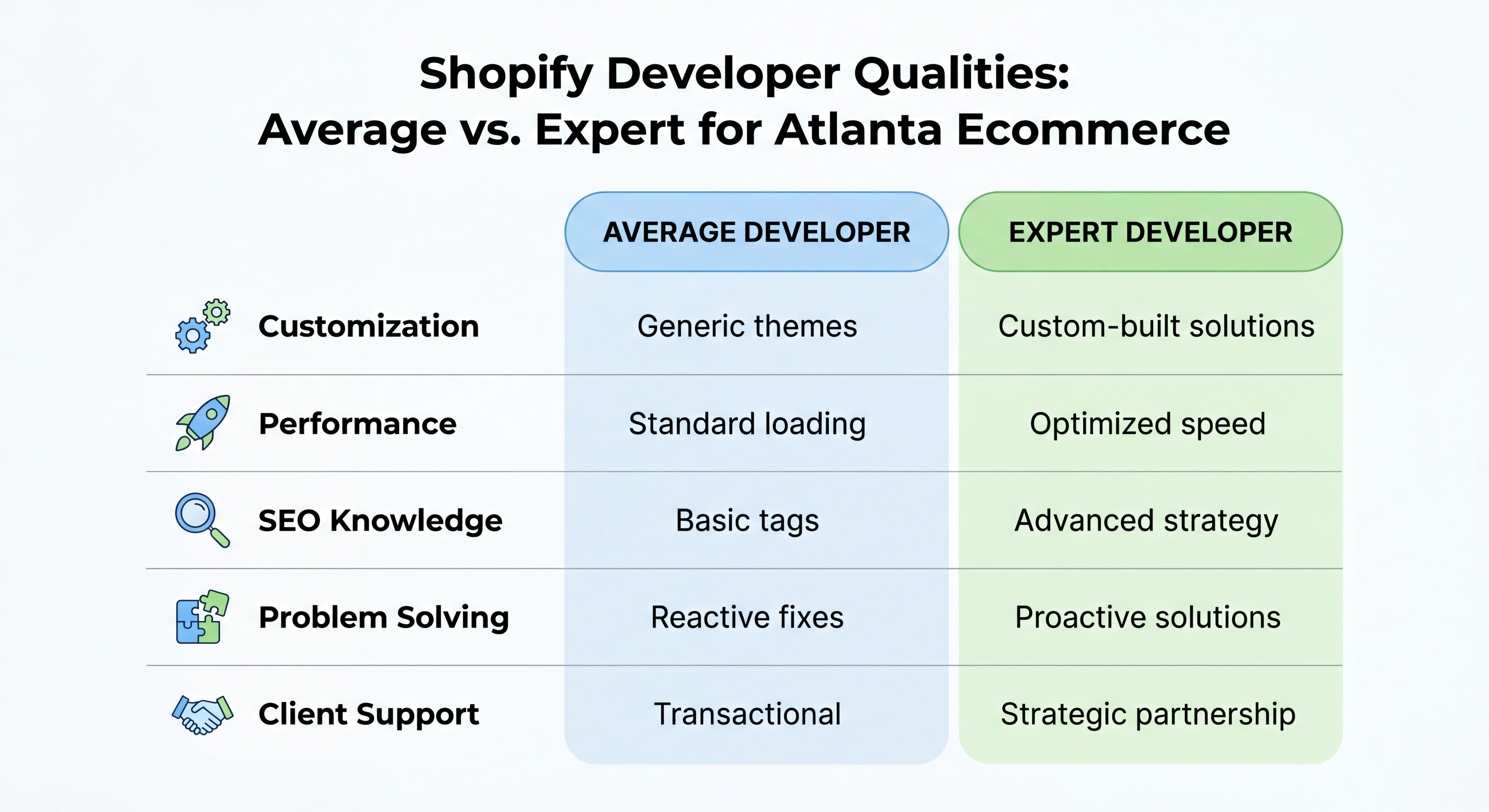
Technical Shopify Expertise
Look for developers who can demonstrate:
- Liquid templating proficiency (Shopify’s native language)
- Shopify Theme Architecture knowledge (Dawn, Debut, custom themes)
- Shopify Sections Everywhere implementation
- Headless Shopify experience (for high-performance stores)
- App development capability (custom Shopify apps)
Ecommerce Web Design Sensibility
A developer who only codes but doesn’t understand conversion design is a liability. Your ideal partner understands:
- Above-the-fold hierarchy and hero section optimization
- Product page psychology (trust signals, urgency, social proof)
- Mobile-first design (over 70% of ecommerce traffic is mobile in 2026)
- Page speed optimization (Core Web Vitals compliance)
Local Atlanta Market Knowledge
An Atlanta-based or Atlanta-familiar developer understands:
- Local consumer behavior and preferences
- Georgia-specific tax and compliance requirements
- Regional shipping and fulfillment logistics
- Atlanta’s competitive retail landscape
| Criteria |
Must-Have |
Nice-to-Have |
| Liquid / Shopify Theming |
✅ |
— |
| Conversion Rate Optimization |
✅ |
— |
| Custom App Development |
— |
✅ |
| Shopify Plus Experience |
Depends on scale |
— |
| Local Atlanta Market Knowledge |
✅ |
— |
| SEO-Ready Build |
✅ |
— |
| Post-Launch Support |
✅ |
— |
Step 3: Ask These 7 Non-Negotiable Interview Questions
When vetting a
Shopify developer in Atlanta, these questions will separate professionals from pretenders:
1. “Can you show me 3 Shopify stores you’ve built, and what were the conversion rates before and after?”
Any serious developer tracks performance metrics, not just aesthetics.
2. “How do you approach mobile-first ecommerce web design?”
If they say “we make it responsive at the end,” walk away. Mobile-first is a design philosophy, not a checkbox.
3. “What’s your process for page speed optimization on Shopify?”
Look for answers that mention image compression, lazy loading, app audit, and Core Web Vitals.
4. “How do you handle Shopify’s checkout customization limitations?”
This reveals their depth of platform knowledge — especially important if you need custom checkout flows.
5. “What’s your post-launch support structure?”
Bugs happen. Servers go down. You need a developer who has a clear support protocol.
6. “Have you worked with Atlanta-based brands or Georgia businesses before?”
Local experience matters for understanding regional market nuance.
7. “How do you approach SEO during the build, not after?”
SEO-baked-in development (proper heading structure, schema markup, URL architecture) is far more effective than bolting it on post-launch.
Step 4: Evaluate Ecommerce Web Design Portfolios Like a Pro
A portfolio review isn’t just about whether the stores look pretty. Here’s a structured framework for evaluating an Atlanta developer’s past ecommerce web design work:
The 5-Point Portfolio Audit
Point 1: Above-the-Fold Clarity
Within 3 seconds of landing on the homepage, can you tell exactly what the store sells and who it’s for? If not, the designer failed the clarity test.
Point 2: Product Page Anatomy
Check for: high-quality images with zoom, clear pricing, compelling product descriptions, trust badges, reviews/social proof, and a prominent Add-to-Cart button.
Point 3: Mobile Experience
Pull up every portfolio store on your phone. Is the navigation intuitive? Do images load fast? Is the CTA button thumb-friendly?
Point 4: Checkout Flow
Add a product to the cart and go through the checkout process. Count the number of steps. The best ecommerce web designs minimize friction — ideally 1-page or 2-page checkout.
Point 5: Load Speed
Run every portfolio URL through Google PageSpeed Insights. A score below 70 on mobile is a red flag.
📊
Portent Research – Ecommerce conversion rates drop by 4.42% for every additional second of load time
Step 5: Structure Your Website Development Atlanta Project for Success
Once you’ve selected your Shopify developer, how you structure the engagement determines whether the project stays on time and budget. Here’s a proven project framework for
website development Atlanta projects:
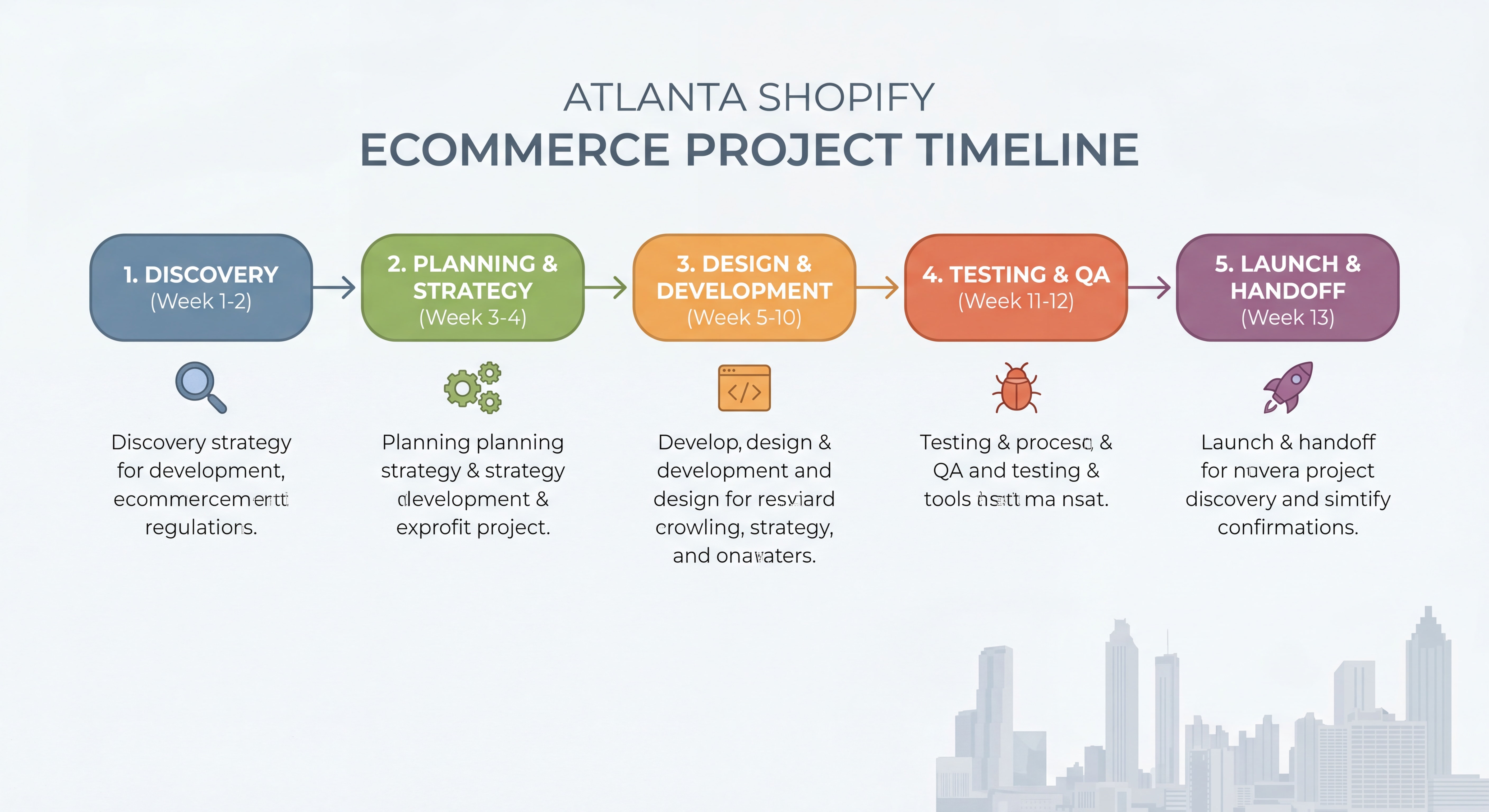
Phase 1: Discovery & Strategy (Week 1–2)
- Brand audit and competitor analysis
- Sitemap and user journey mapping
- Technical requirements documentation
- Wireframes for key pages (Homepage, PDP, Cart, Checkout)
Phase 2: Design (Week 2–4)
- High-fidelity mockups in Figma or Adobe XD
- Mobile and desktop versions
- Design system (typography, colors, component library)
- Client review and approval rounds (limit to 2 rounds to avoid scope creep)
Phase 3: Development (Week 4–8)
- Shopify theme setup or custom build
- App integrations
- Payment gateway configuration
- Speed and performance optimization
- SEO technical implementation
Phase 4: QA & Testing (Week 8–9)
- Cross-browser and cross-device testing
- Checkout flow testing (real transactions)
- 404 and redirect audit
- Performance benchmarking
Phase 5: Launch & Handoff (Week 9–10)
- DNS migration and go-live
- Google Analytics 4 and Search Console setup
- Staff training on Shopify admin
- 30-day post-launch support period
Atlanta Business Tip: If you’re launching a new business in Georgia alongside your Shopify store, Shopify’s own guide on starting a business in Georgia outlines the 11 key steps — from registering your LLC to obtaining the right licenses — which your developer should be aware of when configuring tax settings.
Step 6: Optimize Your Shopify Store Post-Launch
Launching your store is the beginning, not the finish line. The most successful Atlanta ecommerce brands treat their Shopify store as a living product. Here are the highest-impact post-launch optimizations:
Conversion Rate Optimization (CRO) Quick Wins
Homepage:
- A/B test your hero headline every 30 days
- Add a social proof ticker (e.g., “Join 4,200+ Atlanta customers”)
- Feature a bestseller collection above the fold
Product Pages:
- Add video demonstrations (increases conversions by up to 80%)
- Implement “Recently Viewed” and “Frequently Bought Together” sections
- Display real-time stock levels to create urgency (“Only 3 left!”)
Cart & Checkout:
- Enable Shopify’s native cart drawer for frictionless add-to-cart
- Add a free shipping progress bar (“Add $12 more for free shipping!”)
- Offer one-click upsells via Shopify’s native checkout extensions
Email & SMS Capture Strategy
Before you drive a single dollar of paid traffic to your new Atlanta ecommerce store, ensure you have:
- A pop-up with a compelling offer (10% off, free shipping, exclusive access)
- A Klaviyo or Omnisend welcome sequence (minimum 3 emails)
- An abandoned cart flow (recovers 5–15% of lost revenue)
📊
Klaviyo Benchmark Report – Abandoned cart email sequences recover an average of 8.24% of lost revenue for Shopify stores
Local Atlanta SEO for Ecommerce
Forbes highlighted in April 2026 that small business ecommerce owners consistently underinvest in local SEO. For Atlanta brands, this means:
- Adding Atlanta-specific landing pages (e.g., “Shopify store for Atlanta boutiques”)
- Claiming and optimizing your Google Business Profile
- Building local citations on Atlanta business directories
- Targeting “near me” and location-modified keywords in your product descriptions
“Small business ecommerce owners consistently underinvest in local SEO, missing significant organic traffic opportunities”
— Forbes
Step 7: Measure, Iterate, and Scale
The Atlanta tech community has identified a critical shift in how businesses view their digital presence. As reported in early 2026, Atlanta’s The Scale Tech noted that companies are increasingly treating their
“Digital Blueprint” as a core asset — not a one-time expense.
“Atlanta businesses are increasingly treating their digital blueprint as a core strategic asset rather than a one-time investment”
— Burlington Free Press
This mindset shift is exactly right. Here’s how to operationalize it for your Shopify store:
Monthly KPIs Every Atlanta Ecommerce Brand Should Track
| Metric |
Benchmark (Good) |
Benchmark (Excellent) |
| Conversion Rate |
2–3% |
4%+ |
| Average Order Value (AOV) |
$65–$85 |
$100+ |
| Cart Abandonment Rate |
Below 70% |
Below 60% |
| Return Customer Rate |
25–30% |
40%+ |
| Email Revenue Share |
20–25% |
30%+ |
| Mobile Conversion Rate |
1.5–2% |
3%+ |
| Page Load Speed (Mobile) |
Under 3 sec |
Under 2 sec |
90-Day Growth Sprint Framework
- Month 1: Baseline all metrics, fix critical UX issues, launch email flows
- Month 2: Run first A/B tests on homepage and product pages, activate paid traffic
- Month 3: Double down on what’s working, expand winning ad creative, add upsell flows
Ecommerce Web Design Checklist
Use this checklist before you sign off on any Atlanta ecommerce web design project:
Design & UX
- Mobile-first design with thumb-friendly CTAs
- Clear value proposition visible above the fold
- Consistent brand identity (fonts, colors, imagery)
- Trust signals on homepage (reviews, badges, press mentions)
- Accessible design (WCAG 2.1 AA compliance)
Technical Development
- Core Web Vitals score 90+ on desktop, 70+ on mobile
- SSL certificate active
- Structured data / schema markup implemented
- 301 redirects configured (if migrating from existing site)
- Google Analytics 4 + Search Console connected
Shopify-Specific
- Shopify Payments or preferred gateway configured
- Shipping zones and rates set up correctly
- Georgia sales tax configured
- Inventory tracking enabled
- Returns policy page live
SEO
- Title tags and meta descriptions on all key pages
- Clean URL structure (no dynamic parameters)
- Image alt text on all product images
- Sitemap submitted to Google
- Internal linking structure in place
Chiffres Clés
📊
$6.86 trillion — Global ecommerce sales projected for 2026, making a professionally built Shopify store more critical than ever (Source: eMarketer, 2026)
💡
70%+ of ecommerce traffic now comes from mobile devices, making mobile-first ecommerce web design non-negotiable (Source: Statista, 2026)
⚡
4.42% drop in conversions for every additional second of page load time — the single most compelling reason to invest in expert Shopify development (Source: Portent Research, 2026)
🏙️
Georgia ranks in the top 10 U.S. states for new business formation, creating a massive opportunity for Atlanta-based ecommerce brands to capture local and national market share (Source: U.S. Census Bureau, 2026)
📊
$6.86 trillion projected in 2026 – Global ecommerce sales
Questions Fréquentes (FAQ)
How much does it cost to hire a Shopify developer in Atlanta?
The cost of hiring a Shopify developer in Atlanta varies widely based on project complexity. Freelance developers typically charge $75–$150/hour, while specialized Atlanta ecommerce agencies range from $5,000 for a basic theme customization to $50,000+ for a fully custom Shopify build with integrations. Always request a fixed-price proposal with a detailed scope of work to avoid budget overruns.
How long does a Shopify ecommerce web design project take in Atlanta?
A standard Shopify store build for an Atlanta business takes 6–10 weeks from kickoff to launch. Simple theme customizations can be done in 2–3 weeks, while complex builds with custom apps, ERP integrations, or Shopify Plus configurations can take 3–6 months. Setting a realistic timeline upfront — and building in a QA phase — prevents rushed launches that hurt conversions.
What’s the difference between a Shopify developer and a Shopify designer?
A Shopify developer handles the technical implementation: writing Liquid code, building custom functionality, configuring apps, and optimizing performance. A Shopify designer focuses on the visual and UX layer: creating mockups, defining the brand experience, and structuring user flows. The best Atlanta ecommerce web design projects have both — either as a two-person team or a developer with strong design sensibility.
Do I need a local Atlanta Shopify developer, or can I hire remotely?
Both options work, but there are real advantages to working with a local Atlanta-based Shopify developer or agency. Local developers understand Georgia’s business environment, tax regulations, and consumer preferences. They’re also available for in-person strategy sessions, which can significantly accelerate decision-making. That said, many excellent remote developers specialize in Atlanta ecommerce brands — just ensure they have demonstrable experience with your industry.
What Shopify plan do I need for my Atlanta ecommerce store?
For most Atlanta small-to-medium businesses,
Shopify ($105/month) or
Shopify Advanced ($399/month) covers all standard ecommerce needs. If you’re processing over $1M/year in revenue or need advanced B2B features,
Shopify Plus (starting at $2,300/month) offers enterprise-grade capabilities including custom checkout, dedicated support, and advanced automation. Your developer should help you choose the right plan during the discovery phase.
Conclusion: Your Atlanta Ecommerce Success Starts With the Right Build
Building a high-converting Shopify store in Atlanta isn’t about finding the cheapest developer or copying a competitor’s design. It’s about executing a deliberate, strategic process — from defining your goals and vetting your developer, to structuring your project and optimizing relentlessly post-launch.
Atlanta’s ecommerce market is growing fast. Shopify’s investment in Georgia’s infrastructure, the rise of homegrown Atlanta brands, and the city’s booming tech talent pool all point to one conclusion:
the window to establish your brand’s digital presence is right now.
Use the 7 strategies in this guide as your roadmap. Audit your developer candidates against the criteria above. Structure your website development Atlanta project with clear phases. And treat your ecommerce web design as the revenue-generating asset it truly is.
Ready to take the next step? Work with an experienced Shopify developer in Atlanta who understands both the technical craft and the conversion science behind a store that sells. Your customers are already searching — make sure they find a store worth buying from.