Picture this: It’s 11:47 PM on a Tuesday. A homeowner in Buckhead just had their HVAC unit stop working. They land on your website, look around for 45 seconds, and leave — because nobody answered their question. Meanwhile, your competitor’s
AI chatbot responded in under three seconds, captured the lead, and booked the appointment before midnight.
That’s not a hypothetical. That’s what’s happening right now across Atlanta.
The average business takes
47 hours to respond to a new lead. Research shows that responding within 5 minutes makes you
21x more likely to qualify that lead. If you’re a small business in Midtown, Buckhead, or anywhere in the metro area, you’re losing money every single day your website sits there silently.
This guide isn’t about theory. It’s about
exactly how to set up and deploy AI chatbots on your website — whether you’re running WordPress, Shopify, or a custom site — and the specific steps that turn visitors into booked appointments, qualified leads, and paying customers.
Table of Contents
Why Atlanta Small Businesses Are Losing Leads Right Now
Atlanta isn’t a slow market. It’s one of the fastest-growing metros in the Southeast — home to Delta, UPS, Georgia Tech’s ATDC, and a booming tech scene anchored by Atlanta Tech Village. The competition for customer attention is brutal, and the speed expectations are even more so.
Here’s the uncomfortable truth:
63% of businesses never respond to leads at all. Of those that do, the average response time is 29+ hours. In a city where a Midtown law firm, a Sandy Springs dental practice, and a Decatur HVAC company are all competing for the same Google search clicks, the business that responds first wins.
A well-configured
small business chatbot doesn’t just answer questions. It qualifies prospects, books appointments, and delivers leads directly to your phone — while you’re sleeping, at a job site, or with another client.
“Companies responding within 5 minutes are 21x more likely to qualify a lead”
— GreetNow Lead Response Time Study
Strategy 1: Build a Lead Capture Flow Before You Launch
Most business owners make the same mistake: they install a chatbot, set a generic greeting like “Hi! How can I help you?”, and wonder why it doesn’t convert.
Your chatbot needs a conversation architecture before it goes live. Here’s how to build one that works:
Map Your Top 3 Visitor Intents
Before touching any software, answer these questions:
- What is the #1 reason people visit your website?
- What’s the most common question your receptionist or front desk answers every day?
- What information does a prospect need before they’ll book or buy?
For an Atlanta HVAC company, the answers might be:
get a quote, ask about emergency service, and find out if you serve their zip code. For a Buckhead law firm, it’s:
check practice areas, ask about a free consultation, and understand fee structures.
Build a Decision Tree, Not a Script
Your chatbot flow should branch based on visitor responses. A simple structure looks like this:
| Visitor Says |
Chatbot Response |
Next Step |
| “I need a quote” |
Asks service type + location |
Captures name, phone, email |
| “Do you serve my area?” |
Confirms zip code |
Confirms service area + books call |
| “What are your hours?” |
Answers + offers callback |
Offers to take a message |
| “I have an emergency” |
Immediate escalation path |
Routes to on-call number |
Pro tip: Keep your initial message specific to your industry. Instead of “How can I help you?”, try:
“Are you looking for a quote, or do you have an urgent issue we can help with right now?” That one change alone can double engagement rates.
📊
64% of businesses report AI chatbots generate more qualified leads – Chatbot lead capture
Strategy 2: Install Your WordPress Chatbot in Under 15 Minutes
If your site runs on WordPress — and roughly 43% of all websites do — you have the easiest path to deployment. Here’s the exact process:
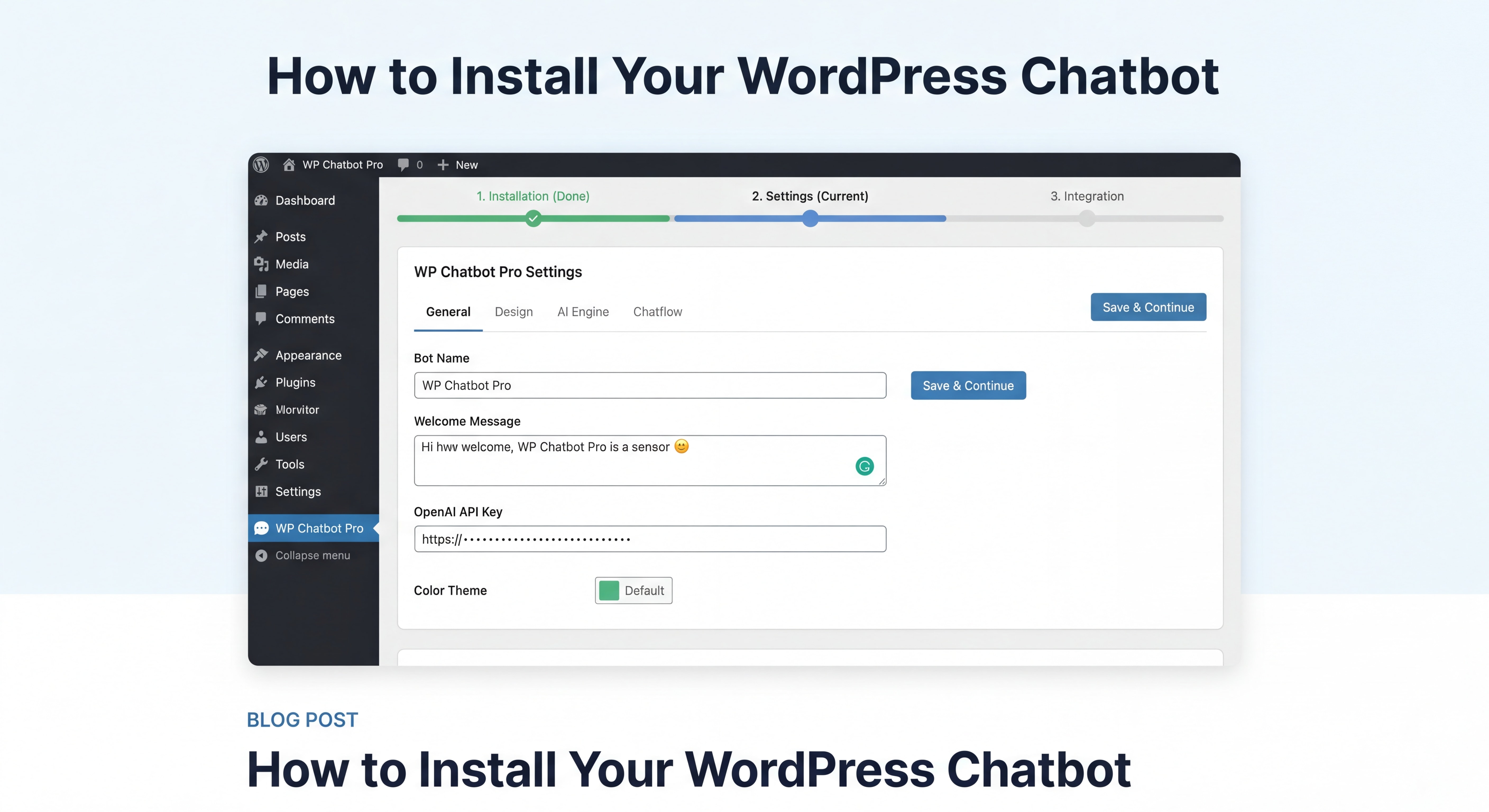
Step-by-Step WordPress Chatbot Installation
Step 1: Choose your platform
For most Atlanta small businesses, one of these three options makes the most sense:
- Tidio — Best for service businesses wanting live chat + AI hybrid ($29–$39/month)
- MxChat — Built exclusively for WordPress, strong WooCommerce integration
- Chatbase — Fast setup, trains on your website content automatically (free tier available)
Step 2: Install via the WordPress Plugin Directory
- Go to your WordPress dashboard → Plugins → Add New
- Search for your chosen platform (e.g., “Tidio” or “Chatbase”)
- Click Install Now → Activate
- No ZIP files, no code editing, no developer required
Step 3: Add a JavaScript snippet (alternative method)
If your preferred platform isn’t in the plugin directory:
- Install the free WPCode plugin
- Go to WPCode → Code Snippets → Header & Footer
- Paste your chatbot’s embed code into the Footer field
- Save — your chatbot appears on every page instantly
Step 4: Connect your knowledge base
Most modern
WordPress chatbots will automatically crawl your site content. Let it scan your service pages, FAQ, and About page. This is how it learns to answer questions accurately without manual training.
Step 5: Set your trigger rules
Configure the chatbot to appear:
- After 15–30 seconds on a page (not immediately — that’s annoying)
- When a visitor scrolls 50% down a service page
- When a visitor moves their cursor toward the browser’s back button (exit intent)
Total setup time:
10–15 minutes. No developer. No monthly retainer. Done.
Strategy 3: Set Up Your Shopify Chatbot as a Sales Associate
If you’re running an ecommerce store on Shopify, the game is different. Your chatbot isn’t just answering questions — it should be actively selling.
Shopify has leaned hard into agentic commerce in 2026. Merchants can now sell products directly through AI chatbot conversations, and the data backs up the investment: AI-powered product recommendations account for
31% of total ecommerce revenue for stores that implement them.
The “Sales Associate AI” Setup
The biggest mistake Shopify store owners make is treating their chatbot like a support ticket system. Flip the mindset: your chatbot is your best salesperson, available 24/7.
Configure these three flows immediately:
1. Product Discovery Flow
When a visitor says “I’m looking for [product type],” your chatbot should ask 2–3 qualifying questions (budget, use case, preference) and then recommend 2–3 specific products with direct links to checkout.
2. Cart Abandonment Recovery
Set your chatbot to trigger when a visitor adds items to cart but doesn’t check out within 5 minutes. A simple message like
“Still thinking it over? I can answer any questions about that item” recovers a meaningful percentage of abandoned carts.
3. Post-Purchase Upsell
After a completed order, configure the chatbot to suggest complementary products. This is low-hanging fruit most Shopify stores ignore entirely.
Recommended Shopify Chatbot Apps (2026)
| App |
Best For |
Starting Price |
| Tidio |
SMBs, high AI resolution rate (67%) |
$29/month |
| Oscar Chat |
Native Shopify integration |
$39/month |
| Gorgias |
Customer support focus |
$10/month |
| Thunai |
Full automation, refunds, recommendations |
Custom |
“Shopify merchants can now sell products through AI chatbots”
— BetaKit(https://limova-public-v2.s3.eu-central-1.amazonaws.com/blog-images/blog-image-1778158978787-sepyf4tb.jpeg)
Before vs. After: A Real Atlanta Scenario
The Business: A family-owned HVAC company in Marietta, serving the North Atlanta suburbs.
Before the chatbot:
- Website getting ~600 visitors/month
- Contact form submissions: 8–12/month
- Average response time to inquiries: 4–6 hours (during business hours only)
- Leads lost after hours: unknown, but significant
After deploying a $79/month AI chatbot:
- Same traffic: ~600 visitors/month
- Chatbot conversations: 110/month
- Leads captured: 38/month (name, phone, service type, zip code)
- Appointments booked directly through chatbot: 14/month
- After-hours leads captured: 22/month (previously zero)
- Estimated additional monthly revenue from chatbot-sourced jobs: $8,400+
The chatbot didn’t change the traffic. It changed what happened to that traffic.
Related Services
Looking for a complete AI-powered web presence for your Atlanta business? Our team builds custom chatbot strategies integrated with your website, CRM, and lead management systems — so every visitor becomes a tracked opportunity. Explore our AI Chatbot Services → | View Our Lead Generation Solutions → | Read: How Atlanta Businesses Are Using AI Automation in 2026 →
Frequently Asked Questions (FAQ)
How long does it take to set up an AI chatbot on a WordPress website?
For most small businesses using a plugin like Tidio or Chatbase, the basic setup takes
10–15 minutes. That includes installing the plugin, connecting your account, and getting the widget live on your site. A fully trained, conversion-optimized chatbot with custom flows typically takes 2–4 hours of configuration — still something you can do yourself without a developer.
Do AI chatbots work for service businesses like HVAC, law firms, or dental practices?
Absolutely — and they often outperform retail chatbots because the customer journey is more defined. A visitor to an HVAC site either needs a quote, has an emergency, or wants to schedule maintenance. A chatbot can handle all three paths efficiently, capture the lead, and route it appropriately. Atlanta service businesses in particular benefit because they serve specific geographic areas, and a chatbot can instantly qualify leads by zip code.
What’s the difference between a WordPress chatbot and a Shopify chatbot?
WordPress chatbots are typically installed via plugin or JavaScript snippet and focus on lead generation, appointment booking, and customer service for service-based or content-driven sites.
Shopify chatbots are ecommerce-focused — they integrate with your product catalog, handle order tracking, recommend products, and support checkout. The underlying AI technology is similar, but the conversation flows and integrations are built for different business models.
Will customers know they’re talking to a chatbot?
In 2026, most users understand and accept AI chatbots — especially for initial inquiries. The key is transparency and quality: don’t pretend the bot is a human, but make sure it’s genuinely helpful. A well-trained
small business chatbot that answers questions accurately and routes complex issues to a real person builds trust rather than eroding it. Forbes research confirms that customers prefer humans for complex issues, but accept AI for fast answers to simple questions.
How do I make sure my chatbot doesn’t give wrong information?
This comes down to training discipline. Only feed your chatbot verified, current information. Configure it to respond with “I’ll connect you with our team” when it encounters questions outside its knowledge base — rather than guessing. Regularly audit conversation logs (most platforms provide these) to spot where the bot is struggling and update its training accordingly.
Key Statistics
📊
21x — How much more likely you are to qualify a lead when you respond within 5 minutes vs. 47+ hours
(GreetNow Lead Response Study, 2026)
💡
64% of businesses report AI chatbots help generate more qualified leads from existing website traffic
(TailorTalk Research, 2026)
📈
31% of total ecommerce revenue for Shopify stores that implement AI-powered product recommendations
(Salesforce via EasyApps Ecom, 2026)
🤖
20–35% more leads and
30% lower support costs — average results for businesses with properly implemented website chatbots
(Scalify, 2026)
📊
Businesses responding within 5 minutes are 21x more likely to qualify leads – Lead response time impact
Ready to Stop Losing Leads Overnight?
Atlanta doesn’t slow down. Buckhead doesn’t sleep. And your competitors in Midtown, Alpharetta, and Marietta are already deploying AI chatbots that capture the leads your website is currently letting walk out the door.
The strategies in this guide aren’t complicated. They don’t require a developer, a big budget, or weeks of setup. They require a decision: are you going to let your website be a digital brochure, or are you going to turn it into a 24/7 lead generation machine?
Start with Strategy 1 today. Map your top three visitor intents. Build one conversation flow. Install a free or low-cost chatbot. Measure the results for 30 days.
That’s it. One hour of setup. Leads coming in while you sleep.
Contact us to get your Atlanta business chatbot strategy →