It's 11:47 PM on a Tuesday. Someone in Buckhead just Googled "emergency HVAC repair Atlanta," landed on your website, and had one question before they were ready to book. Nobody was there to answer it. They clicked over to your competitor — and booked with them instead.
That's not a hypothetical. That's what happens every night to Atlanta small businesses without AI chatbots on their websites.
Here's the uncomfortable truth: your contact form isn't a lead capture tool. It's a graveyard for intent. The businesses winning in Atlanta's hyper-competitive market — from Midtown law firms to Sandy Springs dental practices to Little Five Points boutiques — are the ones that respond in seconds, not hours. And they're doing it with chatbots that cost less per month than a tank of gas.
About half of U.S. adults now use AI chatbots, up substantially from a third in 2024 — meaning your customers already know how to use them and expect them. The question is whether your website is ready.
This guide gives you the exact playbook: real steps, real pricing, and real results.
Table of contents
- Why Atlanta Businesses Are Losing Leads Right Now
- What a Small Business Chatbot Actually Does
- Strategy 1: Install a WordPress Chatbot in Under 10 Minutes
- Strategy 2: Activate a Shopify Chatbot for E-Commerce Conversions
- Strategy 3: Set Up Lead Qualification Flows
- Strategy 4: Add Voice Chatbot Capabilities
- Strategy 5: Train Your Chatbot on Your Own Content
- Strategy 6: Connect Your Chatbot to Your CRM
- Strategy 7: Use Analytics to Continuously Improve
- Real Pricing: What You'll Actually Pay
- Before vs. After: An Atlanta Service Business Scenario
- FAQ
- Key Statistics
Why atlanta businesses are losing leads right now
Atlanta is one of the most competitive small business markets in the Southeast. Buckhead has more law firms per square mile than most U.S. cities. Midtown is packed with boutique agencies, med spas, and specialty contractors all fighting for the same Google searches. And across the metro — from Decatur to Alpharetta — every service business is dealing with the same problem: website visitors who leave without converting.
The root cause isn't your pricing or your reviews. It's response time.
Studies consistently show that responding to a lead within five minutes increases conversion likelihood by up to 9x compared to a 30-minute response. Most small businesses respond in hours — if at all. Meanwhile, a chatbot responds in milliseconds. Every time.
Chatbots can handle 40–60% of routine inquiries without staff — which is transformative for businesses that can't afford a dedicated support team. For a Marietta roofing company or a Vinings real estate agent, that's the difference between capturing a lead and losing it forever.
Here's the contrarian statement nobody in the agency world wants to say: most Atlanta small businesses don't need a bigger ad budget — they need to stop leaking the leads they're already paying for.
What a small business chatbot actually does
Let's cut through the buzzwords. An AI chatbot for small business is a widget on your website that:
- Greets visitors and asks how it can help
- Answers common questions from your own content (services, pricing, hours, FAQs)
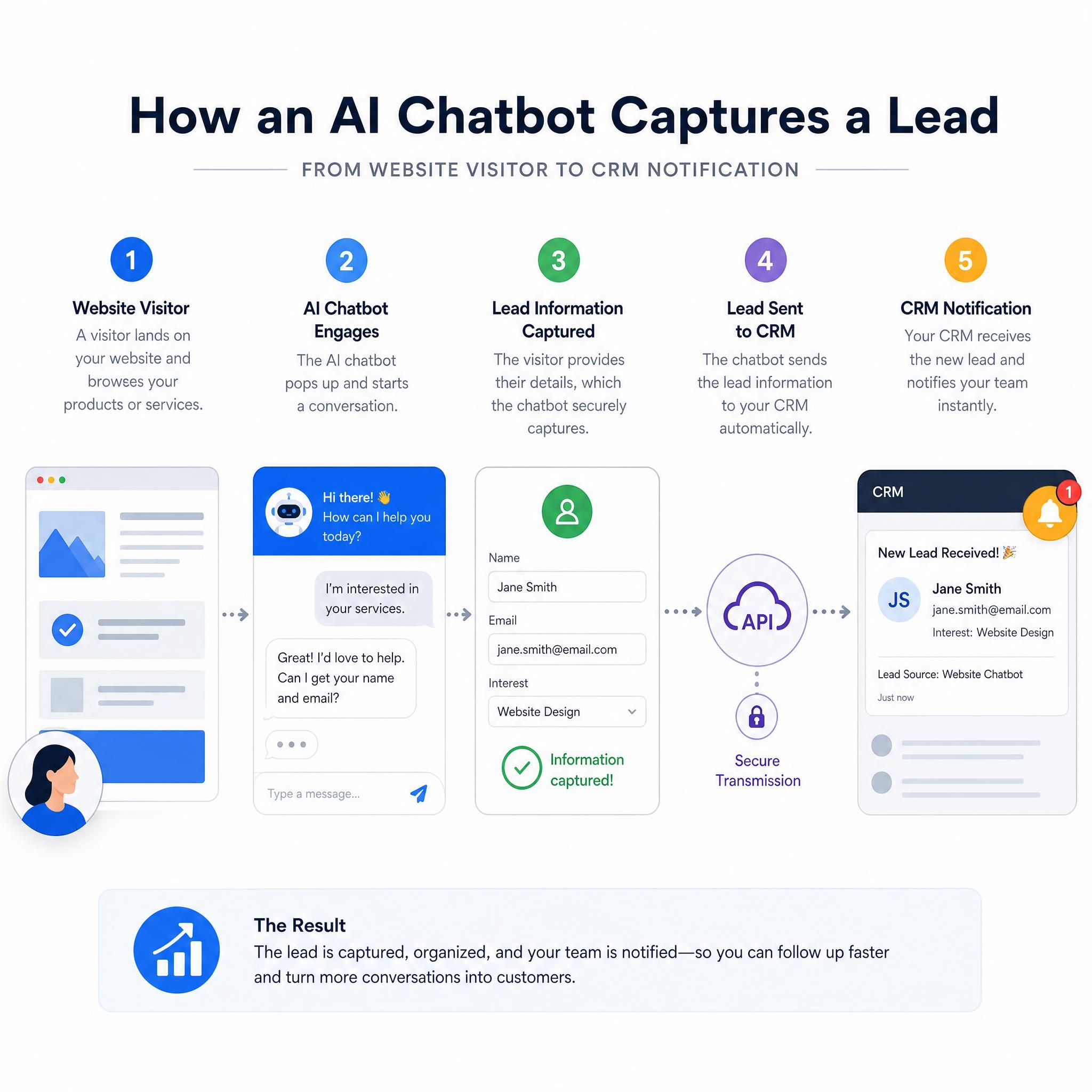
- Captures lead info — name, email, phone, service interest — before handing off to your team
- Books appointments directly into your calendar (with the right integrations)
- Escalates complex issues to a human via email or SMS
That's it. It's not magic. It's a fast, always-on front desk that never calls in sick.
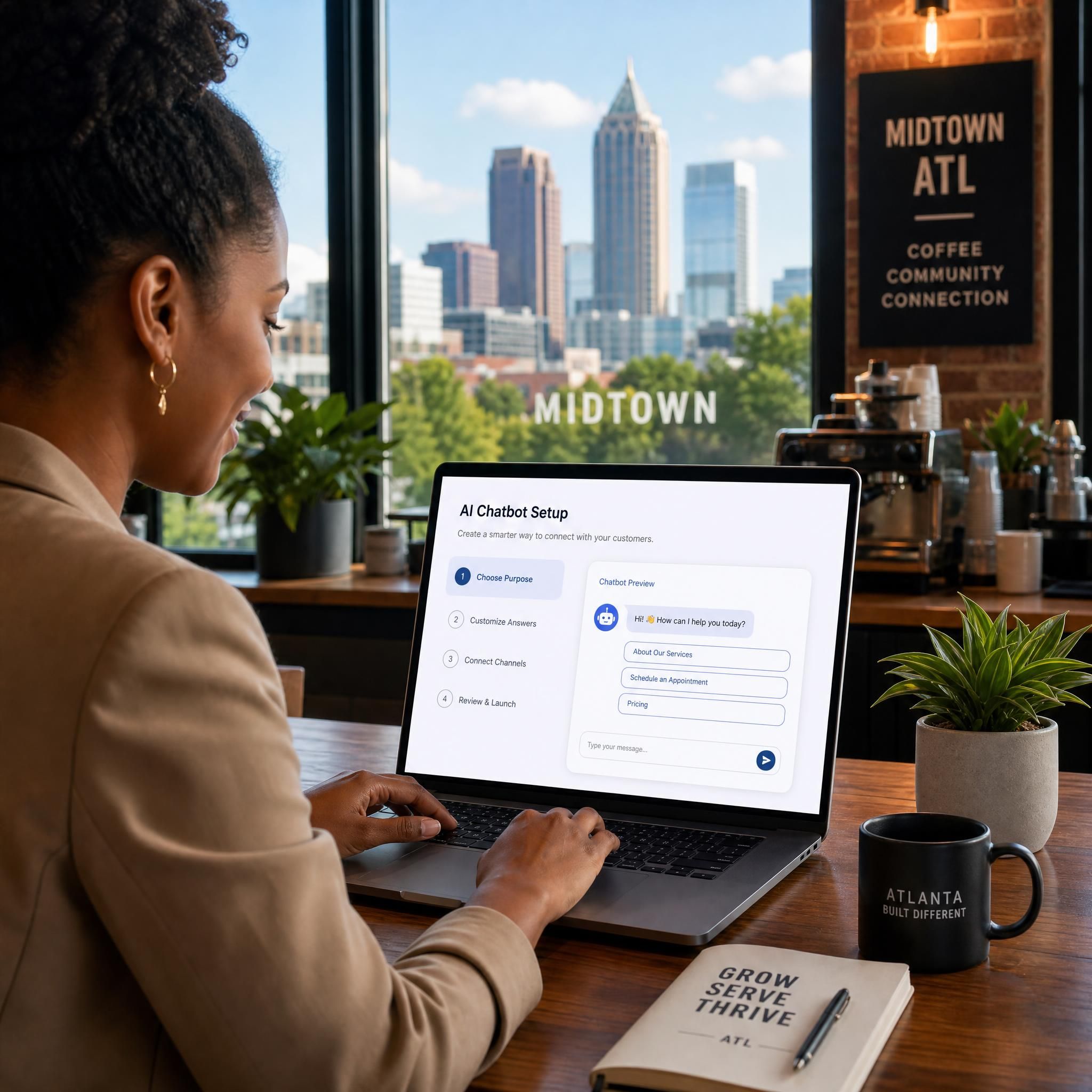
The best part? Modern AI chatbots don't require a developer. Platforms like Tidio combine live chat, AI chatbots, and email marketing in one dashboard. Its AI agent, Lyro, learns from your support content and delivers conversational responses within seconds. You set it up once, train it on your content, and it works around the clock.
Strategy 1: install a wordpress chatbot in under 10 minutes
If your Atlanta business runs on WordPress — and most service businesses do — this is the fastest win available to you right now.
Step-by-step:
- Log into your WordPress dashboard and navigate to Plugins → Add New
- Search for your chatbot plugin — Tidio, Chatbase, or Voiceflow are all solid choices with free tiers
- Install and activate the plugin (one click)
- Connect your account — you'll sign up on the chatbot platform's site and paste an API key or connect via OAuth
- Choose a template — most platforms offer industry-specific templates (service business, e-commerce, appointment booking)
- Train it on your content — upload your FAQ page, service descriptions, or let the bot crawl your site automatically
- Customize the greeting — something specific like "Hey! Looking for HVAC service in Atlanta? I can help." converts better than "Hi, how can I help?"
- Go live — the widget appears on your site immediately
Adding an AI chatbot to your WordPress website can be done in under 10 minutes without writing a single line of code. The plugin handles the embed. You handle the content.
Pro tip for Atlanta service businesses: Set your chatbot's greeting to reference your service area. "Serving Buckhead, Midtown, and Sandy Springs" builds instant local trust.
Strategy 2: activate a shopify chatbot for e-commerce conversions
If you run a Shopify store — whether you're selling Atlanta-made goods, apparel, or specialty products — a chatbot is your 24/7 sales associate.
Shopify merchants can now sell products through AI chatbots. The integration connects directly to your store and answers customer questions, recommends products from your live catalog, tracks orders in real time, and lets shoppers manage their cart — all through a single chat widget.
How to set it up on Shopify:
- Go to your Shopify App Store and search for your chatbot (Chatbase, Tidio, or Gorgias work well)
- Install the app and authorize it to access your store data
- Sync your product catalog — the chatbot will automatically know your inventory, pricing, and product descriptions
- Enable order tracking so customers can ask "Where's my order?" without emailing you
- Set up proactive triggers — for example, if a visitor has been on a product page for 60 seconds, the chatbot pops up: "Need help deciding? I can compare options for you."
- Configure abandoned cart recovery — the chatbot can message visitors who added items but didn't check out
The result: fewer support tickets, more completed purchases, and a shopping experience that feels personal even when you're not online.
| Feature | Without Chatbot | With Shopify Chatbot |
|---|---|---|
| Order inquiry response time | Hours (email) | Instant |
| Abandoned cart recovery | Email only | Real-time chat nudge |
| Product recommendations | Static pages | Personalized, dynamic |
| After-hours support | None | 24/7 automated |
| Support ticket volume | High | Reduced 40–60% |
Strategy 3: set up lead qualification flows
This is where most small businesses leave serious money on the table. They install a chatbot that just says "Hi! How can I help?" and wonder why it's not converting.
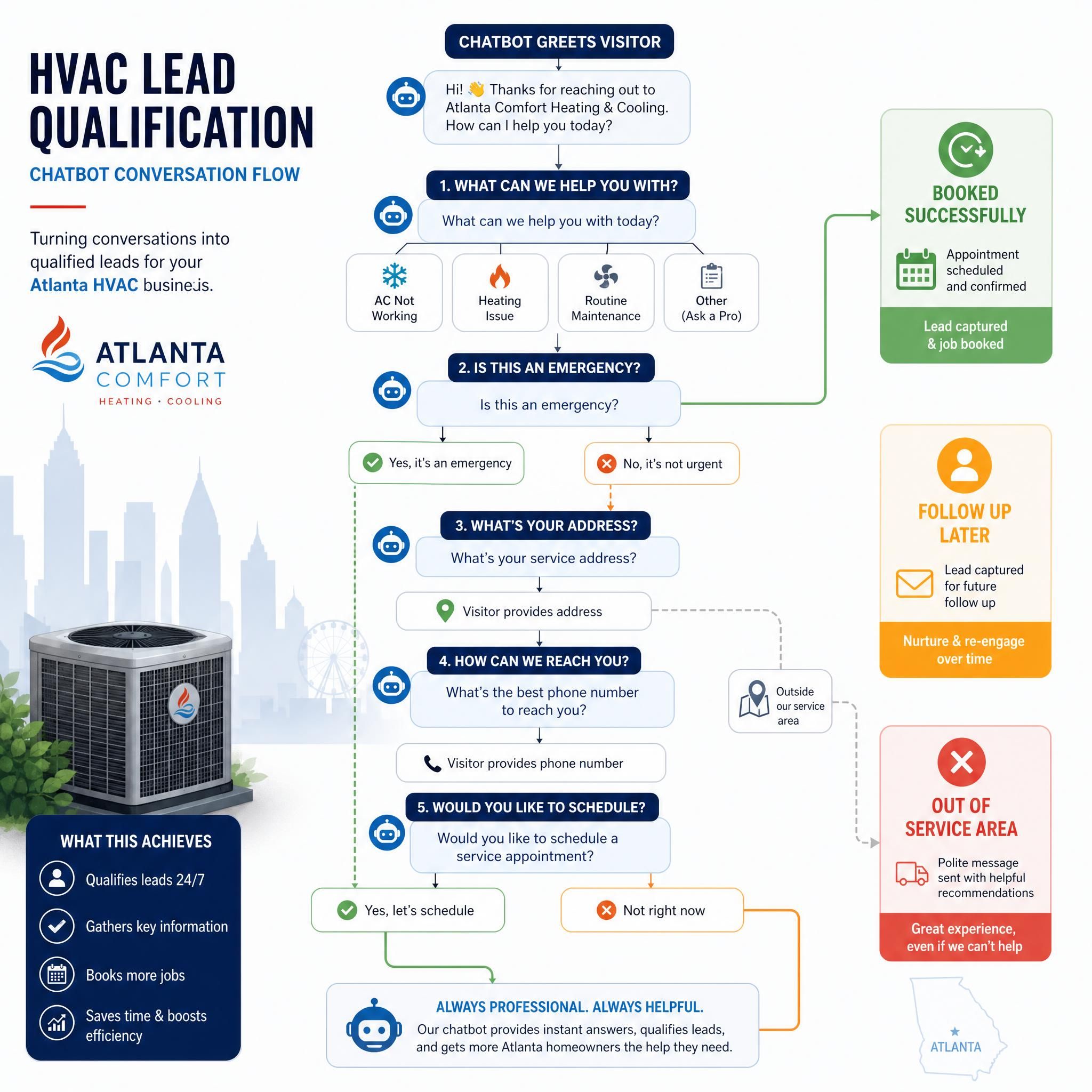
A lead qualification flow is a scripted conversation that collects the information you need to determine if a visitor is a real prospect — before your team spends a single minute on them.
For an Atlanta law firm:
"Are you looking for help with a personal injury case, a business dispute, or something else?" → Collects case type → "What's the best way to reach you for a free consultation?" → Captures phone + email → Notifies attorney via SMS
For an HVAC company in Roswell:
"Is this a repair, maintenance, or new installation?" → "Is this for a residential or commercial property?" → "What's your zip code?" → "When's the soonest you'd need service?" → Captures full lead with context
Building your flow:
- Map the 3–5 questions your sales team always asks first
- Build a branching conversation in your chatbot's visual builder (drag-and-drop, no code)
- End every branch with a lead capture form (name, email, phone)
- Set up an instant notification to your phone or email when a lead completes the flow
- Add a calendar booking link as the final step — tools like Calendly integrate directly
A prospect who types "I'm looking for help with my website" into a chatbot is giving the business infinitely more signal than the same prospect who abandons a contact form — and the chatbot can immediately provide relevant information, collect qualification data, and ensure someone follows up.
Strategy 4: add voice chatbot capabilities
Voice chatbots are the next layer — and they're becoming relevant faster than most Atlanta business owners realize. Apple plans to allow outside voice-controlled AI chatbots in CarPlay, which means voice-first interactions are moving beyond smart speakers and into everyday consumer touchpoints.
For small businesses, the practical application right now is voice-to-text intake on mobile. Many chatbot platforms now allow users to speak their question rather than type it — which matters enormously for mobile traffic (which accounts for 60%+ of most local business website visits).
How to enable it:
- Choose a chatbot platform that supports voice input (Voiceflow is purpose-built for this)
- Enable the microphone permission prompt on your chat widget
- Test on mobile — especially on iOS and Android Chrome
- Keep your chatbot's responses short and scannable, since voice users often switch between speaking and reading
Voice chatbots are particularly powerful for Atlanta's service industries where customers are often calling from job sites, cars, or busy environments where typing is inconvenient.
Strategy 5: train your chatbot on your own content
A generic chatbot that gives generic answers is almost worse than no chatbot — it erodes trust. The secret to a high-performing small business chatbot is training it on your specific content.
What to feed it:
- Your FAQ page — the most direct training source
- Service pages — descriptions, pricing, process, timelines
- Blog posts — especially how-to content and local guides
- Past customer emails — anonymized, to capture common questions
- Google Business Profile Q&A — real questions real Atlanta customers have asked
How it works technically (no code required):
Platforms like FwdSlash support multiple AI models and allow you to upload your documents, connect your website, and the tool crawls your content to build a custom knowledge base automatically. Within minutes, you have an AI agent that answers customer questions grounded in your actual business data.
Most platforms let you paste a URL or upload a PDF. The AI does the rest. Re-train whenever you update your services or pricing.
Atlanta-specific tip: Include neighborhood-level content in your training data. "Do you serve Decatur?" "Are you available in Alpharetta?" These hyper-local questions come up constantly and a well-trained bot can answer them instantly.
Strategy 6: connect your chatbot to your CRM
Capturing leads in a chatbot is step one. Getting them into your sales pipeline is step two — and it's where most small businesses drop the ball.
Every major chatbot platform integrates with the tools you're already using:
| Chatbot Platform | CRM/Tool Integrations |
|---|---|
| Tidio | HubSpot, Mailchimp, Zapier, Shopify |
| Chatbase | Slack, Zapier, Notion, Google Sheets |
| FwdSlash | Slack, Shopify, WordPress, Zapier |
| ManyChat | HubSpot, ActiveCampaign, Google Sheets |
| Voiceflow | Airtable, Zapier, Twilio, HubSpot |
Simple setup via Zapier (no developer needed):
- Create a Zapier account (free tier works for most small businesses)
- Connect your chatbot platform as the "Trigger" (new lead captured)
- Connect your CRM or Google Sheet as the "Action" (create new contact)
- Map the fields: name → name, email → email, phone → phone
- Test it — submit a test lead through your chatbot and confirm it appears in your CRM
Now every lead your chatbot captures is automatically in your pipeline, ready for follow-up.
Strategy 7: use analytics to continuously improve
Most Atlanta business owners set up their chatbot and never look at the data again. That's leaving optimization on the table.
What to review monthly:
- Containment rate — what % of conversations the bot handles without human escalation (aim for 50%+)
- Drop-off points — where in your flow are users abandoning? That's where your messaging needs work
- Top questions — what are people asking that your bot can't answer? Add that content to your training data
- Conversion rate — what % of chatbot conversations result in a captured lead or booked appointment?
- Peak traffic times — when are Atlanta visitors hitting your site? Make sure your escalation notifications are set up for those windows
AI chatbots can resolve 40–78% of customer inquiries automatically, reduce time on support calls by 45%, and improve resolution speed by 44% — but only when they're actively maintained and improved.
Set a 30-minute monthly calendar block to review your chatbot analytics. Treat it like you'd treat your Google Ads performance — it compounds over time.
Real pricing: what you'll actually pay
Let's talk numbers. No vague "it depends" — here's what Atlanta small businesses are actually spending.
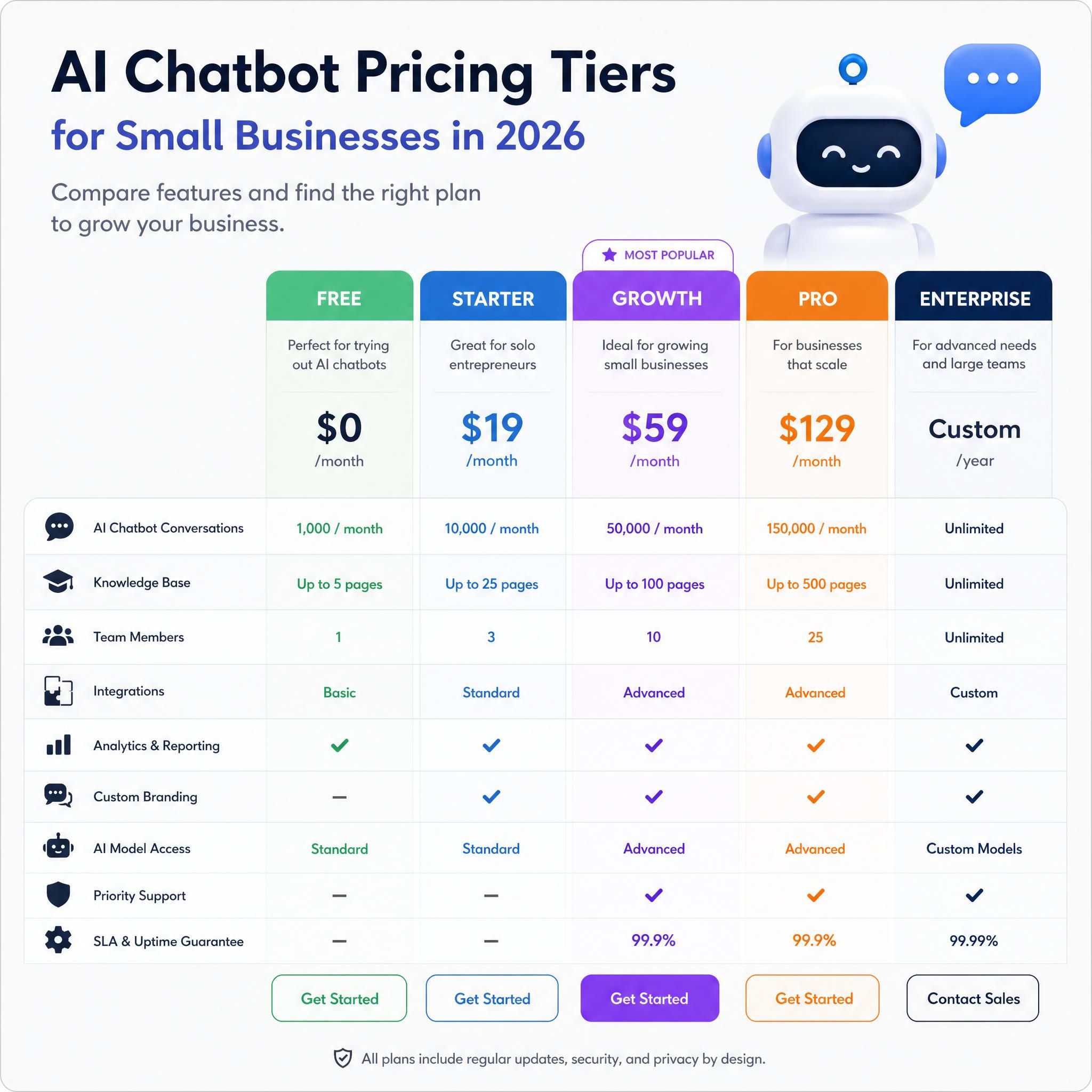
Across the 2026 market, basic to mid-level chatbot plans land around $30 to $150 per month. Free plans are suitable for solopreneurs handling 50–200 conversations monthly.
| Tier | Monthly Cost | Best For | What's Included |
|---|---|---|---|
| Free | $0 | Just getting started | Basic widget, limited conversations (50–200/mo) |
| Starter | $29–$49/mo | Service businesses, solo operators | AI responses, lead capture, 1–2 integrations |
| Growth | $79–$150/mo | Multi-location, higher traffic | CRM sync, advanced flows, analytics, priority support |
| Custom Build | $2,000–$10,000 one-time | Complex workflows, enterprise | Fully branded, custom integrations, dedicated support |
ROI math for a Midtown Atlanta service business:
- Average service ticket value: $350
- Chatbot captures 8 additional leads/month that would have otherwise bounced
- Close rate: 30% = ~2.4 new customers/month
- Revenue added: ~$840/month
- Chatbot cost: $79/month
- Net ROI: ~$761/month on a $79 investment
A small e-commerce business using an AI chatbot for customer service reports saving 3 hours per day on customer inquiries and $1,200 per month compared to hiring a part-time assistant, at a tool cost of approximately $70 per month.
Before vs. after: an atlanta service business scenario
The Business: A residential plumbing company based in East Atlanta, serving Decatur, Kirkwood, and Grant Park.
Before chatbot:
- Website gets ~400 visitors/month
- Contact form submissions: 6–8/month
- Average response time to inquiries: 4–6 hours
- After-hours leads captured: 0
- Monthly revenue from website leads: ~$2,100
After deploying a $79/month chatbot with lead qualification flow:
- Same 400 visitors/month
- Chatbot conversations initiated: 47/month
- Qualified leads captured: 19/month (including 8 after-hours)
- Average response time: Instant
- Close rate on chatbot leads: 35%
- Additional monthly revenue from website: ~$4,500
- Net gain: ~$2,400/month on a $79 investment
The traffic didn't change. The ad spend didn't change. The only thing that changed was what happened when someone landed on the site at 11 PM with a burst pipe.
Related services
Looking to go further with your Atlanta business's digital presence? These services pair directly with your chatbot strategy:
- AI-Powered Lead Generation for Atlanta Small Businesses — Full-funnel setup from traffic to closed deal
- Local SEO for Atlanta Service Businesses — Get found before the chatbot even has to work
- Website Conversion Optimization — Make every page of your site work harder
Frequently asked questions (FAQ)
Do i need a developer to set up an AI chatbot on my wordpress site?
No. Every major chatbot platform in 2026 offers a no-code WordPress plugin. You install it from the WordPress plugin directory, connect your account, and the widget appears on your site. The entire process takes under 10 minutes. No coding, no developer, no agency required.
How much does a small business chatbot cost in atlanta?
Most small businesses spend between $29 and $150 per month on a chatbot platform. Free tiers exist but cap conversation volume. For a typical Atlanta service business handling moderate web traffic, a $49–$79/month plan covers everything you need — lead capture, CRM integration, and AI-powered responses.
Can a chatbot work for my shopify store?
Absolutely. Shopify chatbots connect directly to your product catalog, handle order tracking questions, recommend products, and recover abandoned carts — all automatically. Most Shopify chatbot apps set up in minutes from the Shopify App Store with no code required.
What's the difference between a regular chatbot and an AI chatbot?
A regular (rule-based) chatbot follows a fixed script — if the user says X, show Y. An AI chatbot understands natural language, so it can handle questions it wasn't explicitly programmed for by drawing on your training content. For small businesses, AI chatbots are significantly more effective because customers don't phrase questions the same way twice.
How do i make sure my chatbot sounds like my business, not a robot?
Train it on your own content — your website copy, FAQ page, and service descriptions. Then customize the greeting and tone settings in your platform. Use your business name, reference your service area (Atlanta, Buckhead, Decatur, etc.), and write your opening message the way you'd actually talk to a customer walking in the door.
Key statistics
📊 50% of U.S. adults now use AI chatbots — up from roughly one-third in 2024 (Pew Research Center, June 2026)
📊 50% as of 2026 – AI chatbot adoption among U.S. adults
💡 40–60% of routine customer inquiries can be handled by chatbots without any human involvement (Small Business AI Statistics, 2026)
📊 40–60% handled without human staff – Routine inquiry automation rate
💰 $1,200/month saved on average by small e-commerce businesses that replace part-time support staff with AI chatbot automation (AI for Small Business Guide, 2026)
📊 $1,200/month – Monthly savings from chatbot vs part-time assistant
📈 76% of small businesses are either actively using AI or actively exploring it — the adoption gap between small and large businesses is closing faster than any previous technology cycle (AdAI News, 2026)
📊 76% using or exploring AI – Small business AI adoption
Conclusion: atlanta, your competitors are already doing this
Here's the reality check: while you're reading this, a competitor in your Atlanta market is capturing the lead you just paid $12 in Google Ads to generate. They're doing it with a $49/month chatbot that works at 2 AM, never misses a follow-up, and qualifies every visitor before a human ever gets involved.
The strategies in this guide aren't theoretical. They're deployable today — whether you're on WordPress, Shopify, or any modern website platform. Start with Strategy 1 (install the plugin) and Strategy 3 (build your lead qualification flow). Those two moves alone will change what your website does for your business by this time next week.
Atlanta is a fast market. Your customers expect fast answers. AI chatbots are how you deliver that — without hiring a single additional person.
Ready to stop losing leads after hours? Talk to our team about setting up your Atlanta small business chatbot →