Picture this: It's 11:47 PM on a Tuesday. A homeowner in Buckhead just had their AC unit die. They're sweating, frustrated, and searching Google for an HVAC company. They land on your website. They have one question: "Can you come tomorrow?"
Your contact form sits there, silent. No answer. No chat. Nothing.
So they click back. They find your competitor in Midtown. That competitor has an AI chatbot on their site. Within 8 seconds, the visitor gets a response, books a next-day appointment, and goes to bed relieved.
You lost that lead. Not because your service is worse — but because you weren't there.
That's the real cost of not having a small business chatbot in 2026. And this guide isn't going to tell you why chatbots matter. You already know. This guide is going to show you exactly how to set one up, configure it right, and squeeze every dollar of ROI out of it — whether you're running a WordPress site, a Shopify store, or anything in between.
Table of contents
- Why Atlanta Businesses Are Losing Leads Right Now
- Strategy 1: Deploy Your Chatbot on the Right Pages First
- Strategy 2: How to Set Up WordPress Chatbots in Under 10 Minutes
- Strategy 3: Shopify Chatbots — Turn Browsers Into Buyers
- Strategy 4: Configure Your Lead Qualification Flow
- Strategy 5: Add Voice Chatbot Capability
- Strategy 6: Pricing Tiers — What to Spend and When
- Strategy 7: Measure What Actually Matters
- Before vs. After: A Real Atlanta Business Scenario
- FAQ
- Key Statistics
Why atlanta businesses are losing leads right now
Atlanta is one of the most competitive small business markets in the Southeast. Buckhead, Midtown, Decatur, Sandy Springs — every neighborhood has two or three competitors for every service category you can name. Customers here are fast-moving, digitally savvy, and have zero patience for slow responses.
Here's the hard truth most business owners won't say out loud: your website is probably a lead graveyard.
Traffic comes in. People browse. Then they leave — not because they didn't want your service, but because they hit friction. A form that takes 3 minutes to fill out. A phone number that goes to voicemail. A "we'll get back to you within 24 hours" auto-reply.
According to Harvard Business Review data, contacting a lead within five minutes makes them 21 times more likely to convert than contacting them later. Twenty-one times. That's not a marginal improvement — that's the difference between a thriving business and one that wonders why their ad spend isn't working.
AI chatbots reduce first-response time by up to 90%, which means your website can effectively compete with businesses that have full-time reception staff — at a fraction of the cost.
The contrarian take? Most Atlanta small businesses don't have a traffic problem. They have a conversion problem. And a well-configured AI chatbot is the fastest fix available right now.
Strategy 1: deploy your chatbot on the right pages first
Don't make the mistake of slapping a chatbot on every page and calling it done. That's how you get annoying pop-ups that visitors immediately close.
High-impact pages to deploy first:
- Service/product pages — This is where purchase intent is highest. Someone reading your HVAC services page is already interested. Meet them there.
- Pricing page — Visitors here have a specific question: "Can I afford this?" A chatbot can qualify them, offer a quote flow, or connect them to a rep.
- Contact page — If someone navigated to your contact page, they're ready to talk. Don't make them fill out a form and wait. Engage them instantly.
- Blog posts with high organic traffic — These visitors came from Google with a specific question. Your chatbot can answer it and capture their info.
What NOT to do: Don't deploy on your homepage with a generic "Hi! How can I help?" greeting that fires 2 seconds after the page loads. It's intrusive and trains visitors to dismiss it. Instead, trigger the chat after 30–45 seconds on page, or after scroll depth of 50%.
Strategy 2: how to set up wordpress chatbots in under 10 minutes
If your Atlanta business runs on WordPress — and a huge percentage do — you're in luck. The setup process for WordPress chatbots has gotten remarkably simple in 2026.
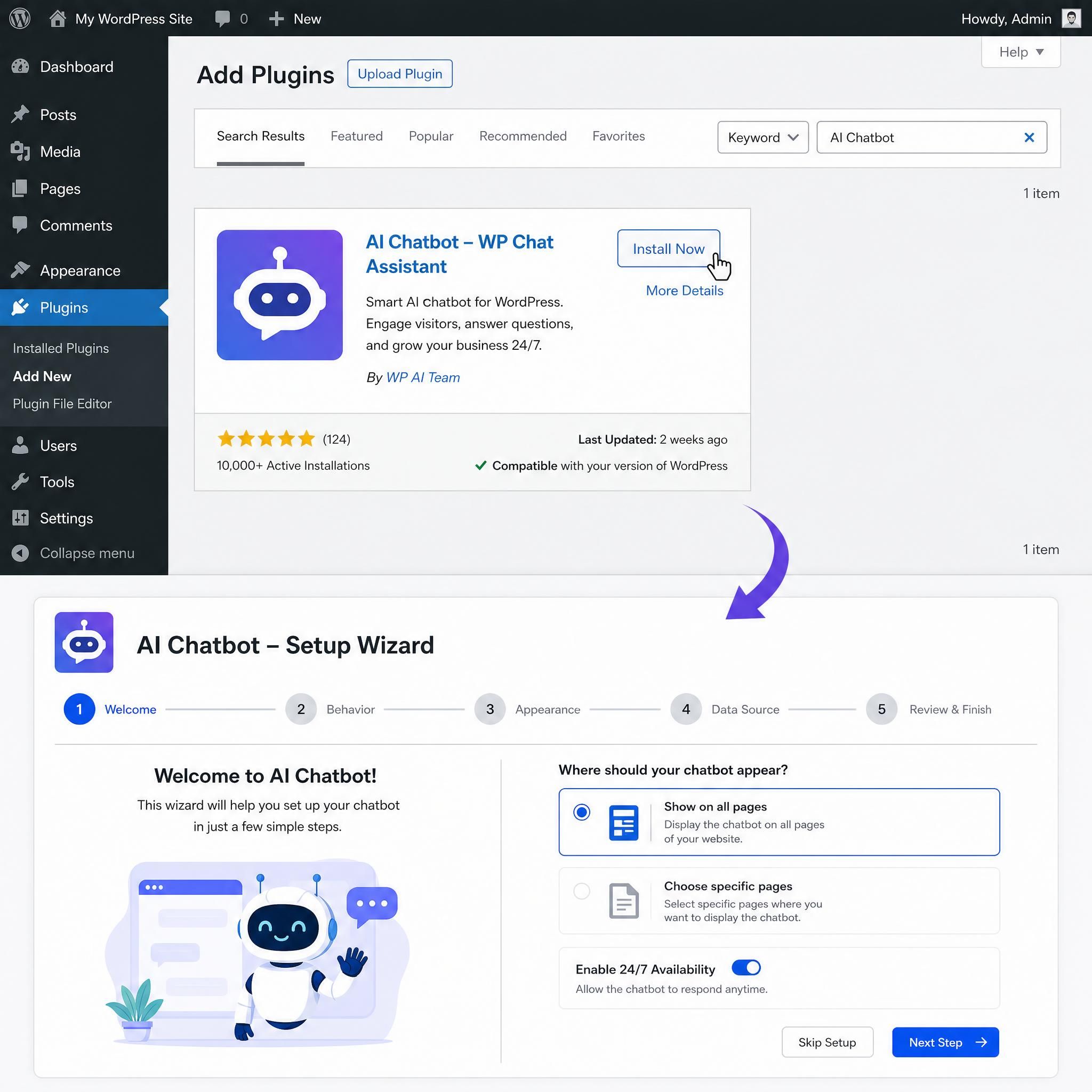
Here's the exact process:
Step 1: choose your plugin
The best WordPress chatbot plugins install with a few clicks and require no coding knowledge. Options like Tidio, Jotform AI Chatbot, and WP-Chatbot are all available directly in the WordPress Plugin Directory.
For most Atlanta small businesses, Tidio is the sweet spot — it combines live chat, AI responses, and lead capture templates in one package. If you want a one-time payment instead of monthly fees, PurioChat at $69 one-time is worth considering.
Step 2: install and activate
Go to your WordPress dashboard, navigate to Plugins → Add New, search for your chosen tool, click Install Now, then Activate. Most modern plugins auto-register your site and begin crawling your content automatically — no manual knowledge base setup required.
Step 3: configure your opening message
This is where most people go wrong. Don't write "Hello! I'm a virtual assistant." Write something that reflects your specific business:
"Hey! Looking for [service] in Atlanta? I can get you a quote in about 2 minutes — no phone call needed."
Specific, local, low-friction. That's the formula.
Step 4: set up lead capture
Configure the bot to ask for name, email, and one qualifying question (e.g., "What neighborhood are you in?" or "What's your timeline?") before offering to connect them with your team. This gives you warm, pre-qualified leads instead of cold form submissions.
Step 5: connect to your CRM
Most WordPress chatbot plugins integrate directly with tools like HubSpot, Mailchimp, or Google Sheets. Every lead captured by the bot should automatically flow into your CRM — no manual data entry.
Total setup time: 8–12 minutes. There's no excuse for not having this running by end of day.
Strategy 3: shopify chatbots — turn browsers into buyers
If you're running an ecommerce store on Shopify, AI chatbots aren't just a nice-to-have — they're a revenue lever.
AI chatbots handle 68% of customer inquiries autonomously, reducing customer service costs by 30–40%, while delivering an 8–14% increase in conversion rates for ecommerce stores. For a store doing $20,000/month in revenue, that conversion lift alone is worth $1,600–$2,800 in additional monthly sales.
AI chatbots also capture 32% more sales during off-hours — which matters enormously for Atlanta-area ecommerce businesses whose customers shop late at night after work.
The 3 shopify chatbot flows every store needs
1. Cart Abandonment Recovery
When a visitor adds items to their cart but doesn't check out within 10 minutes, trigger a chat: "Still thinking it over? I can answer any questions or grab you a discount code." This alone can recover 5–15% of abandoned carts.
2. Product Recommendation Flow
Configure the bot to ask 2–3 qualifying questions ("What's the occasion?" / "What's your budget?") and then surface the right products. This mimics the in-store sales experience that big-box retailers can't replicate.
3. Post-Purchase Support
Automatically engage customers after purchase with order status updates, care instructions, or upsell offers. Reduces support tickets and increases lifetime value.
Best Shopify chatbot tools for small businesses:
| Tool | Best For | Starting Price |
|---|---|---|
| Tidio | Small stores, easy setup | Free / $29/month |
| Gorgias | High-volume support | $10/month |
| ManyChat | Social + Shopify integration | Free / $15/month |
| Intercom | Growing stores with CRM needs | $74/month |
| Chatbase | Custom AI trained on your catalog | $19/month |
Strategy 4: configure your lead qualification flow
This is the strategy that separates businesses making real money from chatbots versus those just collecting email addresses that go nowhere.
A lead qualification flow is a scripted conversation sequence that determines whether a visitor is a good fit before your sales team spends time on them. Done right, it's like having a full-time receptionist who never sleeps.
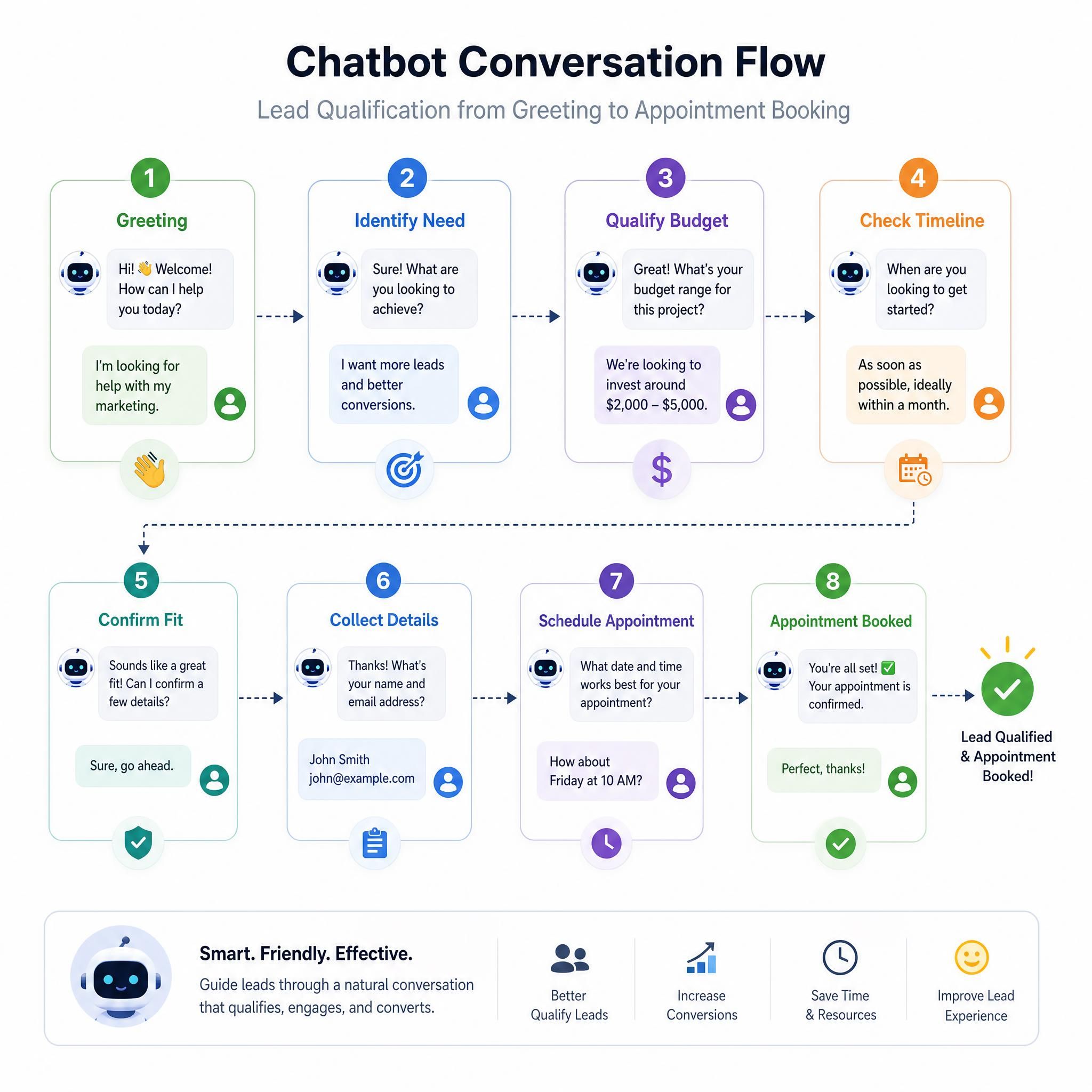
The 5-Question Qualification Framework:
- Intent question: "What brings you to our site today?" (Identify what they need)
- Timeline question: "Are you looking for help right away, or just researching?" (Separate hot leads from browsers)
- Budget question: "Do you have a rough budget in mind?" (Qualify for fit — ask this softly)
- Location question: "What area of Atlanta are you in?" (Confirm service area — Buckhead, Marietta, Smyrna, etc.)
- Contact capture: "Perfect! What's the best email/number to reach you?" (Only ask after you've provided value)
The key insight: ask for contact info last, not first. Most businesses do it backwards. They ask for an email before they've given the visitor any reason to share it. Build a little rapport first.
AI chatbots qualify visitors 24/7, asking the necessary questions in a friendly, conversational format that feels less like an interrogation and more like a consultation — which is exactly the energy you want for a local Atlanta business trying to build trust.
Strategy 5: add voice chatbot capability
Voice chatbots are the next evolution — and they're becoming relevant for small businesses faster than most people realize. Drive-through restaurants, service businesses, and healthcare practices are already experimenting with voice-first AI interactions.
The practical application for most Atlanta small businesses right now isn't full voice replacement — it's voice-to-text input within your existing chat widget. Many modern chatbot platforms now allow visitors to speak their question instead of typing it, which dramatically reduces friction on mobile devices.
Where voice chatbot features make the most sense:
- Service businesses (HVAC, plumbing, electrical) where customers often call from job sites with dirty hands
- Restaurants and food service where quick ordering queries are common
- Healthcare and dental practices where older patients may prefer speaking to typing
If you're on WordPress, look for plugins that include speech-to-text input. If you're on Shopify, Tidio and Gorgias both have voice input roadmap features in 2026. You don't need to overhaul your tech stack — just enable the feature when it's available in your current tool.
Strategy 6: pricing tiers — what to spend and when
Let's talk real numbers, because vague "it depends" answers don't help you make a decision.
Entry-level chatbot platforms range from free to $50/month and include tools like Tidio, Botsonic, and HubSpot's basic chatbot — suitable for small businesses testing AI-powered lead generation. Mid-tier platforms from $50–$500/month include more advanced workflows, CRM integrations, and better AI capabilities.
Here's how to think about which tier is right for your Atlanta business:
| Business Stage | Monthly Budget | Recommended Tier | Expected ROI |
|---|---|---|---|
| Just starting out | $0–$30/month | Free or Tidio Starter | 2–5 extra leads/month |
| Established local biz | $30–$100/month | Tidio Pro / Chatbase | 10–20 extra leads/month |
| Growing multi-location | $100–$300/month | Intercom Starter / Drift | 25–50 leads + automation |
| Scaling ecommerce | $300–$500/month | Full Intercom / Gorgias | Full support automation |
A chatbot generating even 15 qualified leads per month at a $5,000 average contract value pays for itself many times over, regardless of the pricing tier you choose.
For most Atlanta small businesses — an HVAC company, a law firm, a dental practice, a boutique retailer — the $30–$100/month tier is the sweet spot. You get real AI capability, CRM integration, and enough customization to build a proper lead flow, without overpaying for enterprise features you won't use.
Strategy 7: measure what actually matters
Most business owners set up a chatbot and then forget to measure it. Don't do this. The data is where you find the improvements.
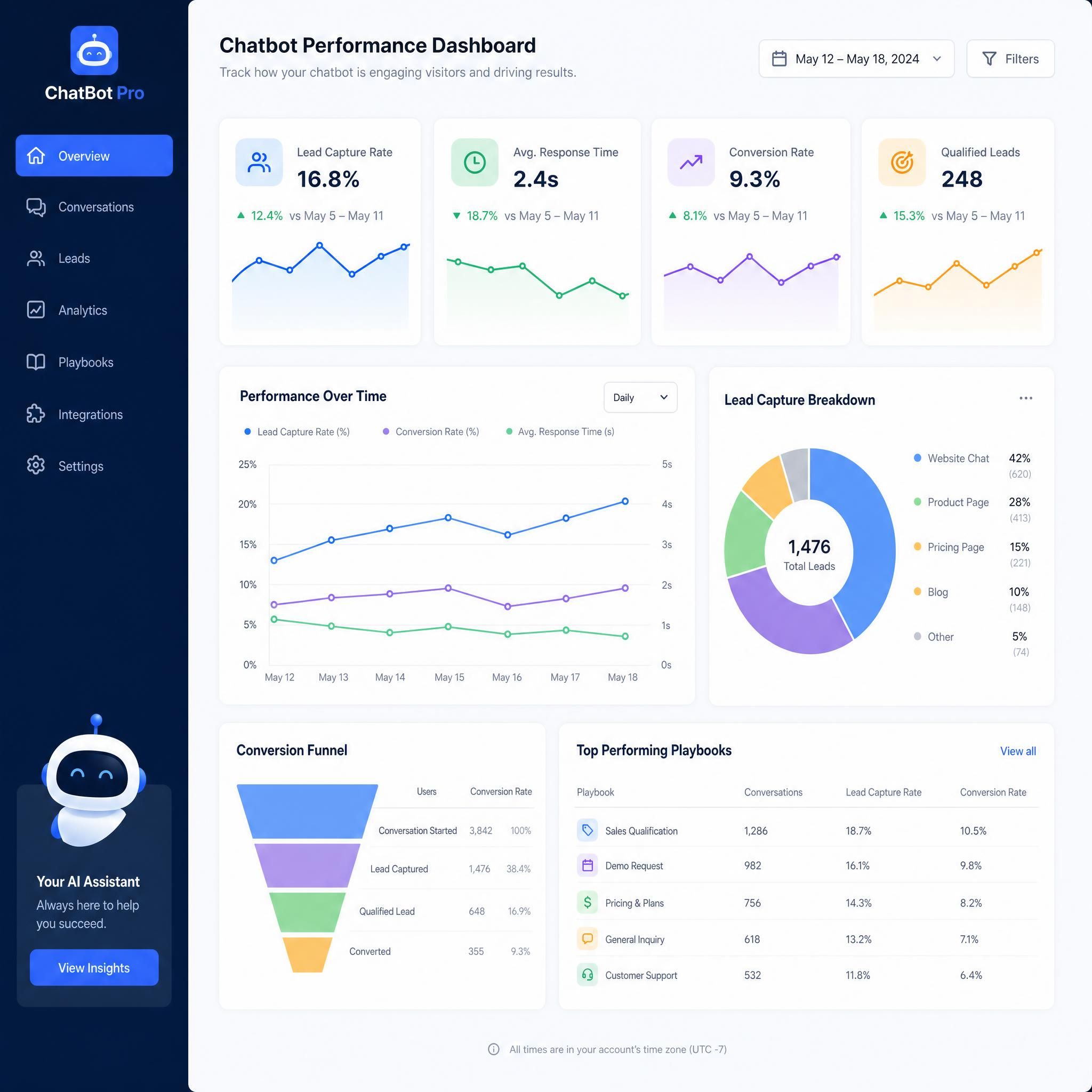
The 4 KPIs that matter for small business chatbots:
1. Chat-to-Lead Rate
What percentage of chatbot conversations result in a captured lead (name + email/phone)? Benchmark: 15–25% is solid. Below 10% means your qualification flow needs work.
2. Lead-to-Close Rate from Chat
Are chatbot leads converting to customers at the same rate as other channels? If chat leads close at a lower rate, your qualification questions may be too loose.
3. After-Hours Lead Capture
What percentage of your leads come in between 6 PM and 8 AM? AI chatbots capture 32% more sales during off-hours — if your after-hours number is low, your bot may not be engaging late-night visitors effectively.
4. Cost Per Lead from Chat vs. Other Channels
Compare your chatbot cost per lead against Google Ads, Facebook Ads, and organic. In most cases, chatbot leads are dramatically cheaper because you're converting existing traffic rather than buying new traffic.
Before vs. after: a real atlanta business scenario
Let's make this concrete. Here's a realistic scenario for a home services company based in Decatur, Georgia.
Before AI Chatbot:
- Monthly website visitors: 1,200
- Contact form submissions: 18 (1.5% conversion)
- Leads that convert to booked jobs: 6
- Revenue from website leads: ~$4,800/month
- After-hours leads captured: 0
After AI Chatbot (90 days post-setup):
- Monthly website visitors: 1,200 (same traffic)
- Chatbot conversations initiated: 240 (20% engagement rate)
- Leads captured by chatbot: 52 (21.6% chat-to-lead rate)
- Leads that convert to booked jobs: 14
- Revenue from website leads: ~$11,200/month
- After-hours leads captured: 19 (37% of total)
The difference: $6,400 more in monthly revenue. From the same traffic. With a tool that costs $79/month.
That's not a hypothetical — it's the math that plays out for service businesses across Atlanta when they stop letting their website traffic leak and start converting it.
Related services
If you're serious about maximizing your website's lead generation potential, a chatbot is one piece of the puzzle. Consider pairing it with:
- Local SEO Services — Drive more qualified Atlanta-area traffic to the pages where your chatbot converts
- Website Design & Optimization — Ensure your site loads fast and creates the right context for chatbot engagement
- CRM Setup & Automation — Connect your chatbot leads to automated follow-up sequences so no lead falls through the cracks
Faq
How long does it take to set up an AI chatbot on a wordpress site?
Most modern WordPress chatbot plugins can be installed, activated, and configured in under 15 minutes. Tools like Tidio and Jotform AI Chatbot include setup wizards and auto-crawl your existing site content to build their knowledge base automatically. You don't need a developer.
Do AI chatbots work for service businesses, or just ecommerce?
They work exceptionally well for service businesses — arguably better than ecommerce in some cases. HVAC companies, law firms, dental practices, real estate agents, and contractors in Atlanta are all using chatbots to capture after-hours leads, qualify prospects, and book appointments without any human involvement. The key is configuring the qualification flow to match your specific service and service area.
What's the difference between a basic chatbot and an AI chatbot?
A basic chatbot follows a rigid decision tree — it can only respond to the exact options you pre-program. An AI chatbot uses natural language processing to understand intent, handle off-script questions, and respond conversationally. For small businesses, this matters because real customers ask unpredictable questions. AI handles that; rule-based bots don't.
Can a chatbot integrate with my existing CRM or booking software?
Yes — most major chatbot platforms integrate with tools like HubSpot, Salesforce, Google Calendar, Calendly, and Mailchimp. For Shopify chatbots, integrations with the Shopify backend allow the bot to check order status, pull product info, and trigger automated workflows. For WordPress, most integrations are handled via native connectors or Zapier.
Is there a risk that customers will find chatbots annoying?
Only if they're configured poorly. A chatbot that fires immediately, asks for your email in the first message, and gives generic responses will annoy people. A chatbot that waits for the right moment, provides genuinely useful answers, and feels like a helpful assistant — not a pop-up ad — gets strong engagement. The configuration is everything.
Key statistics
📊 68% of customer inquiries are handled autonomously by AI chatbots, reducing customer service costs by 30–40% (Source: Drift / Juniper Research, 2025)
💡 8–14% increase in ecommerce conversion rates reported by Shopify stores using AI chatbots (Source: Tidio, 2025)
⚡ 2.7 seconds — average AI chatbot response time vs. 6+ minutes for human agents (Source: Drift, 2025)
📈 32% more sales captured during off-hours by businesses using AI chatbots (Source: Tidio, 2025)
🏆 57% of companies say chatbots deliver "significant ROI" within the first year of deployment (Source: Marketing LTB Chatbot Statistics, 2026)
Ready to stop losing atlanta leads?
Every day your website runs without an AI chatbot is another day you're handing leads to competitors who figured this out before you. The setup is fast. The cost is low. The ROI is measurable.
Whether you're running WordPress chatbots on a service business site, Shopify chatbots on an ecommerce store, or exploring voice chatbot options for a more hands-free experience — the strategies in this guide give you a clear, actionable path from zero to converting.
Atlanta businesses that move fast on this will own their market. The ones that wait will spend the next 12 months wondering why their traffic isn't turning into revenue.
Take the first step today. Install a chatbot on your highest-traffic page, configure a 5-question lead qualification flow, and connect it to your CRM. You can have all of that running before lunch.
Contact our team to get a custom AI chatbot strategy built for your Atlanta business →