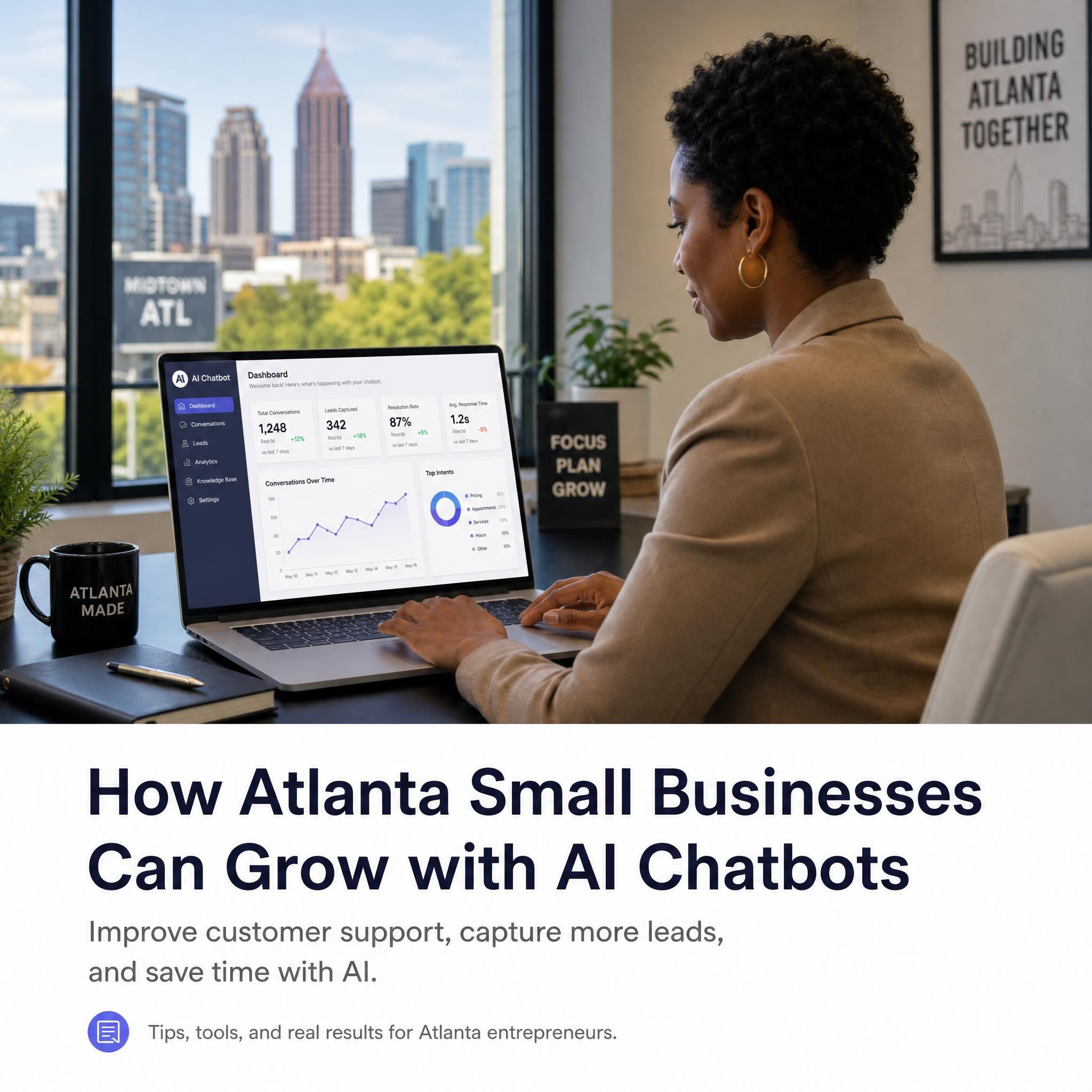
You just spent $1,200 running Google Ads for your Buckhead HVAC company. The traffic hit. Visitors landed on your site at 9 PM on a Tuesday. And then… nothing. No form fills. No calls. Just bounce rates climbing while your competitors — the ones with a live chat widget that responds in seconds — walked away with your leads.
That's not a traffic problem. That's a response problem. And in 2026, AI chatbots fix it.
This isn't a beginner's explainer on what chatbots are. This is a tactical, step-by-step guide for Atlanta small business owners who want to deploy a small business chatbot that actually converts — whether you're running a WordPress site, a Shopify store, or anything in between.
Table of contents
- Why Atlanta Businesses Lose Leads Without a Chatbot
- Strategy 1: Map Your Top 10 Repetitive Questions First
- Strategy 2: Set Up Your WordPress Chatbot the Right Way
- Strategy 3: Turn Your Shopify Store Into a 24/7 Sales Rep
- Strategy 4: Use Voice Chatbots for Phone-First Customers
- Strategy 5: Trigger the Chatbot at the Right Moment
- Strategy 6: Price It Right — What You Should Actually Pay
- Strategy 7: Measure What Matters, Then Optimize
- Before vs. After: A Real-World Scenario
- Related Services
- FAQ
- Key Statistics
- Final CTA
Why atlanta businesses lose leads without a chatbot
Atlanta is a fast market. Midtown law firms, Buckhead dental practices, East Atlanta e-commerce brands — they're all competing for the same impatient, mobile-first customer who expects an answer right now. If your website doesn't respond within seconds, that visitor is already on your competitor's contact page.
Here's the uncomfortable truth: most small businesses don't have a lead generation problem. They have a response speed problem. Chatbots on websites produce 20–35% more leads, handle 68% of inquiries autonomously, and reduce support costs by 30%. That's not theoretical. That's what happens when you stop making customers wait.
The fix isn't hiring another staff member. It's deploying a small business chatbot that works at 2 AM when your team doesn't.
Strategy 1: map your top 10 repetitive questions first
Before you install a single plugin, open a spreadsheet. This step takes 20 minutes and will save you weeks of chatbot misconfiguration.
List the 10 to 20 questions customers ask most — pricing, order status, appointments, product info, policies. For an Atlanta HVAC company, that list looks like: "Do you service Smyrna?", "What's the cost for a tune-up?", "Are you available on weekends?" For a Buckhead boutique, it's sizing, return policies, and shipping timelines.
Here's the action:
- Pull your last 90 days of email inquiries and filter by subject line
- Check your Google Business Profile Q&A section
- Review your website's live chat history (if any) or contact form submissions
- Talk to your front desk staff — they know the repeat questions by heart
Once you have the list, group questions into three buckets:
| Question Type | Chatbot Action | Example |
|---|---|---|
| Pricing / Availability | Auto-answer + lead capture | "We offer free quotes — enter your info below" |
| Appointment Requests | Calendar booking flow | Direct link to scheduling tool |
| Complex / Custom | Human handoff trigger | "Let me connect you with our team" |
Modern SMB chatbot tools train directly on your website pages, FAQs, and support documents so the bot can answer accurately. Feed it your mapped questions first. Your chatbot will be smarter from day one.
Strategy 2: set up your wordpress chatbot the right way
WordPress powers a huge portion of Atlanta small business websites — and the good news is that deploying a chatbot here has never been easier or cheaper. The bad news is that most business owners install the wrong plugin and wonder why it doesn't convert.
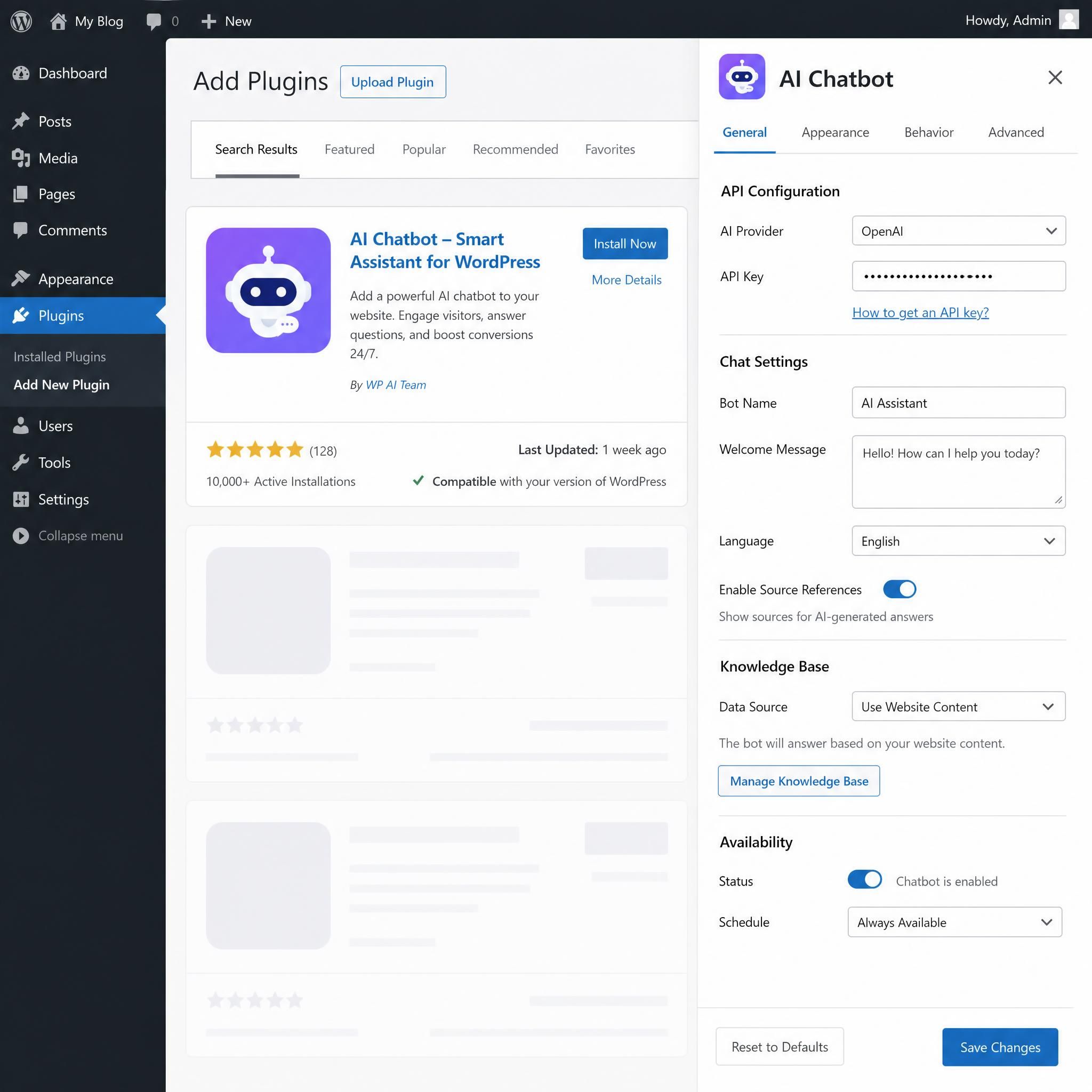
Here's the step-by-step that actually works:
Step 1: define your goal before picking a plugin
Before selecting a chatbot plugin, clearly outline your goals. Are you looking to improve customer support, generate leads, or automate sales processes? Your objectives will guide your choice of plugin and implementation strategy.
A dental office in Sandy Springs needs appointment booking. A law firm in Midtown needs lead qualification and intake. These are different tools.
Step 2: choose a plugin built for wordpress — not just ported to it
For businesses running on WordPress, a platform like MxChat is built from the ground up to integrate flawlessly with the WordPress environment. This ensures that deploying and managing your chatbot feels like a native part of your website, not a clunky third-party add-on. Other strong options include Tidio (great for WooCommerce), Chatbase, and Intercom.
Step 3: install without breaking your site speed
Measure your baseline with Google PageSpeed Insights before installation. Use a staging environment — never test directly on the live site. Enable async loading in plugin settings and only load the chatbot on relevant pages (product pages, checkout, support).
This matters. A slow site in Atlanta's competitive local SEO landscape costs you rankings and conversions.
Step 4: train it on your content
A good chatbot should automatically learn from your website pages, FAQs, product descriptions, and policy information. This allows it to answer customer questions accurately from day one.
Don't skip this. An untrained chatbot that says "I don't know" to every question destroys trust faster than having no chatbot at all.
Step 5: enable human handoff
Ensure your team can step in when the chatbot cannot handle a complex question. Set a trigger: if the bot can't resolve an issue in 2 exchanges, it should offer to connect the visitor with a real person or collect their contact info for a callback.
Strategy 3: turn your shopify store into a 24/7 sales rep
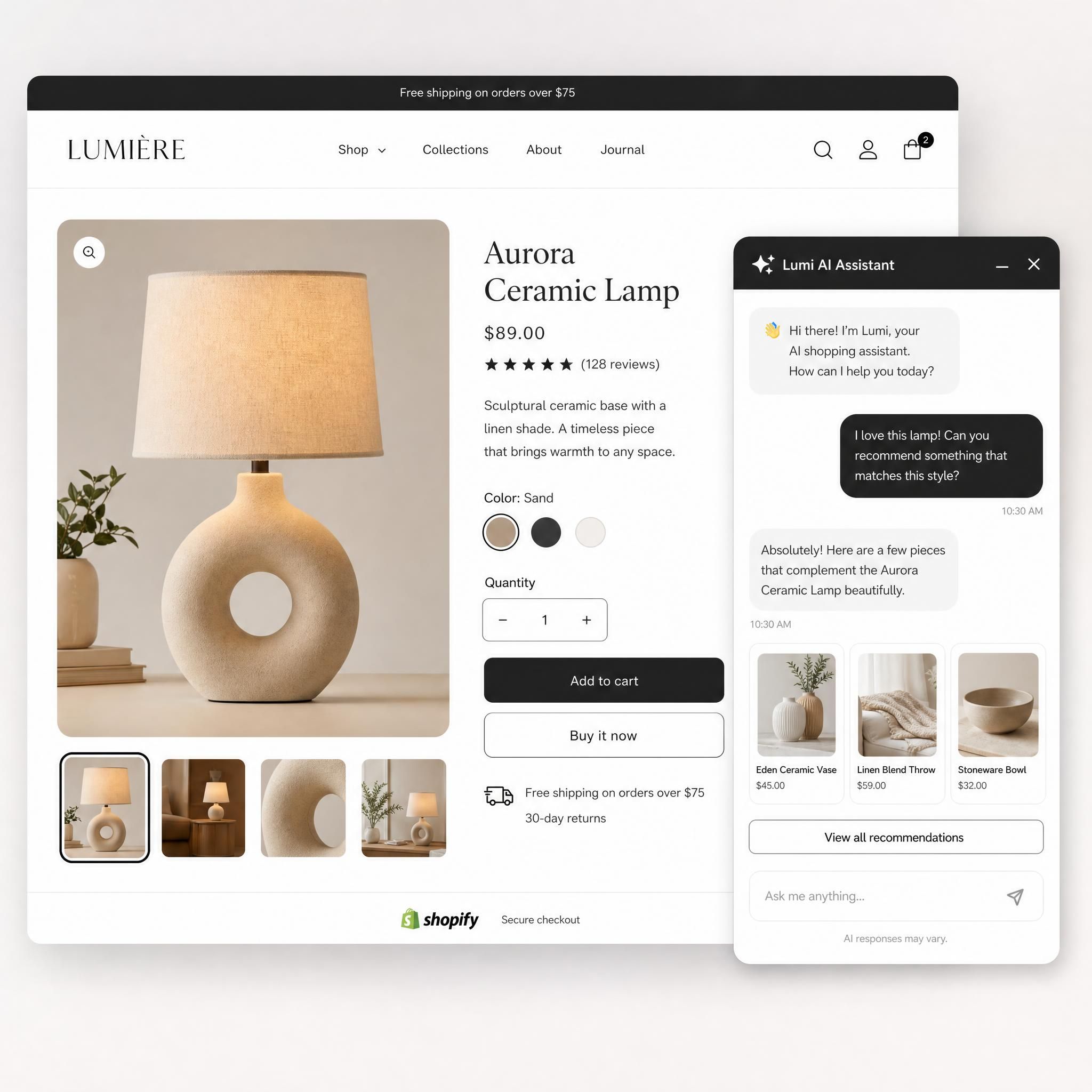
If you're running a Shopify chatbot for an Atlanta e-commerce brand, the opportunity is massive — and most stores are leaving it on the table. Only 36% of top Shopify stores currently use AI chatbots, despite the AI boom. That gap is your competitive edge.
Shopify merchants can now sell products directly through AI chatbots, meaning the chatbot isn't just answering questions — it's closing sales. Here's how to make that work for a small Atlanta retailer:
Abandoned Cart Recovery Flow:
Set your chatbot to trigger when a visitor has items in their cart but hasn't checked out after 3 minutes. The message: "Hey! Looks like you left something behind — can I help answer any questions before you go?" An e-commerce store implementing AI chatbots saw cart recovery rate jump from 8% to 23% and email response time drop from 18 hours to 2 minutes.
Product Recommendation Flow:
Train the chatbot on your product catalog. When a visitor lands on a category page, the bot asks: "What are you shopping for today?" Then it narrows down options based on their answers — budget, size, use case — and links directly to the product.
Post-Purchase Flow:
Don't stop at the sale. A chatbot that follows up with "Your order ships tomorrow — here's your tracking link" and "Based on what you bought, you might love this too" drives repeat purchases and reduces support tickets simultaneously.
Strategy 4: use voice chatbots for phone-first customers
Here's what most Atlanta small business guides miss: a significant chunk of your customers — especially in service industries like roofing, plumbing, and home repair — prefer to call, not type. Voice chatbots bridge this gap.
A voice chatbot answers your business phone line when you're on another call or after hours. It can:
- Qualify the caller ("Is this a new or existing customer?")
- Collect contact info and job details
- Book appointments directly into your calendar
- Escalate urgent calls to your cell phone
AnveVoice and similar voice AI platforms offer 5-minute setup and flat pricing, making them genuinely accessible for a one-person HVAC operation or a small Decatur plumbing company.
The key difference between a voice chatbot and a standard phone answering service: the voice chatbot learns. After 30 days of calls, it knows the most common reasons people call your business and handles them without human intervention.
Integration tip: Connect your voice chatbot to the same knowledge base as your website chatbot. A customer who chats on your site at noon and calls at 6 PM should get consistent information both times.
Strategy 5: trigger the chatbot at the right moment
Most chatbots fail not because of bad technology — they fail because of bad timing. A chatbot that pops up 0.5 seconds after a visitor lands on your homepage is annoying. One that appears after 45 seconds on your pricing page, when the visitor is clearly evaluating options, is a conversion machine.
Here are the trigger rules that work for Atlanta small businesses:
| Page | Trigger Timing | Chatbot Opening Line |
|---|---|---|
| Homepage | 45 seconds | "Have a question about our services?" |
| Pricing Page | 20 seconds | "Want a custom quote for your project?" |
| Contact Page | Immediate | "We're here — how can we help?" |
| Blog Post | Exit intent | "Before you go — grab our free guide" |
| Service Pages | 30 seconds | "Is this service available in your area?" |
The chatbot implementations that fail are almost always either poorly triggered, under-powered, or deployed without a clear goal beyond "having a chatbot."
Exit-intent triggers are especially powerful for Atlanta service businesses. When a visitor moves their cursor toward the browser's close button, the chatbot fires: "Before you go — we're currently offering free estimates for Buckhead and Midtown residents. Want one?" That single trigger can recover 5–10% of visitors who would have otherwise bounced.
Strategy 6: price it right — what you should actually pay
Let's talk numbers, because the chatbot pricing landscape in 2026 is confusing — and some platforms hide fees that triple your actual cost.
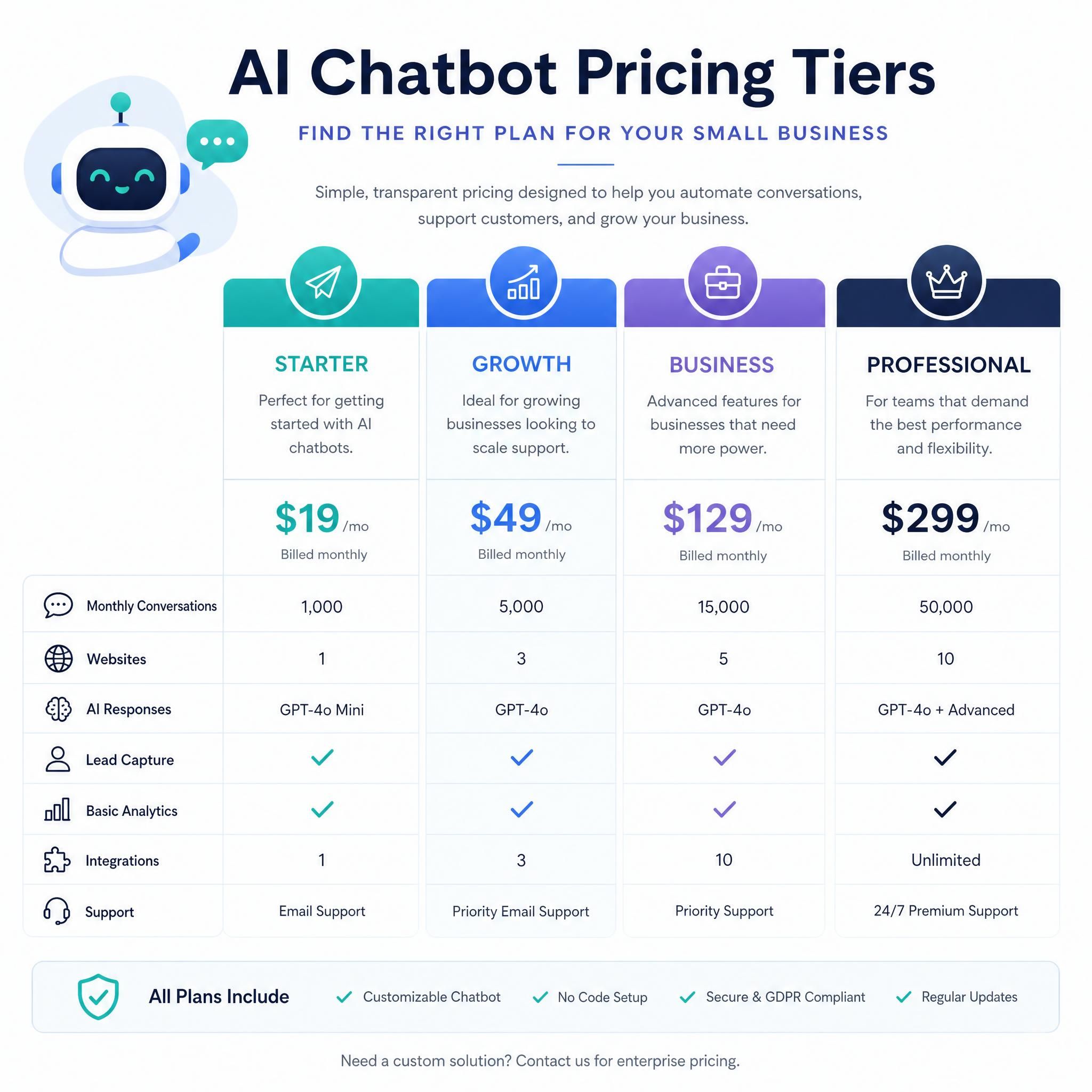
Entry-level AI chatbots cost $6–$50 monthly. Mid-tier SaaS platforms cost $100–$500 monthly for 2,000–5,000 conversations.
Here's a realistic pricing breakdown for Atlanta small businesses:
| Tier | Monthly Cost | Best For | What You Get |
|---|---|---|---|
| Starter | $0–$29/mo | Solo operators, testing | Basic lead capture, 50–200 conversations |
| Growth | $50–$150/mo | Small teams, service businesses | AI-powered responses, CRM integration, 500–2,000 conversations |
| Professional | $150–$500/mo | Multi-location, e-commerce | Unlimited conversations, voice, analytics, custom flows |
| Custom Build | $3,000–$5,000 one-time | Complex workflows | Full CRM integration, custom AI, branded experience |
Watch out for these hidden costs:
- Some platforms charge the base rate plus a separate AI add-on fee (Tidio's Lyro AI is an extra $39–$78/month on top of the base plan)
- Per-conversation billing can spike unexpectedly if you run a promotion
- Setup fees and onboarding charges on enterprise plans
The $29 Starter plan from platforms like Denser AI includes RAG-powered AI, 80+ language support, and source citations — features that cost $68–138/month when purchased as add-ons from competitors.
ROI reality check: A small business chatbot at $99/month that captures just 3 additional leads per week — at a $200 average customer value — generates $2,400/month in new revenue. The math is straightforward.
Strategy 7: measure what matters, then optimize
Installing a chatbot and forgetting about it is almost as bad as not having one. The businesses that see the best results treat their chatbot like a sales rep — they review performance weekly and make adjustments.
The four metrics that matter:
-
Conversation-to-Lead Rate — What percentage of chatbot conversations result in a captured name, email, or phone number? Benchmark: 15–25% is solid for service businesses.
-
Resolution Rate — What percentage of inquiries does the bot handle without human intervention? The average chatbot handles 68% of inquiries autonomously. If yours is below 40%, your knowledge base needs more content.
-
Conversion Rate from Chat — How many chat interactions lead to a purchase or booked appointment? A/B test different opening lines and flows to improve this number.
-
Cost per Resolution — What does each resolved inquiry cost you? Compare this to what it would cost a team member to handle the same volume.
Monthly optimization routine (takes 30 minutes):
- Review the top 10 questions the bot couldn't answer → add those to the knowledge base
- Check which pages have the highest chatbot engagement → those are your hottest conversion pages
- Review any conversations where visitors dropped off → find the friction point and fix the flow
- Test one new trigger or opening line each month
Before vs. after: a real-world scenario
The Business: A 4-person HVAC company serving Atlanta's Northside — Buckhead, Sandy Springs, Dunwoody.
Before Chatbot:
- Website traffic: 800 visitors/month
- Lead capture: 12 form fills/month (1.5% conversion)
- After-hours inquiries: lost — no one to respond
- Average response time: 4–6 hours
After Deploying a Small Business Chatbot (90 days):
- Lead capture: 38 qualified leads/month (4.7% conversion)
- After-hours leads captured: 11/month (previously zero)
- Average response time: instant
- New revenue attributed to chatbot: ~$6,200/month at $200 average job value
The chatbot cost: $119/month. The return: 52x.
That's not a hypothetical. Small businesses implementing AI automation report time savings of 20–30 hours per week, cost reductions of 30–40%, and improved customer satisfaction scores.
Related services
Looking to go beyond chatbots? These services work hand-in-hand with your AI chatbot strategy:
- AI Lead Generation for Atlanta Businesses — Combine chatbot capture with automated follow-up sequences
- WordPress Website Design & Optimization — A fast, conversion-optimized site makes your chatbot dramatically more effective
- Local SEO for Atlanta Service Businesses — Drive the traffic that your chatbot converts
- CRM Integration & Automation — Connect your chatbot leads directly into your sales pipeline
Frequently asked questions (FAQ)
How long does it take to set up an AI chatbot on a wordpress site?
Most SMBs can go live in a few hours without technical skills. With a no-code plugin like Tidio, MxChat, or Chatbase, the basic installation takes under 30 minutes. Training the bot on your content and customizing your flows adds another 1–2 hours. Plan for a half-day to do it properly, including testing.
Do AI chatbots work for service businesses, or just e-commerce?
Absolutely — service businesses are often where chatbots deliver the highest ROI. Real estate businesses using chatbots see 35–45% improvement in lead capture, while legal services see 25–35% more consultation requests. For Atlanta HVAC, dental, law, and home services companies, the chatbot handles the initial qualification so your team only talks to serious prospects.
What's the difference between a regular chatbot and an AI chatbot?
A rule-based chatbot follows a fixed decision tree — it can only answer questions you've pre-programmed. An AI chatbot uses natural language processing to understand intent, handle variations in how questions are asked, and learn over time. AI-powered chatbots significantly outperform rule-based bots for complex query types and deliver measurably better conversion results. For most Atlanta small businesses in 2026, the price difference between the two is minimal — always choose AI.
Can i use a chatbot on shopify without technical knowledge?
Yes. Shopify's app store has dozens of chatbot integrations — Tidio, Gorgias, and Freshchat are the most popular. Over half of Shopify's merchant base is actively planning to adopt AI-powered tools, and platforms now make setup accessible even for solo entrepreneurs. Most apps install with a single click and connect to your product catalog automatically.
How do i make sure my chatbot doesn't frustrate customers?
The number-one rule: always offer a human option. Customers still prefer humans for complex issues — the best chatbot strategy combines AI efficiency with a clear path to human support. Program your bot to recognize frustration signals (repeated questions, short angry responses) and immediately offer to connect the visitor with a real person. A chatbot that knows its limits builds trust; one that keeps failing destroys it.
Key statistics
📊 68% of website inquiries can be handled autonomously by AI chatbots, freeing your team for high-value work (Scalify, 2026)
📊 20–35% more leads captured – AI Chatbot Lead Generation Impact
💡 Only 36% of top Shopify stores currently use AI chatbots — the majority of your competitors haven't deployed one yet (Brenton Way, 2026)
📊 Only 36% of top stores use AI chatbots – Shopify Chatbot Adoption Gap
📈 $9,500/month net gain reported by a 3-person e-commerce team after deploying an AI chatbot at $108/month (AI Crescent, 2026)
📊 Up to 1300% ROI within 90 days – Small Business Chatbot ROI
⚡ Entry-level AI chatbots start at $6–$29/month — the barrier to entry has effectively collapsed for Atlanta small businesses (Elfsight / Denser AI, 2026)
"Chatbots produce 20-35% more leads and handle 68% of inquiries autonomously"
— Scalify
Ready to stop losing leads after hours?
Every night your website sits without a chatbot, you're handing leads to competitors who figured this out before you did. Atlanta moves fast — Buckhead, Midtown, Decatur, Sandy Springs — your customers are searching at 10 PM and expecting answers immediately.
The strategies in this guide aren't complicated. Pick one. Start with mapping your top 10 questions. Install a $29/month plugin on your WordPress site this week. Set up a Shopify chatbot flow for abandoned carts this weekend. Small moves, compounding results.
The businesses winning in Atlanta right now aren't necessarily the biggest. They're the fastest to respond.
If you're ready to deploy an AI chatbot built specifically for your Atlanta small business — one that captures leads, books appointments, and converts visitors around the clock — contact our team today for a free strategy session. We'll audit your current website, identify your highest-value chatbot triggers, and have you live within 48 hours.