It's 11:47 PM on a Tuesday. A potential customer in Buckhead just landed on your website after searching "emergency HVAC repair Atlanta." They're ready to book. Your contact form is sitting there, silent. No one's answering. By morning, they've already called your competitor in Midtown — who had a chatbot that captured their name, address, and appointment preference before midnight.
That's not a hypothetical. That's happening right now, every night, to Atlanta businesses that haven't made the move yet.
This guide isn't about why you should get an AI chatbot. It's about how — with real steps, real pricing, and real results you can replicate.
Table of contents
- Why Atlanta Businesses Are Losing Leads Without a Chatbot
- What an AI Chatbot Actually Does (Plain English)
- Step-by-Step: How to Set Up a Small Business Chatbot
- Installing Your Chatbot on WordPress
- Setting Up Shopify Chatbots for E-Commerce
- Chatbot Pricing: What You'll Actually Pay
- Before vs. After: A Real Atlanta Business Scenario
- FAQ
- Key Statistics
Why atlanta businesses are losing leads without a chatbot
Here's the uncomfortable truth most agencies won't say out loud: your contact form is a lead graveyard.
The average business takes 47 hours to respond to a new lead — while research consistently shows that responding within 5 minutes makes you 21x more likely to qualify that lead. In a market as competitive as Atlanta — where Buckhead law firms, Sandy Springs med spas, and Decatur home service companies are all fighting for the same Google clicks — 47 hours might as well be forever.
The contrarian take? Most Atlanta small businesses don't have a sales problem. They have a response speed problem. An AI chatbot doesn't just answer questions — it eliminates the gap between "visitor arrives" and "lead captured."
64% of companies report that AI chatbots help them generate more qualified leads, not just more leads. The difference matters. You don't want more tire-kickers. You want the right people, qualified and ready, handed off to your team when they walk in the door Monday morning.
What an AI chatbot actually does (plain english)
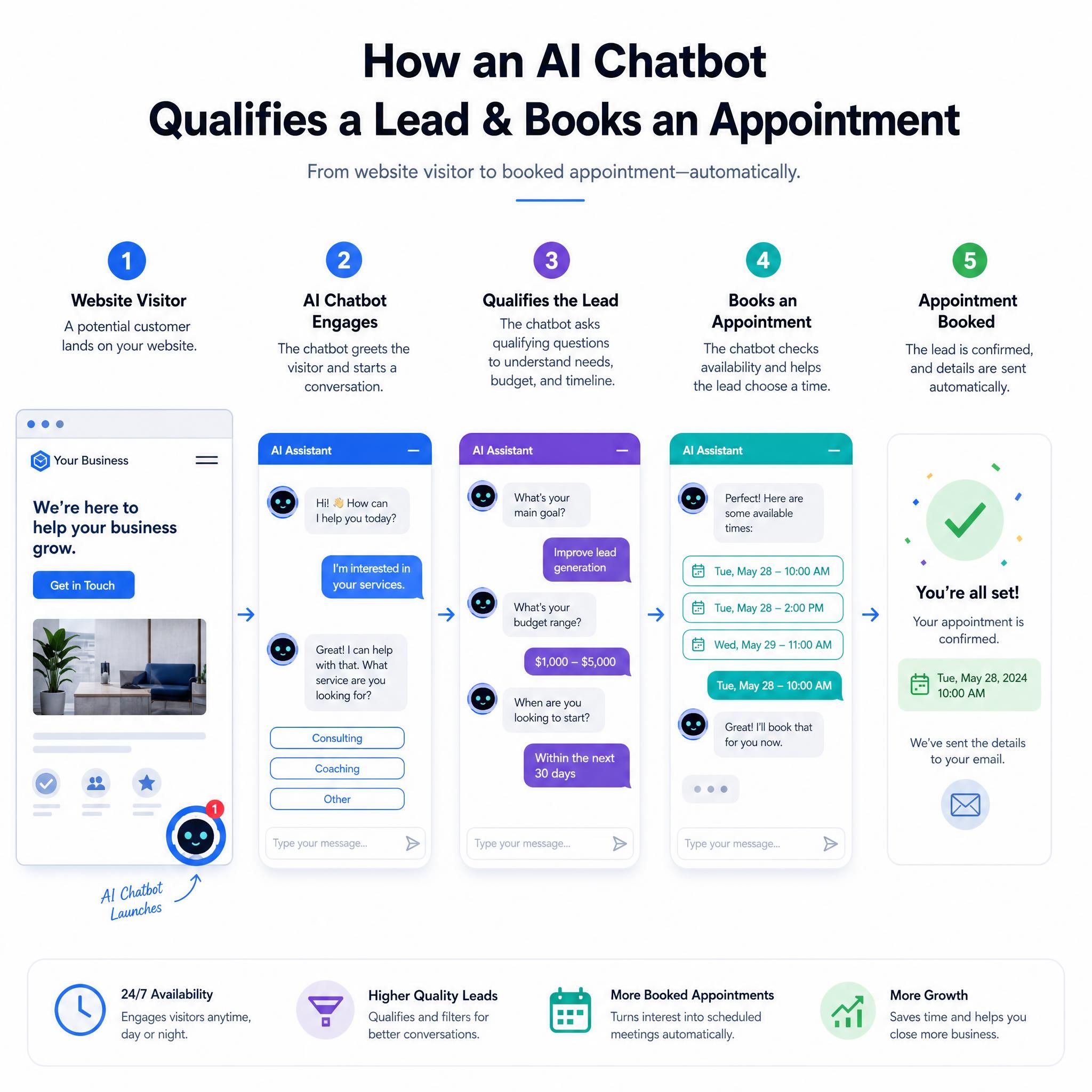
Forget the buzzwords. Here's what a properly configured small business chatbot does on your website every single day:
- Greets visitors with a triggered message based on the page they're on (pricing page = different message than the homepage)
- Qualifies leads by asking the right questions: service needed, location, timeline, budget range
- Books appointments directly into your calendar — no back-and-forth email chains
- Answers FAQs instantly: hours, pricing, service areas, policies
- Captures contact info in a conversational format that feels nothing like a cold form
- Escalates to humans when the conversation needs a real person
AI chatbots work best for three specific jobs: lead qualification plus booking, FAQ deflection, and e-commerce pre-sale Q&A — they fail when asked to close high-ticket deals unassisted. Know what you're deploying it for, and it will deliver.
Step-by-step: how to set up a small business chatbot
Step 1: define your chatbot's one job
Before you touch any software, answer this question: What is the single most valuable action a visitor can take on my site?
For a Midtown Atlanta law firm? That's booking a consultation. For a Buckhead e-commerce boutique? That's completing a purchase. For a Decatur HVAC company? That's submitting a service request. Your chatbot should be laser-focused on driving that one action — everything else is secondary.
Step 2: choose your platform
Most small business websites don't need an expensive solution. Across the 2026 market, basic to mid-level chatbot plans land around $30 to $150 per month. Here are the platforms that consistently perform for small businesses:
| Platform | Best For | Starting Price | WordPress | Shopify |
|---|---|---|---|---|
| Tidio (Lyro AI) | E-commerce + support | $29/mo | ✅ | ✅ |
| MxChat | WordPress-native sites | One-time fee | ✅ | ❌ |
| Chatbase | Simple FAQ + lead capture | Free / $19/mo | ✅ | ✅ |
| Botpress | Custom flows + automation | Free / $89/mo | ✅ | ✅ |
| ManyChat | Social + WhatsApp | $19.99/mo | ✅ | ✅ |
| Intercom | Growing teams + CRM | $74/mo | ✅ | ✅ |
Step 3: train your bot on your business
This is where most small businesses skip a step and then wonder why their bot gives generic answers. Every platform worth using lets you feed it your content:
- Upload your FAQ page or create one from scratch
- Add your service pages — copy/paste the text or input your URL for auto-crawl
- Include your pricing, hours, and service area (for Atlanta businesses: list your neighborhoods — Buckhead, Midtown, Sandy Springs, Decatur, etc.)
- Set your tone — casual and friendly for a boutique, professional and precise for a law firm
Platforms like FwdSlash crawl your website content to build a custom knowledge base automatically — within minutes, you have an AI agent that answers customer questions grounded in your actual business data.
Step 4: build your lead capture flow
This is the money step. Don't just let visitors ask questions — build a flow that captures data:
- Trigger message: "Hey! Looking for [your service] in Atlanta? I can help you get a quote in 2 minutes."
- Qualification question: "What's the main thing you need help with today?"
- Location check: "Are you in the Atlanta metro area?"
- Contact capture: "What's the best email/phone to follow up?"
- Handoff or booking: Route to calendar link or notify your team in real time
Step 5: set up escalation rules
A chatbot that can't hand off to a human is a liability. Configure escalation triggers for:
- Questions involving pricing above a certain threshold
- Complaints or frustrated language
- Requests for a manager or owner
- Legal or medical questions (critical for Atlanta law firms and healthcare practices)
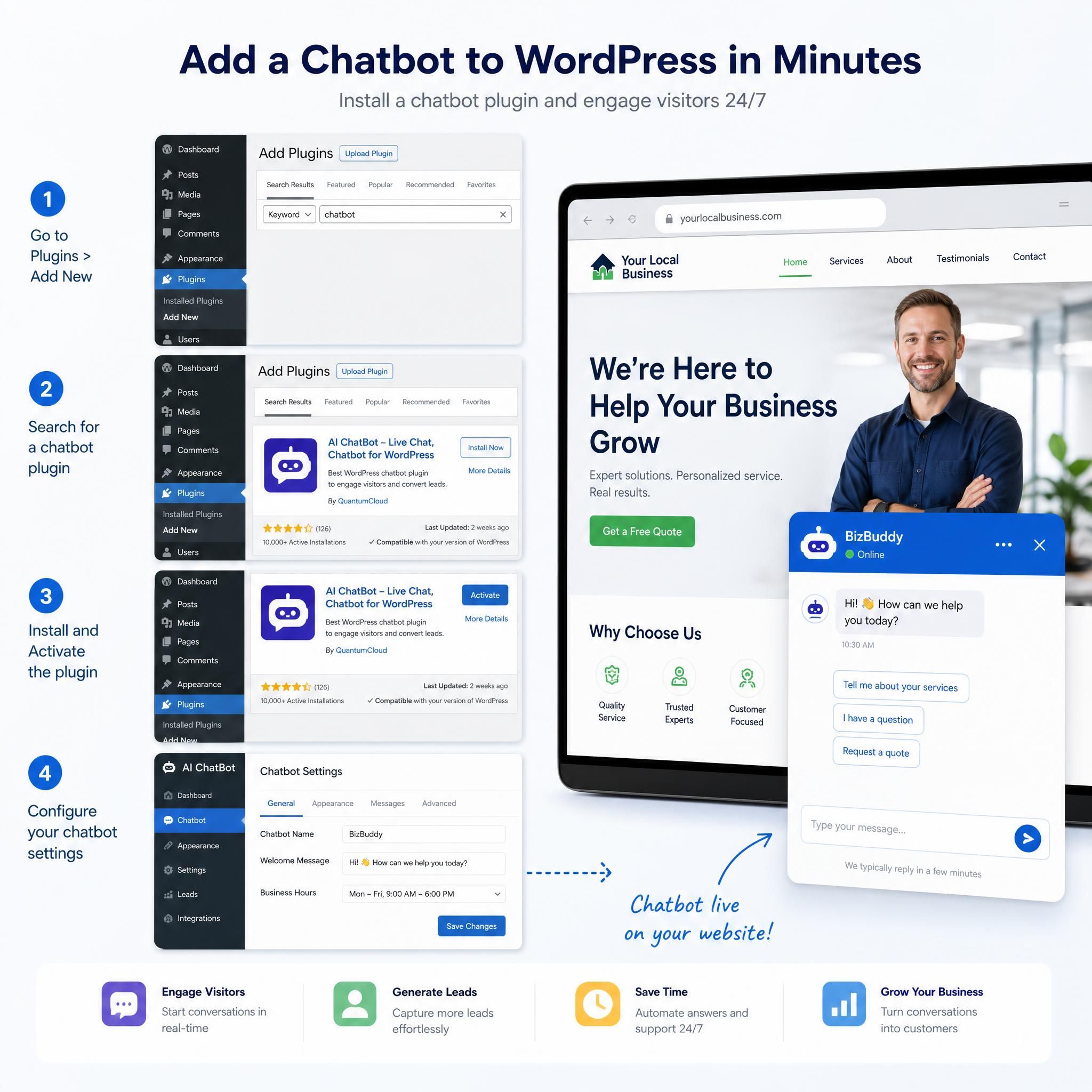
Installing your chatbot on wordpress
Adding an AI chatbot to your WordPress website takes just 15–30 minutes with the right approach. WordPress users can use a one-click plugin that handles everything automatically.
Here's the exact process:
Option A: Plugin Install (Recommended)
- Log into your WordPress dashboard
- Go to Plugins → Add New
- Search for your chatbot provider (Tidio, MxChat, Chatbase all have native plugins)
- Click Install Now → Activate
- Connect your account and your widget appears automatically
Option B: Script Embed (Universal)
- Copy the embed script from your chatbot dashboard
- In WordPress, go to Appearance → Theme Editor (or use a plugin like Insert Headers and Footers)
- Paste the script before the closing
</body>tag - Save — your chatbot is live on every page
Pro tip for Atlanta service businesses: Use page-level targeting to show different chatbot messages on different pages. Your "Contact Us" page bot should say something different than your "Services" page bot. Most platforms support this with zero coding.
Setting up shopify chatbots for e-commerce
Atlanta's e-commerce businesses — from Ponce City Market boutiques to online retailers shipping nationwide — are leaving serious money on the table without a Shopify chatbot.
Shopify AI chatbots deliver measurable business results: 41 to 58% ticket deflection rates, response times reduced from hours to seconds, 20 to 30% reduction in cart abandonment, and $3.50 average ROI per dollar invested.
Step-by-step Shopify setup:
- Log into your Shopify Admin
- Navigate to Online Store → Themes
- Click the three dots on your active theme → Edit code
- In the Layout folder, open theme.liquid
- Find the closing
</body>tag and paste your chatbot script immediately before it - Click Save
Alternatively, most major chatbot providers (Tidio, Botpress, re:amaze) have one-click Shopify app installs from the Shopify App Store — even faster.
What to configure for Shopify specifically:
- Product Q&A flows: Train the bot on your product catalog so it can answer sizing, material, and compatibility questions
- Order tracking integration: Connect to your fulfillment system so the bot can pull real-time order status
- Cart abandonment triggers: Set the bot to fire when a visitor sits on the cart page for 60+ seconds without checking out
- Return policy automation: Pre-load your return policy so the bot handles it without a ticket
Platforms like Tidio were designed with e-commerce at its core — pre-built templates for order status, shipping estimates, return policies, and product recommendations make them especially effective for Shopify and WooCommerce stores.
Chatbot pricing: what you'll actually pay
No fluff. Here's the real breakdown for Atlanta small businesses:
Tier 1: getting started ($0–$30/month)
Best for: Solo operators, new businesses, testing before committing
- Free plans from Chatbase, Tidio, ManyChat
- Limited conversations (50–200/month), basic flows
- Good enough to prove the concept before scaling
Tier 2: growing business ($30–$100/month)
Best for: Service businesses doing 5–50 leads/month, e-commerce stores
- Full AI responses, CRM integrations, appointment booking
- Platforms: Tidio ($29–$59/mo), Chatbase ($19–$49/mo), Denser AI ($29/mo)
- This is where most Atlanta small businesses should start
Tier 3: scaling up ($100–$300/month)
Best for: Multi-location businesses, high-volume e-commerce, teams with dedicated sales reps
- Advanced routing, multi-channel (web + WhatsApp + SMS), analytics dashboards
- Platforms: Intercom ($74–$139/mo), Botpress ($89/mo+), re:amaze ($29–$69/mo per agent)
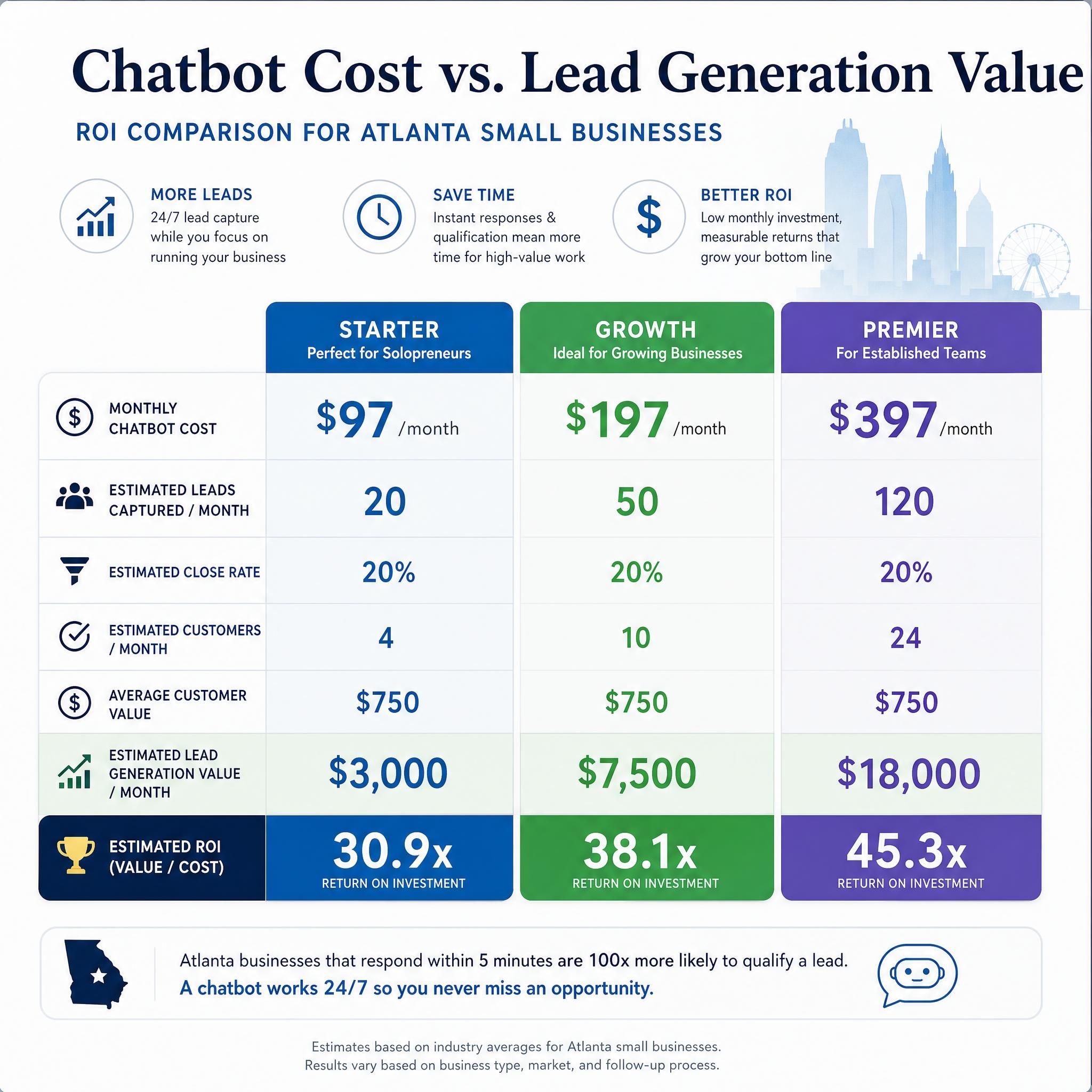
The ROI math is simple: If your average customer is worth $500 and your chatbot captures just 5 extra leads per month that you would have otherwise lost — that's $2,500/month in new revenue against a $50–$100 tool cost. The numbers aren't close.
Before vs. after: a real atlanta business scenario
The Business: A residential plumbing company serving Buckhead, Brookhaven, and Sandy Springs.
Before AI Chatbot:
- Website gets 400 visitors/month
- Contact form submissions: ~12/month
- Response time: Next business day (avg. 18 hours)
- Leads lost after hours: Estimated 40–50%
- Monthly new customers from website: 4–5
After Deploying a Small Business Chatbot:
- Same 400 visitors/month
- Chatbot conversations initiated: ~80/month (20% engagement rate)
- Qualified leads captured: 28/month (including after-hours)
- Response time: Instant (bot), 15 minutes (human follow-up during business hours)
- Monthly new customers from website: 9–11
The result: Roughly 2x more customers from the same traffic, with zero additional ad spend. The chatbot paid for itself in the first week of the second month.
Related services
Looking to go further with your Atlanta business's digital presence? These resources can help:
- AI Lead Generation for Atlanta Businesses — How to build a full funnel, not just a chatbot
- Local SEO for Atlanta Service Businesses — Get found before your competitors
- Voice Chatbots and Phone AI for Small Business — The next frontier in customer capture
Frequently asked questions (FAQ)
How long does it take to set up an AI chatbot on my website?
Adding an AI chatbot to your website takes just 5–10 minutes for the basic installation. The entire process from signup to live chatbot typically takes under 30 minutes, including initial AI training. WordPress users can use a one-click plugin. Shopify stores paste a single script into the theme editor. No developer required.
Do i need technical skills to set up a chatbot?
No. Modern AI chatbot platforms are built for non-technical business owners. If you can copy and paste text and click through a dashboard, you can deploy a chatbot. Platforms like Tidio, Chatbase, and MxChat are specifically designed for small business owners without coding backgrounds.
What's the difference between a rule-based chatbot and an AI chatbot?
A rule-based chatbot follows a rigid decision tree — it only responds to the exact phrases it was programmed for. An AI chatbot understands natural language, so it can handle unexpected questions, interpret intent, and give useful answers even when a visitor words something in an unusual way. For Atlanta small businesses dealing with diverse customers, AI is the clear choice.
Can a chatbot replace my receptionist or sales team?
Not entirely — and you shouldn't want it to. Chatbots aren't replacing human sales teams — they're handling the repetitive qualification work so your team can focus on closing deals. Think of it as a 24/7 front-line assistant that handles the first conversation, so your team only engages with warm, qualified prospects.
Is a chatbot worth it for a very small business (1–3 employees)?
Absolutely — arguably more so. For small businesses, AI ROI concentrates in areas where the work is high-volume, repetitive, and language-based — and every hour saved matters more on a small team. A 2-person Atlanta landscaping company that stops missing after-hours leads doesn't need to hire a third person. They need a chatbot.
Key statistics
📊 21x — How much more likely you are to qualify a lead when you respond within 5 minutes vs. waiting (and the average business waits 47 hours)
💡 $3.50 ROI per dollar invested — Average return from Shopify AI chatbots, with 20–30% reduction in cart abandonment
📈 64% of companies report AI chatbots help them generate more qualified leads, not just more traffic
🤖 40–60% of routine customer inquiries can be handled by chatbots without any staff involvement — transformative for small teams
📊 76% of small businesses are actively using AI or exploring it in 2026 – Small Business AI Adoption
📊 Businesses using chatbots see 20–35% more leads and 30% lower support costs – Chatbot Lead Generation Impact
Ready to stop losing leads overnight?
Atlanta is a fast-moving market. Buckhead clients don't wait. Midtown prospects don't leave voicemails. And the HVAC company, the law firm, or the boutique that answers first — wins.
Setting up an AI chatbot for your small business isn't a six-month project. It's a Tuesday afternoon. Pick a platform, train it on your services, install it on your WordPress or Shopify site, and wake up Wednesday morning to leads you would have missed.
The only question left is: how many more leads can you afford to lose before you start?
"Companies responding within 5 minutes are 21x more likely to qualify leads, yet the average response time is 47 hours"
— GreetNow Lead Response Time Statistics 2026
"Shopify AI chatbots deliver 41–58% ticket deflection rates and $3.50 average ROI per dollar invested"
— SortResume AI Shopify Chatbots 2026