It's 11:47 PM on a Tuesday. A homeowner in Midtown Atlanta just landed on your HVAC website after their AC unit died. They want a quote. They want it now. Your phone is off, your inbox won't get checked until morning, and your competitor — the one who installed a chatbot six months ago — just captured that lead while you slept.
That's not a hypothetical. That's what's happening to Atlanta small businesses every single night.
The good news? Deploying a small business chatbot is no longer a six-month IT project. You can have one live on your WordPress or Shopify site within a few hours. This guide walks you through exactly how — with real steps, real pricing, and no fluff.
Table of contents
- Why Your Website Is Leaking Leads Right Now
- What an AI Chatbot Actually Does on Your Site
- Chatbot Pricing: What Atlanta Small Businesses Actually Pay
- Step-by-Step: Adding a Chatbot to Your WordPress Site
- Step-by-Step: Adding a Chatbot to Your Shopify Store
- How to Train Your Chatbot So It Doesn't Sound Like a Robot
- Before vs. After: A Real Atlanta Business Scenario
- Related Services
- FAQ
- Key Statistics
Why your website is leaking leads right now
Here's the part nobody wants to say out loud: your website is probably terrible at capturing leads. Not because it looks bad. Because it's passive.
Visitors land on your page, browse for 90 seconds, don't find an immediate answer, and leave. They don't fill out your contact form. They don't call. They just bounce — and they go to the next result on Google.
The contrarian truth most agencies won't tell you? A contact form is not a lead capture strategy. It's a hope. A chatbot is a strategy.
Businesses using AI for lead generation report a 50% increase in sales-ready leads and up to 60% lower customer acquisition costs — and that gap is only widening. In Atlanta's hyper-competitive markets like Buckhead, Sandy Springs, and Midtown, speed is everything. Leads contacted within five minutes have an 85% conversion rate, which drops to 60% if contacted within 30 minutes, and just 30% within an hour. A chatbot responds in zero minutes, every time.
What an AI chatbot actually does on your site
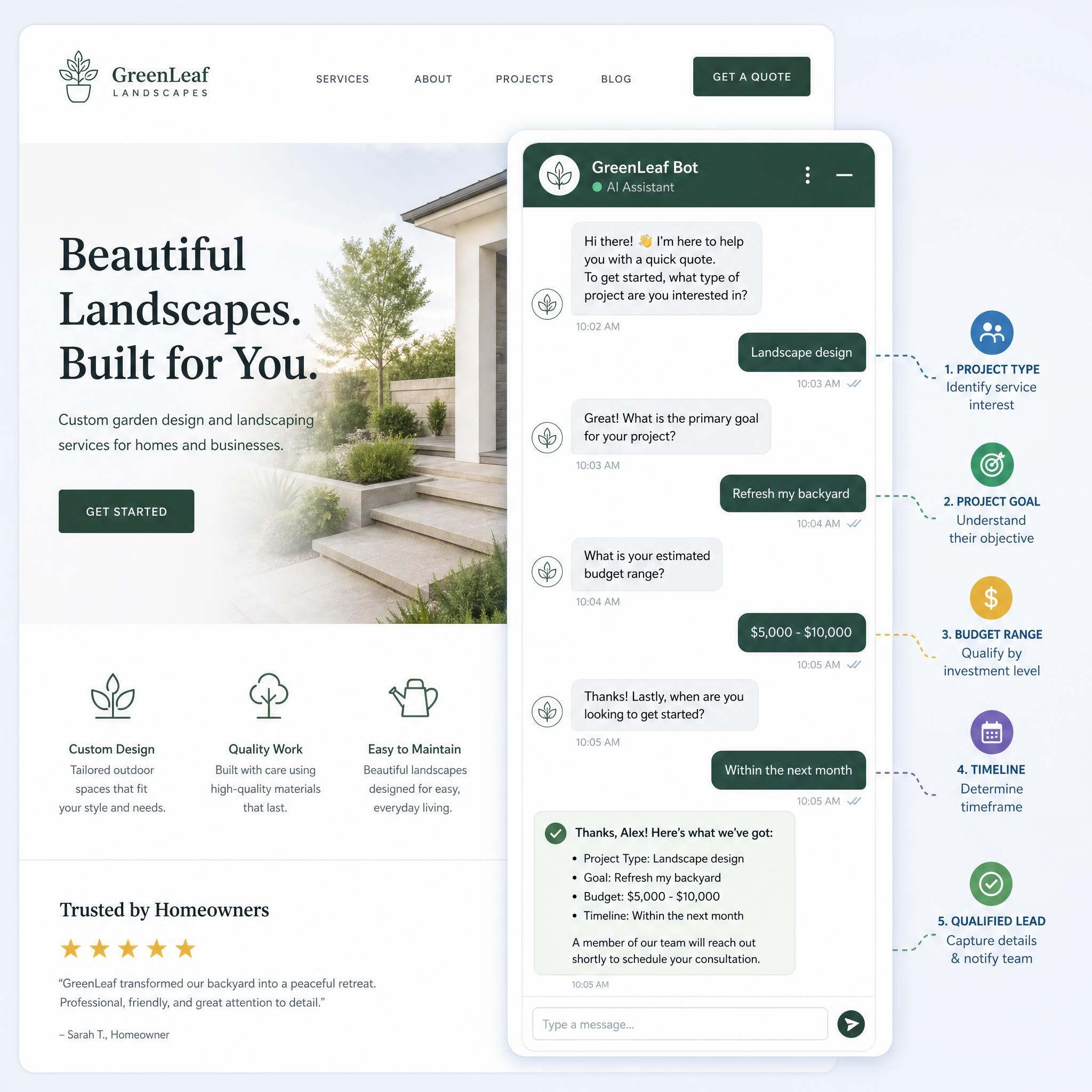
Let's be specific. A well-configured AI chatbot on your small business website does four things simultaneously:
- Greets visitors with a context-aware message (e.g., "Looking for HVAC service in Atlanta? We're here 24/7.")
- Qualifies the lead by asking a few short questions — location, service needed, budget range
- Captures contact info — name, email, phone — before the visitor leaves
- Books appointments or routes hot leads directly to your CRM or calendar
This isn't a FAQ bot that spits out pre-written answers. Modern AI chatbots use natural language processing to hold a genuine conversation, handle objections, and escalate to a human when needed.
The business impact is direct. Shoppers who interact with AI-powered recommendation chatbots are 40 percent more likely to complete a purchase than those who navigate product catalogs on their own, with stores reporting 15 to 35 percent conversion rate improvements.
Chatbot pricing: what atlanta small businesses actually pay
Forget the enterprise quotes. Here's what a real small business chatbot costs in 2026:
| Tier | Monthly Cost | Best For | Key Features |
|---|---|---|---|
| Starter | $0–$29/mo | Solo operators, new sites | Basic Q&A, lead form, limited conversations |
| Growth | $30–$79/mo | Service businesses, local shops | AI responses, CRM integration, 500–1,000 conversations |
| Pro | $80–$150/mo | Multi-location, eCommerce | Advanced AI, Shopify/WordPress sync, analytics, handoff |
| Custom/Agency | $200–$500+/mo | Franchises, high-volume | White-label, voice integration, full automation |
When looking at AI chatbot pricing in 2026, basic to mid-level chatbot plans land around $30 to $150 per month for most small business websites. Watch out for platforms that advertise "$29/month" but charge separately for AI features. Some platforms advertise "$29/month" but charge separately for AI features, pushing real costs to $90 or more.
The ROI math for an Atlanta small business: If your average service ticket is $800 (think HVAC repair, dental visit, legal consultation), and your chatbot captures just 3 extra leads per month that convert at 30%, that's one additional sale — easily covering your monthly chatbot cost 5–10x over.
Step-by-step: adding a chatbot to your wordpress site
Adding a chatbot to your WordPress site can instantly improve how visitors interact with your brand. Here's exactly how to do it without touching a line of code.
Step 1: choose your plugin
The most reliable WordPress chatbot plugins for small businesses in 2026 include:
- Tidio — Best overall for service businesses; free tier available
- JoyzAI — Platforms like JoyzAI let you launch AI chatbots in five minutes, with a plug-and-play setup for websites and WhatsApp, automating conversations and escalating tricky queries to humans.
- WPBot — Native WordPress plugin, no third-party account required
- Jotform AI Chatbot — Ideal if you already use Jotform for forms
Step 2: install and activate
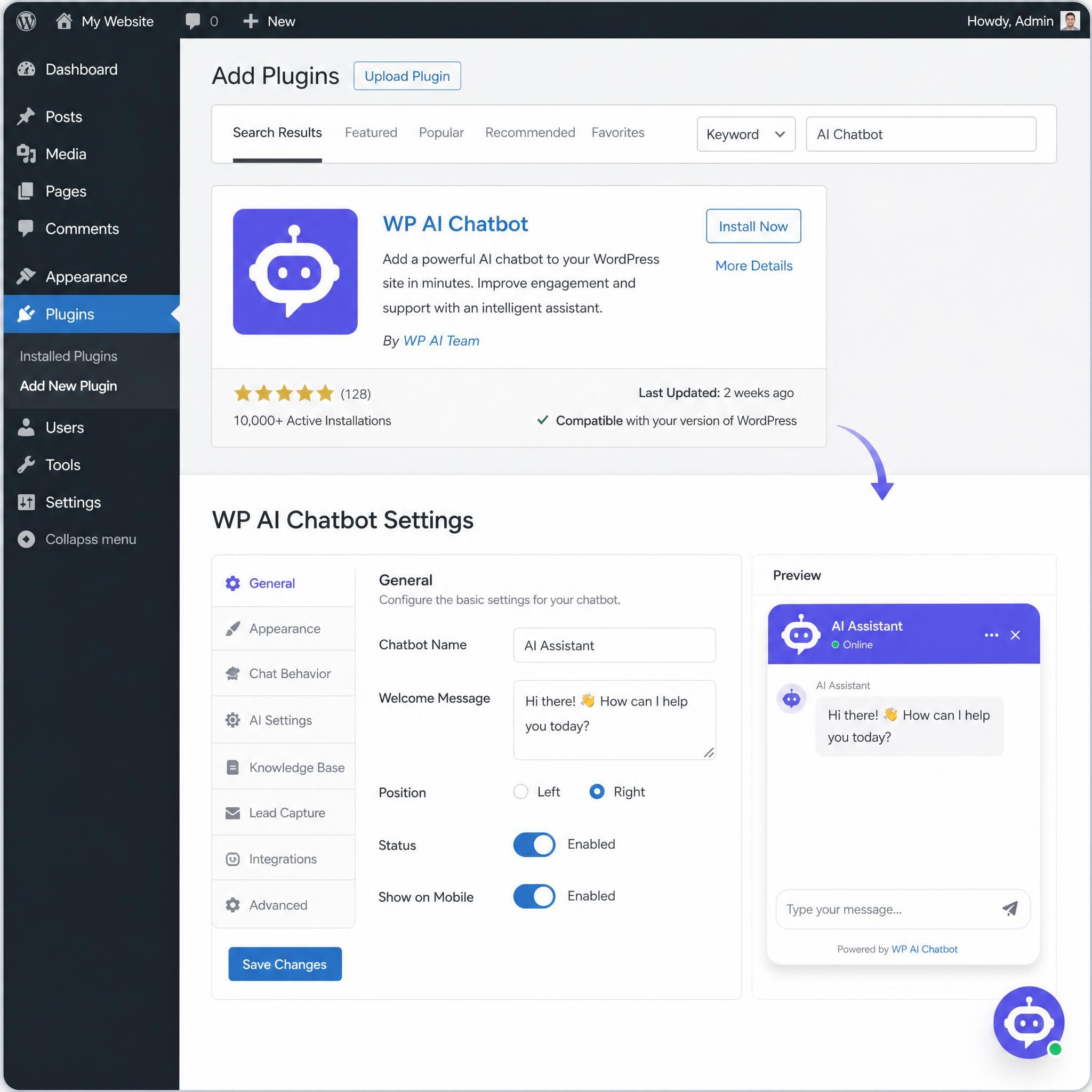
- Go to your WordPress dashboard → Plugins → Add New
- Search for your chosen plugin (e.g., "Tidio" or "WPBot")
- Click Install Now, then Activate
- A new menu item will appear in your sidebar
Step 3: train it on your business
This is the step most people skip — and it's why their chatbot sounds generic.
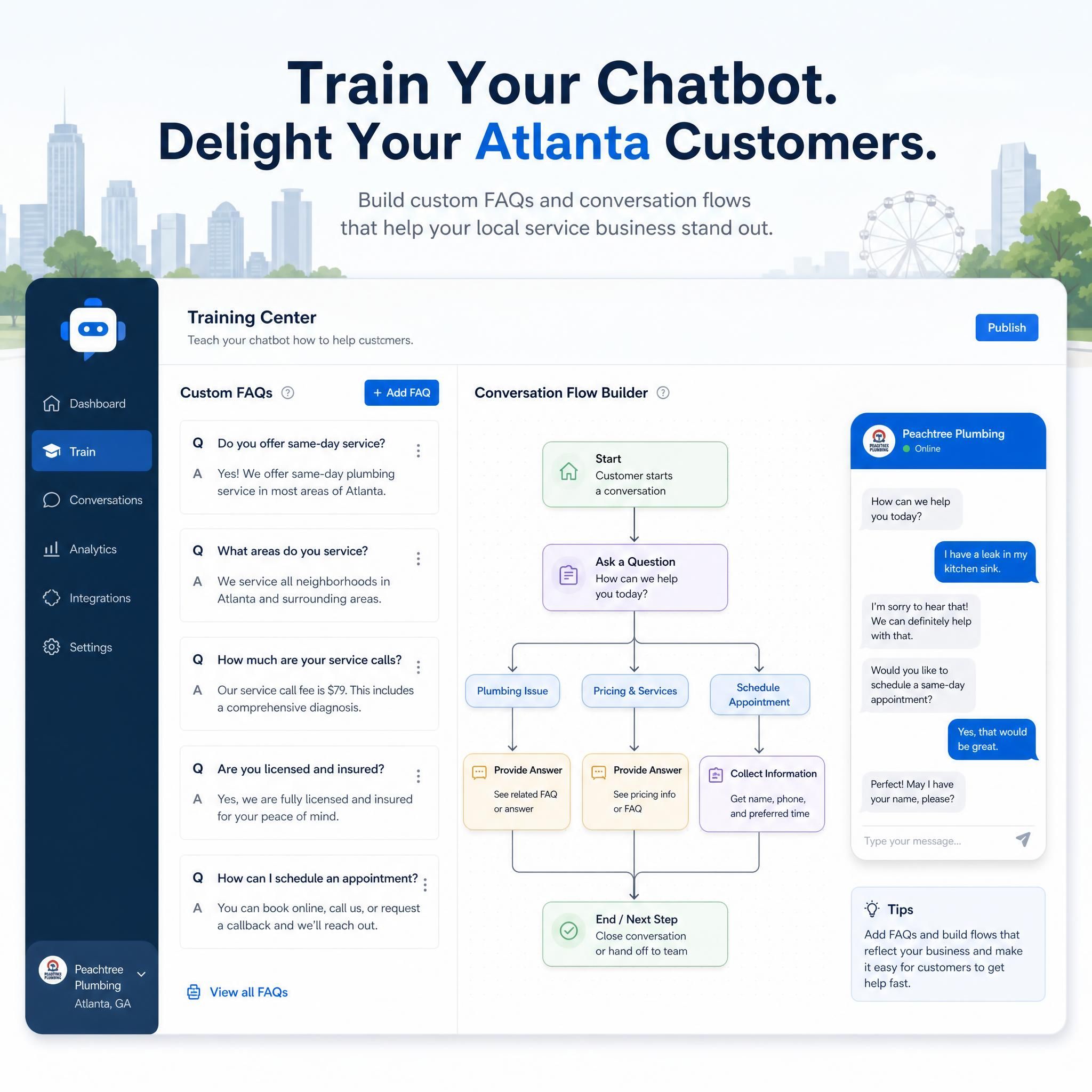
- Upload your service pages, FAQ content, and pricing info as training data
- Set a custom greeting that mentions your city (e.g., "Welcome! We serve Atlanta, Decatur, and Marietta.")
- Define 5–10 "trigger phrases" — the questions your customers actually ask
You can use tools like the Jotform AI Chatbot Builder to train a chatbot on your data, customize tone and branding, and embed it into your WordPress pages with a single line of code.
Step 4: connect your CRM or calendar
Most WordPress chatbot plugins integrate directly with:
- Google Calendar (for appointment booking)
- HubSpot or Mailchimp (for lead nurturing)
- Zapier (to connect to virtually anything else)
Step 5: set your escalation rules
Define when the bot should hand off to a human. A good rule: if a visitor asks about pricing more than twice, or mentions a specific urgent problem, route them to live chat or send an SMS alert to your phone.
Step-by-step: adding a chatbot to your shopify store
If you run a Shopify store — whether you're selling Atlanta-made goods, home products, or apparel — a chatbot is one of the fastest ways to recover abandoned carts and boost your conversion rate.
The average Shopify store conversion rate sits at 1.4%, which means 98.6% of your visitors are leaving without buying. A Shopify chatbot directly attacks that number.
Step 1: find your app in the shopify app store
Top Shopify chatbot apps for 2026:
- Tidio — Seamless Shopify integration, abandoned cart recovery
- Alhena AI — Built specifically for eCommerce product recommendations
- Re:amaze — Combines chatbot + helpdesk in one
Step 2: install and authenticate
- Go to Shopify App Store → search your chosen app
- Click Add App → Install
- Authenticate with your store credentials
Step 3: sync your product catalog
This is the power move for Shopify chatbots. Once synced, your bot can:
- Recommend products based on visitor behavior
- Answer "Do you have this in size X?" questions automatically
- Upsell related products during checkout conversations
Shopify merchants can now sell products directly through AI chatbots, meaning the entire purchase journey — browse, ask, buy — can happen inside a chat window.
Step 4: set up abandoned cart recovery
Configure your chatbot to trigger a message when a visitor adds items to their cart but doesn't check out within 10 minutes. A simple message like "Still thinking it over? Here's 10% off if you complete your order now" can recover a significant portion of lost sales.
Step 5: test on mobile
Over 60% of your Atlanta shoppers are browsing on mobile. Test your chatbot on iPhone and Android before going live. Check that the chat window doesn't block your checkout button.
How to train your chatbot so it doesn't sound like a robot
This is where most small businesses fail. They install the plugin, leave the default settings, and wonder why nobody engages.
Here's a practical training checklist:
✅ Write your greeting in your brand voice. If you're a laid-back Decatur coffee roaster, don't start with "Hello! How may I assist you today?" Try: "Hey there! Looking for your next favorite roast?"
✅ Feed it real customer questions. Pull your last 50 customer emails or reviews. What do people actually ask? Use those exact phrases as training inputs.
✅ Add location-specific responses. If someone asks "Do you serve Buckhead?", your bot should know the answer — not say "I'm not sure, please contact us."
✅ Set realistic expectations. Your bot should never claim to be human. Transparency builds trust. A simple "I'm an AI assistant — I can answer most questions instantly, or connect you with our team" goes a long way.
✅ Review conversations weekly. Most platforms give you a chat log. Read it. You'll find gaps in your training data fast.
Before vs. after: a real atlanta business scenario
The Business: A 3-person HVAC company in Roswell, GA. Website gets ~400 visitors/month. No chatbot. Contact form only.
| Metric | Before Chatbot | After Chatbot (90 Days) |
|---|---|---|
| Monthly leads captured | 8 | 27 |
| Avg. response time | 4–6 hours | Instant |
| Leads from after-hours | 0 | 11 |
| Appointment bookings/mo | 6 | 19 |
| Estimated monthly revenue impact | Baseline | +$8,400 |
The chatbot cost? $79/month on a Pro plan. The ROI in month one alone was over 100x the subscription cost.
This isn't magic — it's math. More conversations = more leads = more booked jobs. The chatbot doesn't close deals; it makes sure the opportunity doesn't disappear before your team gets to it.
Related services
Looking to go beyond the chatbot? Here are additional services that complement your AI chatbot strategy:
- AI-Powered Lead Generation for Atlanta Businesses — Full-funnel automation from click to close
- Local SEO Services for Atlanta Small Businesses — Get found before the chatbot even needs to engage
- Website Conversion Optimization — Turn more of your existing traffic into paying customers
- Voice Chatbot Integration — Add phone-based AI answering to capture calls after hours
Faq
How long does it take to set up a chatbot on a wordpress site?
Most WordPress chatbot plugins can be installed and live within 1–3 hours. The basic setup (install, activate, connect) takes under 30 minutes. Training the bot on your specific business content — your services, FAQs, pricing — takes another 1–2 hours. Plan for a full afternoon the first time.
Do AI chatbots work for service businesses like HVAC, law firms, or dental offices?
Absolutely — in fact, service businesses often see the highest ROI because their average transaction value is high. A single captured lead from a law firm chatbot can be worth thousands of dollars. The key is training the bot to qualify leads properly (e.g., asking about case type, location, urgency) before routing to a human.
Will a chatbot replace my customer service team?
No — and it shouldn't try to. The best small business chatbot setups handle the first touch: greeting visitors, answering common questions, capturing contact info, and booking appointments. Anything complex, emotional, or high-stakes should escalate to a human. Think of it as a first responder, not a replacement.
Can i use the same chatbot on both my wordpress site and shopify store?
Yes. Platforms like Tidio, Intercom, and Re:amaze support multi-channel deployments. You can run the same bot across your website, Shopify store, and even Facebook Messenger from a single dashboard. This is especially useful for Atlanta businesses that run a service website alongside an eCommerce shop.
What's the biggest mistake small businesses make with chatbots?
Not training them. Installing a chatbot with default settings and generic responses is worse than having no chatbot at all — it frustrates visitors and reflects poorly on your brand. Spend time customizing the greeting, feeding it real FAQs, and testing it from the customer's perspective before going live.
Key statistics
📊 50% increase in sales-ready leads reported by businesses using AI – AI Lead Generation Impact
📊 50% increase in sales-ready leads reported by businesses that deploy AI for lead generation — with up to 60% lower customer acquisition costs (Source: Martal Group, 2026)
📊 15–35% conversion rate improvement for eCommerce stores using AI chatbots – Chatbot Conversion Lift
💡 15–35% conversion rate improvement reported by eCommerce stores deploying AI chatbot product recommendation tools (Source: DigitalApplied.com, 2026)
📊 Leads contacted within 5 minutes convert at 85% vs. 30% at 1 hour – Lead Response Time
⚡ 85% lead conversion rate when contacted within 5 minutes — drops to 30% at the one-hour mark. A chatbot responds in seconds, every time (Source: LeadHero.ai)
📊 $30–$150/month for most small business AI chatbot plans – Small Business Chatbot Cost
💰 $30–$150/month — the realistic range for a capable AI chatbot for most small businesses in 2026, with ROI achievable in the first month (Source: AIFlowReview, 2026)
Conclusion: atlanta, your competitors are already live
Here's the reality check: while you're reading this, a competitor in your Atlanta neighborhood is capturing leads at 2 AM, booking appointments on Sundays, and following up with website visitors before they've even closed their browser tab.
AI chatbots aren't a future technology. They're a present-day competitive advantage — and for Atlanta small businesses operating in fast-moving markets like Buckhead, Midtown, Sandy Springs, and Roswell, the window to get ahead is closing.
The setup is straightforward. The cost is manageable. The ROI is real.
Start with a free or low-cost plan on your WordPress or Shopify site today. Train it on your actual business. Give it one month. The leads you capture after hours will pay for the subscription many times over.
Ready to get a chatbot live on your site? Contact our team — we set up and configure AI chatbots for Atlanta small businesses, from HVAC companies to law firms to eCommerce shops. Let's build yours.
"Businesses using AI for lead generation report a 50% increase in sales-ready leads and up to 60% lower customer acquisition costs"
— Martal Group
"Shoppers who interact with AI-powered recommendation chatbots are 40% more likely to complete a purchase"
— DigitalApplied.com