Atlanta small business owner reviewing AI chatbot dashboard on laptop in Buckhead office

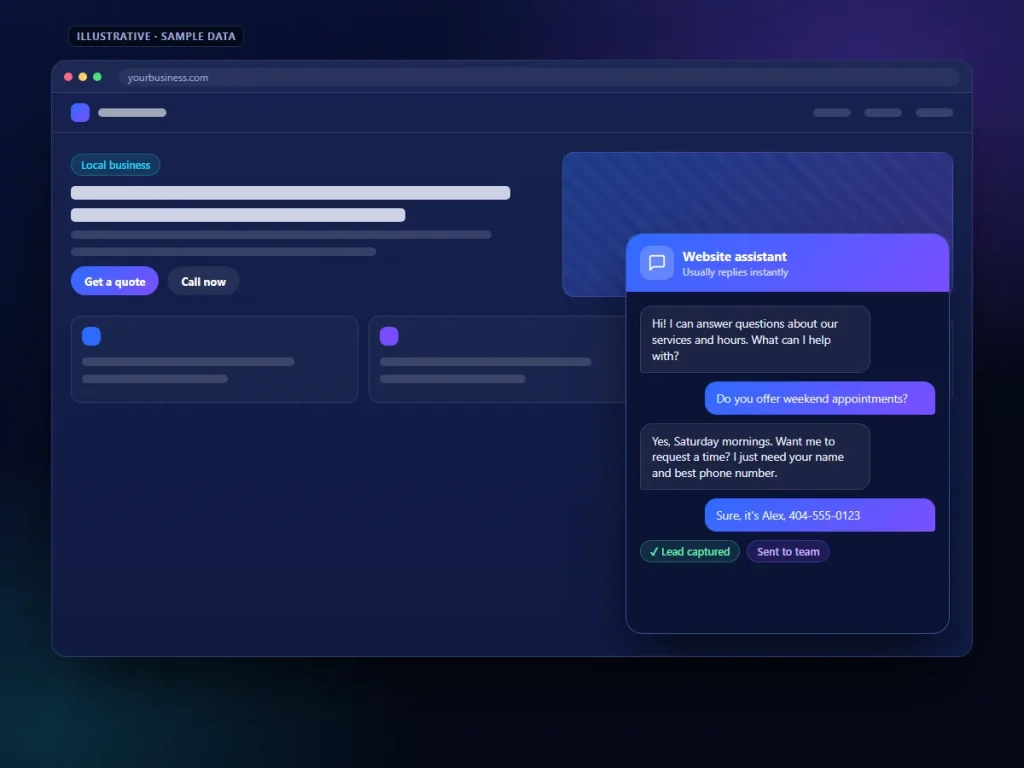
Picture this: It's 11:47 PM on a Tuesday. A homeowner in Midtown Atlanta just discovered a water leak under their kitchen sink. They Google "emergency plumber Atlanta," land on your website — and see nothing but a static contact form and a phone number that goes to voicemail. So they click back and call your competitor, who has a chatbot that books the appointment in 90 seconds flat.

That's not a hypothetical. That's happening to Atlanta small businesses every single night.

AI chatbots are no longer a "nice to have" for small businesses in competitive markets like Atlanta. They're the difference between capturing a lead at midnight and watching it walk straight to the business next door. In this guide, you'll get seven concrete, step-by-step strategies to deploy AI chatbots on your website — whether you're running WordPress, Shopify, or a custom build — and start converting visitors into paying customers.


Table of Contents


Why Atlanta Businesses Are Losing Leads Right Now

Atlanta is one of the fastest-growing business markets in the Southeast. From the tech corridor in Midtown to the dense commercial strips in Buckhead and the booming service economy in Sandy Springs, competition for every customer click is fierce.

Here's the uncomfortable truth most business owners don't want to hear: your website is probably losing 60–70% of the leads it should be capturing. Not because your service is bad. Because visitors have questions at 10 PM, and nobody's there to answer them.

According to HubSpot, 82% of consumers expect an immediate response to sales or service questions. Not within a business day. Immediately. And in a city like Atlanta — where someone can find five competing HVAC companies, three law firms, or a dozen dental offices within a two-mile radius — whoever responds first almost always wins the job.

The fix isn't hiring a night-shift receptionist. It's deploying a small business chatbot that works around the clock, qualifies your leads, and hands warm prospects to you every morning.

"82% of consumers expect an immediate response to sales questions" — HubSpot Research


Strategy 1: Install Your First AI Chatbot on WordPress in Under 30 Minutes

WordPress chatbots are the fastest entry point for most Atlanta small businesses, and the setup is genuinely simpler than most people expect. Here's the exact process:

Step 1: Pick Your Plugin

For most small businesses starting out, one of these three options hits the sweet spot:

Plugin Best For Free Tier Starting Price
Tidio Service businesses, lead gen Yes (100 visitors/mo) $24/month
Jotform AI Chatbot Form-heavy businesses Yes $34/month
ChatBot.com Multi-channel automation No $52/month
Voiceflow Custom flows + knowledge base Yes (limited) $50/month

Our recommendation for most Atlanta small businesses: Start with Tidio. It's the most popular WordPress chatbot plugin, it integrates natively with Shopify too if you run an e-commerce store, and the free tier is enough to prove ROI before you spend a dollar.

Step 2: Install and Activate

  1. Log into your WordPress dashboard
  2. Navigate to Plugins → Add New
  3. Search for your chosen plugin (e.g., "Tidio")
  4. Click Install Now → Activate
  5. Follow the setup wizard — most platforms auto-register your site, no API keys required

Step 3: Add Your Knowledge Base

This is the step most people skip — and it's the most important one. Your chatbot needs to know your business, not just generic FAQs.

  • Upload your service list and pricing page URL
  • Add your FAQ document (even a basic Word doc works)
  • Input your service area (e.g., "We serve Buckhead, Midtown, Decatur, and Sandy Springs")
  • Add common objections and how you handle them

Step 4: Place the Widget Correctly

Always load the chatbot script in your footer, not your header. This keeps your page speed fast — critical for Google rankings — and ensures the chatbot appears after your main content loads. In WordPress, use a plugin like WP Code to inject the snippet without touching your theme files.

Step-by-step WordPress chatbot plugin installation dashboard screenshot for small business


Strategy 2: Build a Lead Capture Flow That Actually Qualifies Prospects

Here's where most small business chatbots fail: they collect names and emails but send you garbage leads. A roofing company in Buckhead doesn't need 40 tire-kicker inquiries — they need 5 qualified homeowners who own their property and have a real problem.

Your AI chatbot flow should do the qualifying work for you.

The 5-Question Lead Qualification Framework

Build a conversation flow that asks:

  1. "What's the main reason you're reaching out today?" — Opens the conversation naturally
  2. "Are you a homeowner or renter?" (for home services) / "What's your timeline for this project?" (for B2B) — Filters unqualified traffic immediately
  3. "What's your zip code?" — Confirms service area before you invest time
  4. "What's your budget range?" — Awkward in person, completely normal in a chatbot
  5. "What's the best way to reach you — phone or email?" — Closes the loop

This five-step flow takes under two minutes for a visitor to complete. At the end, you have a warm lead with context, not just an email address.

Trigger Your Chatbot Proactively

Don't wait for visitors to click the chat bubble. Set up proactive triggers based on behavior:

  • Exit intent: Fire the chatbot when a visitor moves their cursor toward the browser's back button
  • Time on page: Engage visitors who've spent more than 45 seconds on your services page
  • Scroll depth: Trigger a message when someone scrolls 70% down your pricing page

📊 **Scalify AI Benchmark Report 2026]


Strategy 3: Set Up Shopify Chatbots to Recover Abandoned Carts

If you're running an e-commerce store on Shopify in Atlanta — whether it's custom apparel, specialty food products, or home goods — abandoned carts are your single biggest revenue leak. The average Shopify store loses 70% of potential sales to cart abandonment.

Shopify chatbots are now sophisticated enough to recover a significant chunk of that.

The Abandoned Cart Recovery Sequence

  1. Trigger at 15 minutes post-abandonment: Send an in-chat message: "Hey, looks like you left something behind! Can I help answer any questions about [product name]?"
  2. Address the real objection: Train your chatbot to handle the top 3 reasons people abandon — shipping cost questions, sizing/fit uncertainty, and payment security concerns
  3. Offer a time-limited nudge: "We have limited stock on this item. Want me to hold it for 24 hours?"
  4. Escalate to email if no response: Use Shopify's native flow to send a follow-up email for visitors who don't re-engage

Shopify Chatbot Options Compared** – Businesses using proactive chatbot triggers see 20–35% more leads captured per month


Strategy 4: Use Voice Chatbots for After-Hours Calls

Text-based chatbots handle your website traffic. But what about the phone calls that come in after 6 PM?

Voice chatbots — AI-powered phone agents — are gaining serious traction with service businesses in Atlanta. An HVAC company in Sandy Springs, a dental office in Decatur, or a law firm in Midtown can deploy a voice AI agent that answers calls, collects caller information, explains services, and schedules appointments — all without a human picking up.

Reuters recently noted that "chatbots are finding their voice as audio assistants rise," and the data backs it up: voice AI adoption among small businesses grew over 40% in 2025.

How to Deploy a Voice Chatbot

  1. Choose a platform: Options like Bland AI, Vapi, or Synthflow specialize in voice AI for small businesses and integrate with most CRMs
  2. Write your call script: Keep the opening under 10 seconds — "Thanks for calling [Business Name] in Atlanta. I'm an AI assistant. I can help you schedule an appointment or answer questions. What brings you in today?"
  3. Set escalation rules: Any caller who says "I need to speak to a human" or shows frustration should be transferred to voicemail with a guaranteed callback promise
  4. Connect to your calendar: Integrate with Google Calendar or Calendly so the voice bot can book real appointments in real time

Voice chatbots are particularly powerful for HVAC, plumbing, roofing, and dental practices in the Atlanta metro — industries where after-hours emergencies are common and the first business to confirm an appointment wins the job.

Voice AI chatbot interface showing after-hours call handling for Atlanta HVAC small business


Strategy 5: Train Your Chatbot on Your Business — Not Generic Scripts

This is the strategy that separates chatbots that convert from chatbots that frustrate. A generic chatbot that says "I'm sorry, I don't understand that question" will actively hurt your brand. A well-trained chatbot that knows your services, your pricing, your team, and your service area will feel like a natural extension of your business.

What to Feed Your Chatbot

Essential documents to upload:

  • Your full services page (copy-paste the text)
  • Your FAQ page
  • Your pricing guide (even rough ranges work)
  • Any intake forms or questionnaires you use
  • Your "About Us" page — customers ask about your experience and credentials constantly

Local context to add manually:

  • Neighborhoods you serve: "We serve Buckhead, Midtown, Grant Park, Decatur, Smyrna, and Marietta"
  • Parking/location details if you have a physical storefront
  • Local references: "We've been serving Atlanta homeowners since 2011"

Objection handling to pre-program:

  • "Are you licensed and insured?" → Yes, we're fully licensed in Georgia. License #XXXX.
  • "How quickly can you come out?" → For emergencies, we offer same-day service in most Atlanta zip codes.
  • "Do you offer financing?" → Yes, we partner with [lender] for 0% financing on projects over $1,000.

The more specific your training data, the better your chatbot performs. Platforms like Voiceflow and Tidio let you upload documents directly — no coding required.


Strategy 6: Choose the Right Pricing Tier for Your Budget

One of the biggest myths about AI chatbots is that they're expensive. They're not — not anymore. Here's a realistic breakdown of what Atlanta small businesses should expect to pay:

Chatbot Pricing Tiers (2026)

Tier Monthly Cost Best For What You Get
Free $0 Testing the concept Basic widget, 50–100 conversations/month
Starter $20–$50/month Solopreneurs, single-location businesses Lead capture, basic flows, CRM integration
Growth $50–$200/month Multi-service businesses, e-commerce Advanced AI, unlimited conversations, analytics
Professional $200–$500/month High-traffic sites, agencies Custom AI, multi-channel, priority support
Enterprise $500–$2,500+/month Large teams, complex workflows Full custom build, dedicated support, SLA

For most Atlanta small businesses, the $50–$150/month growth tier is the sweet spot. At that price point, you're getting unlimited AI conversations, CRM integration (so leads flow directly into your pipeline), and analytics to track performance.

The ROI Math Is Simple

If your average customer is worth $500 and your chatbot captures just 5 additional leads per month that convert at 20%, that's one extra customer per month — $500 in revenue for $100 in chatbot spend. That's a 5x return before you've even optimized the flows.

[STAT: Companies save an average of $2.5 million annually through chatbot implementation | Ringly.io Chatbot Statistics 2026]


Strategy 7: Measure What Matters — The Metrics That Prove ROI

Deploying a chatbot without tracking performance is like running ads without checking conversions. Here are the four metrics every Atlanta small business owner should watch:

The 4 KPIs That Matter

1. Lead Capture Rate How many website visitors start a chatbot conversation, and of those, how many complete your lead capture flow? A healthy benchmark is 15–25% of chat initiations completing the full qualification sequence.

2. Containment Rate What percentage of questions does the chatbot answer without escalating to a human? Aim for 60–75% for service businesses. If it's lower, your knowledge base needs more training data.

3. Conversation-to-Appointment Rate For service businesses, this is the most important metric. Track how many chatbot conversations result in a booked appointment. Industry benchmarks show 10–20% is achievable with a well-optimized flow.

4. Cart Recovery Rate (Shopify) For e-commerce, track what percentage of abandoned carts are recovered through chatbot engagement. A 20–40% recovery rate is realistic with a proactive sequence.

Set up a monthly review. Pull these numbers, compare them to the previous month, and make one targeted improvement — adjust a trigger, update your knowledge base, or refine a question in your lead flow.

AI chatbot analytics dashboard showing lead capture rate, containment rate, and conversion metrics for small business


Before vs. After: A Real Atlanta Business Scenario

Let's make this concrete. Consider a residential HVAC company based in Sandy Springs serving the greater Atlanta metro.

Before AI Chatbot

  • Website gets 1,200 visitors/month
  • Contact form submissions: 18/month
  • Average response time: 4–6 hours (next business day for evening inquiries)
  • Lost leads to competitors: estimated 30–40%
  • Monthly revenue from web leads: ~$9,000

After Deploying a Small Business Chatbot

  • Same 1,200 visitors/month
  • Chatbot conversations initiated: 240/month (20% engagement rate)
  • Qualified leads captured: 52/month (via 5-question flow)
  • Appointments booked directly through chatbot: 14/month
  • Average response time: Instant, 24/7
  • Monthly revenue from web leads: ~$16,500

The difference: $7,500 more per month in web-generated revenue. Chatbot cost: $99/month. Net gain: $7,401/month.

That's not a projection pulled from thin air — it's consistent with what Shopify stores and service businesses are reporting across the industry, where AI chatbots boost conversion rates by 20–35% when properly configured.


Related Services

Looking to go deeper? Explore these related resources for Atlanta small businesses:


Frequently Asked Questions

How long does it take to set up an AI chatbot for my Atlanta small business?

For a basic WordPress chatbot using a plugin like Tidio or Jotform AI, you can be live in under 30 minutes. A more customized setup — with a full knowledge base, lead qualification flow, and CRM integration — typically takes 2–4 hours of configuration. Most platforms offer setup wizards that require no coding knowledge.

Do I need to use a different chatbot for WordPress vs. Shopify?

Not necessarily. Platforms like Tidio work natively on both WordPress and Shopify, letting you manage one chatbot across multiple sites or storefronts from a single dashboard. If you're running both a service website (WordPress) and an e-commerce store (Shopify), this unified approach saves significant time and cost.

Will customers know they're talking to a chatbot?

Yes — and that's actually fine. Multiple studies show that customers don't mind interacting with a chatbot as long as it answers their questions accurately and quickly. What frustrates customers is a chatbot that gives wrong answers or can't escalate to a human when needed. Always include a clear option to "speak with a real person" or request a callback.

What's the best AI chatbot for a small service business in Atlanta?

For most service businesses (HVAC, plumbing, law firms, dental offices), Tidio or a Voiceflow-powered custom bot offer the best balance of capability and cost. If you're purely on Shopify, start with Shopify Inbox (free) and upgrade to Tidio or Gorgias as your volume grows. The "best" chatbot is the one you'll actually configure properly and keep updated.

How do I make sure my chatbot doesn't give wrong information to customers?

Train your chatbot on your own business documents — not generic templates. Upload your services page, pricing guide, FAQ, and any intake forms. Review chatbot transcripts weekly for the first month to catch gaps. Most platforms flag "unanswered questions" in their analytics, which tells you exactly what to add to your knowledge base next.


Chiffres Clés

📊 82% of consumers expect an immediate response to sales or service questions — making 24/7 chatbot availability critical for Atlanta businesses competing for every lead. (Source: HubSpot, 2026)

💡 $2.5 million is the average annual savings companies achieve through chatbot implementation, including reduced customer service costs, faster lead qualification, and fewer abandoned carts. (Source: Ringly.io Chatbot Statistics, 2026)

🛒 69% higher conversion rates are seen by Shopify stores that respond to customers quickly via chat — the single most compelling argument for turning on Shopify Inbox today. (Source: Shopify Commerce Data, 2026)

64% of small businesses plan to adopt AI chatbots in 2026, meaning if you're not moving now, your Atlanta competitors almost certainly are. (Source: Ringly.io, 2026)


Conclusion: Stop Letting Midnight Leads Walk to Your Competitors

Every night, Atlanta small businesses lose leads they'll never know about — visitors who had questions, hit a dead end, and called someone else. An AI chatbot fixes that. Not someday. This week.

The strategies in this guide aren't theoretical. They're the exact steps — from installing a WordPress chatbot plugin to building a Shopify cart recovery sequence to training your bot on your specific business — that Atlanta service businesses and e-commerce stores are using right now to capture more leads, book more appointments, and grow revenue without adding headcount.

Start with Strategy 1. Get a chatbot live on your website today. Then layer in the qualification flows, the proactive triggers, and the analytics over the next 30 days. By the time you're done, your website will be your hardest-working salesperson — and it won't cost you a night's sleep.

Ready to put a small business chatbot to work for your Atlanta business? Contact our team to get a free chatbot audit and see exactly where your website is losing leads right now.

Related Digital Marketing Services

Many businesses combine SEO with additional marketing strategies to maximize results.

Explore our other services: