AI chatbots for small business are no longer a novelty widget that says “Hi, how can I help?” and then fails at the first real question. Set up properly, a chatbot can answer routine questions, collect enquiries when nobody is at the desk, and hand warm conversations to a person. Set up badly, it frustrates visitors and makes a good business look careless.
This guide covers seven practical, honest ways small-business owners can put a chatbot to work, what to get right before you switch one on, and the situations where you are better off without one. Whether you run a home-service company in Atlanta or an online shop that serves customers nationwide, the same principles apply: start small, keep it accurate, and always give people a clear path to a human.
Why AI chatbots for small business are worth a fresh look
Older chatbots worked from rigid decision trees. If a visitor typed something the script did not expect, the bot got stuck. Modern AI chatbots can understand ordinary language and answer from a knowledge base you provide, such as your service list, service area, hours, policies and FAQs. That makes them far more useful for a small team that cannot staff live chat all day.
The goal is not to replace your people. It is to handle the repetitive first step of a conversation so your team spends its time on enquiries that are ready for a real conversation.
1. Capture leads after hours
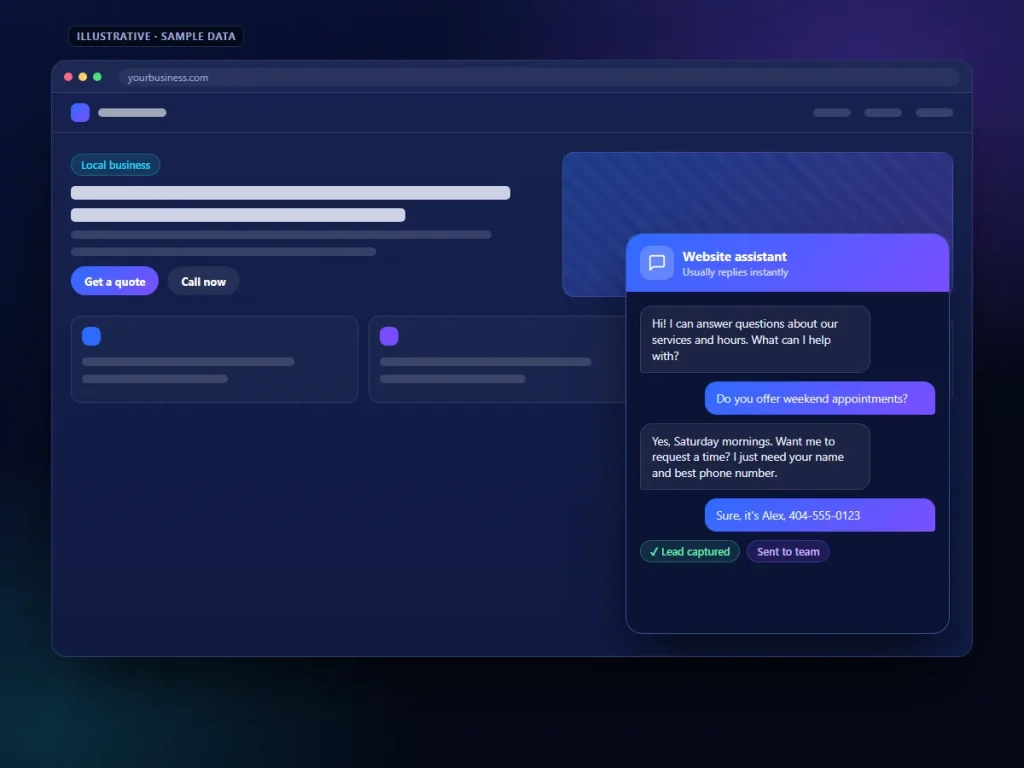
Many visitors browse in the evening or on weekends, when nobody is available to answer the phone or reply to a contact form. A chatbot can greet them, answer a basic question, and collect a name, phone number, email and short description of what they need, so the enquiry is waiting for you in the morning instead of going to a competitor who happened to be awake.
- Check: What currently happens to a website visitor who has a question at night or on a Sunday?
- Fix: Have the bot collect contact details and set a clear expectation, such as “Our team will reply on the next business day.”
2. Answer frequently asked questions accurately
Most small businesses answer the same handful of questions over and over: Do you serve my area? Are you open on Saturdays? Do you offer financing? What brands do you work with? A chatbot trained on your own approved answers can respond instantly and consistently.
- Check: List the questions your team answers most often by phone and email.
- Fix: Write a clear, approved answer to each one and load those answers into the bot’s knowledge base before launch.
3. Ask qualification questions
Not every enquiry is a good fit. A chatbot can ask a few polite questions up front, such as the type of service needed, the location, the timeline and, where appropriate, a rough budget range. That information helps your team prioritise and arrive at the first call already informed.
- Check: What do you always need to know before you can quote or book?
- Fix: Keep qualification to a few short questions. Long interrogations drive people away.
4. Hand off to booking
Once a visitor is ready, the best next step is usually an appointment. A chatbot can link to or embed your scheduling tool so the visitor can pick a time without waiting for a callback. If you already use online scheduling, connecting the two is often straightforward. Our AI appointment scheduling page explains how booking automation can fit around your calendar.
- Check: Can a visitor go from question to booked appointment without leaving the conversation?
- Fix: Offer booking only when the visitor signals they are ready, and confirm the appointment details in writing.
5. Send conversations into your CRM
A lead that sits in a chatbot dashboard nobody checks is a lost lead. Connect the bot to your CRM or email so every conversation creates a contact record, tags the source, and triggers the right follow-up. That way the chatbot becomes part of your sales process rather than a separate island. See our CRM automation services for how this handoff can work.
- Check: Where does chatbot lead data go today, and who is notified?
- Fix: Route each new chat lead to your CRM with a notification to the person responsible for follow-up.
6. Escalate to a human when it matters
A good chatbot knows its limits. Complaints, emergencies, billing disputes, complex quotes and anything sensitive should go to a person. Give the bot clear rules for when to stop and offer a phone number, a callback request or a live handoff during business hours.
- Check: Does your bot have a clear “talk to a person” option on every screen?
- Fix: Define escalation triggers, such as certain keywords, repeated confusion or a direct request, and test them before launch.
7. Review transcripts and improve
Chat transcripts are one of the most useful sources of customer insight a small business can get. They show the exact words people use, the questions your website does not answer, and the points where conversations break down. Review them regularly and use what you learn to improve both the bot and your website content.
- Check: When did someone last read through your chatbot conversations?
- Fix: Set a recurring time to review transcripts, correct wrong answers, and add missing questions to your FAQ page.
Setup considerations before you go live
The difference between a helpful chatbot and an embarrassing one is almost always in the setup. If you want a structured way to think about risks such as inaccurate answers and privacy, the free NIST AI Risk Management Framework is a useful reference.
- Knowledge base: The bot should answer from your own approved content: services, service area, hours, policies and FAQs. Keep it current when prices, hours or services change.
- Guardrails: Tell the bot what it must not do, such as quote final prices, give legal or medical advice, promise availability, or make commitments on your behalf. Instruct it to say “I don’t know, but our team can help” rather than guess.
- Privacy: Only collect the information you actually need. Avoid asking for sensitive data in chat, explain how you will use contact details, and make sure your privacy policy covers the tool and any third-party provider behind it.
- Disclose that it is a bot: Be upfront. A short line such as “I’m an automated assistant” sets honest expectations and builds more trust than pretending to be a person.
- Testing: Before launch, ask it the awkward questions customers really ask, including off-topic ones, and fix anything inaccurate.
If you are comparing options, our AI chatbot services page outlines how we approach setup, and AI chatbot pricing shows what is involved.
When not to use a chatbot
A chatbot is not the right tool for every business or every page. Consider holding off if:
- You do not have time to write and maintain accurate answers. An outdated bot does more harm than no bot.
- Most of your enquiries are complex, emotional or high-stakes, where people expect to speak to someone straight away.
- Your website traffic is very low, so the effort of setup outweighs the benefit. A clear phone number and a simple form may serve you better for now.
- Nobody on your team will follow up on the leads it collects.
- Your callers mostly phone rather than browse. In that case an AI phone agent or a better call-handling process may be the more useful first step.
Frequently asked questions
Will a chatbot replace my receptionist or front-desk staff?
It should not. A chatbot works best handling routine first questions and after-hours enquiries, then passing qualified conversations to your team. People are still needed for judgement, relationships and anything sensitive.
Can a chatbot give wrong answers?
Yes, if it is poorly configured. Limiting it to your approved knowledge base, setting clear guardrails and reviewing transcripts regularly are the main ways to keep answers accurate.
Do I have to tell visitors they are talking to a bot?
We recommend always disclosing it. It is the honest approach, it sets expectations, and it avoids the frustration people feel when they discover it later.
How long does it take to set up a chatbot?
It depends mostly on how ready your content is. If your services, policies and FAQs are already written down, setup is much quicker. The bigger ongoing job is reviewing conversations and keeping answers current.