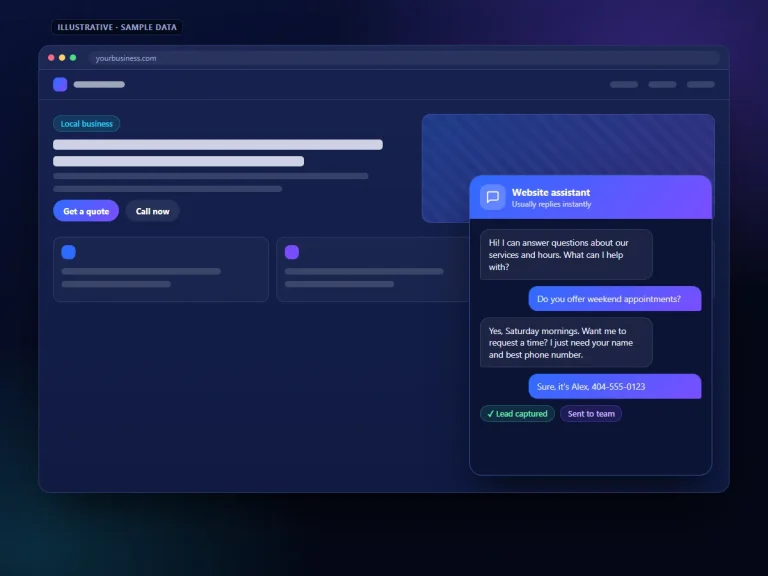
A homeowner notices a leak after dinner. A driver hears a grinding noise on the way home. A parent finally has time to research a dentist after the kids are asleep. For many local businesses, a real share of website visits happen when no one is there to respond, and that is exactly where AI chatbots help capture leads after hours.
A contact form can collect a name and number, but it does not answer questions or give the visitor a reason to stay. A well-built AI chatbot does both. This post covers how that works, what the bot should and should not do, and how to set one up so the leads it collects are actually useful in the morning.
Why after-hours visitors slip away
A visitor who finds your site at 9 p.m. usually has a question first and a commitment second. If the only option is to call a number that goes to voicemail or fill out a generic form, many will leave and keep browsing. The next site they visit may have someone, or something, ready to answer.
The issue is rarely that people do not want to hire you. It is friction: they cannot confirm you serve their area, they are not sure which service they need, or they want a rough idea of next steps before giving out their phone number. Removing that friction is the chatbot’s main job.
What a chatbot needs to do to capture leads after hours
Answer the first questions
Service areas, hours, the services you offer, what to expect at an appointment, and how estimates work. These are the questions that decide whether a visitor stays.
Qualify the request
Ask a few short questions that matter to your team: the type of job, the location, how urgent it is, and the best way to reach them.
Offer a next step
Book an appointment, request a callback at a specific time, or start a quote request. A clear next step turns a conversation into a lead.
Flag urgent issues
If a visitor describes an emergency, the bot can share your emergency line or after-hours instructions and alert the on-call person, based on rules you set.
Hand off cleanly
Send a summary to email, text, or your CRM so the person who follows up has the full context and does not need to ask the same questions again.
What it should not do
A chatbot that overpromises damages trust faster than having no chatbot at all. Set clear boundaries:
- Do not quote firm prices unless you have fixed, published pricing. Explain how pricing works instead.
- Do not diagnose problems, give legal advice, or offer medical guidance. Collect details and route to a professional.
- Do not pretend to be a person. A friendly disclosure such as “I’m the virtual assistant for this business” is honest and sets expectations.
- Do not promise response times your team cannot meet. If follow-up happens at 8 a.m., say so.
- Do not collect more personal information than you need, and do not ask for sensitive data such as payment or health details in chat unless your system and policies are built for it.
A simple after-hours conversation flow
Good flows are short. Here is a structure that works for many service businesses:
-
Greeting with context
“Hi, our office is closed right now, but I can answer questions and get you on the schedule. What can I help with?” This tells the visitor right away that they can still get something done.
-
Understand the need
Let the visitor describe the problem in their own words, then confirm the service category and their location or ZIP code.
-
Answer and reassure
Confirm whether you serve the area and handle that type of work, and explain what happens next.
-
Capture contact details
Ask for a name, phone number, and preferred contact method once the visitor has a reason to share them.
-
Commit to a next step
Offer appointment times if scheduling is connected, or a specific callback window if not.
-
Confirm and summarize
Repeat back what was captured, send a confirmation if your system supports it, and log the lead with a summary.
Setting it up the right way
Build the knowledge base first
The chatbot only knows what you teach it. Write down accurate answers to the twenty or thirty questions your team hears most often, including service areas, services you do not offer, warranty or guarantee terms if you have them, and payment options. Keep the tone close to how your best team member talks to customers.
Connect it to where leads live
If leads land in an inbox nobody checks until noon, the bot has not solved much. Route chat leads into your CRM or a shared inbox and set up an alert for the person responsible for morning follow-up. Our CRM automation work often pairs with chat for this reason.
Decide on scheduling
Booking directly is convenient when your calendar is predictable. For businesses where job length varies, a “request a time” approach with confirmation the next morning is often safer. Our guide on how AI appointment scheduling reduces missed calls covers the tradeoffs.
Place it where it helps
The chat widget should be easy to find on mobile without covering your phone number or main call-to-action buttons. Test it on a small phone screen before going live.
Review transcripts weekly
Read real conversations. You will find questions you did not anticipate, answers that need rewording, and places where visitors drop off. Small edits to the knowledge base and flow add up.
The morning follow-up is half the system
A chatbot creates a lead; your team turns it into a customer. The visitor who chatted at 10 p.m. is still weighing options the next morning, so a prompt, personal follow-up matters. A few practices help:
- Assign one person to review overnight chats first thing each business day.
- Call or text in the order of urgency the bot flagged.
- Reference what the visitor already shared so they do not repeat themselves.
- Mark outcomes in your CRM so you can see which chats became jobs.
- Set an automatic reminder if a lead has not been contacted within your target window.
How to tell if it is working
Avoid judging a chatbot by the number of conversations alone. Look at how many chats produced contact details, how many of those were contacted, and how many became booked jobs. Compare after-hours lead volume and quality to the period before the bot. If conversations are high but leads are low, the flow is probably asking for details too late or not answering the questions people care about.
Results depend on your traffic, your market, and how quickly your team follows up. A chatbot cannot create demand that is not there, but it can stop you from losing visitors who were ready to talk.
Choosing a chatbot platform
Look for a tool that lets you control the knowledge base, set handoff rules, connect to your CRM or calendar, and export conversation history. Make sure you can edit answers without a developer. Infinite Marketing builds website chatbots on Infinite Chats; you can read more on our AI chatbots page or visit Infinite Chats for current features.
Frequently asked questions
Will a chatbot replace my contact form?
Not necessarily. Some visitors prefer a form, so many businesses keep both. The chatbot is for visitors who have questions before they are ready to submit.
Can the chatbot work during business hours too?
Yes. Some businesses use it all day and route live conversations to staff when someone is available, with the bot covering when the team is busy or out.
What if a visitor asks something the bot does not know?
It should say so and offer to have someone follow up, then capture contact details. Those questions are also the best material for improving the knowledge base.