Most missed calls are not a sign that a business does not care. They happen because the team is on another call, with a customer, under a sink, under a car, or closed for the night. AI appointment scheduling reduces missed calls by giving callers a way to get what they need, usually a time on the calendar, even when nobody is free to answer.
This post explains the specific mechanisms involved, how they fit together, and the setup choices that decide whether scheduling automation helps or creates new headaches. We will not throw around percentages; the results depend on your call patterns and how well the system is configured.
Why calls get missed in the first place
Before choosing a tool, it helps to know what kind of missed call you have. Most fall into a few buckets:
- Busy line. One person handles the phones and a second call comes in.
- Hands full. The owner or technician is working and cannot pick up.
- After hours. Calls come in early mornings, evenings, and weekends.
- Peak bursts. Mondays, the first hot or cold day of the season, or right after a storm.
- Phone tag. You call back, they miss it, and the lead goes cold.
Your phone provider’s call logs can show when missed calls happen and how often. That baseline tells you which mechanisms below matter most.
The mechanisms that reduce missed calls
Answering every call
An AI phone agent or voice assistant picks up when your team cannot, whether that is overflow during the day or every call after hours. Instead of voicemail, the caller has a conversation and can book.
Booking during the call
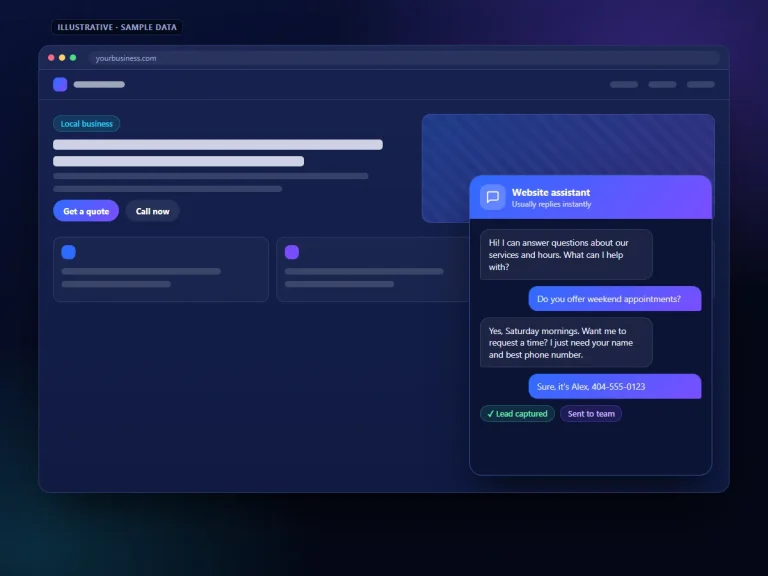
When the scheduling system is connected to your calendar, the agent can offer real open times and confirm one, so the caller leaves with an appointment rather than a promise of a callback.
Missed-call text-back
If a call does go unanswered, an automatic text can follow within moments with a booking link or a short message asking how you can help. Many people find replying by text easier than calling back.
Self-service booking
A booking option on your website, chatbot, and Google Business Profile lets people who prefer not to call schedule on their own, which takes pressure off the phone line.
Reminders and confirmations
Automatic reminders reduce the “just calling to confirm my time” calls and give customers an easy way to reschedule instead of not showing up.
Rescheduling without a call
Links to reschedule or cancel let customers change plans on their own, which frees your line for new business.
How the pieces fit together
A typical flow for a local service business looks like this:
-
A call comes in
If a team member is free, they answer as usual. If not, or if it is after hours, the call routes to the AI agent.
-
The agent identifies the need
It asks what the caller needs, confirms the location or service area, and collects key details such as the type of job or vehicle.
-
It checks availability
Based on the rules you set, such as job types, durations, and which technicians or rooms are available, it offers times.
-
It books or requests
For simple appointments, it books directly. For jobs that need review, it records a requested time and flags it for your team to confirm.
-
It confirms and logs
The caller gets a confirmation by text or email, and the appointment plus a summary lands in your calendar and CRM.
-
Reminders run automatically
Before the appointment, the customer gets reminders with options to confirm or reschedule.
Setup choices that make or break it
Direct booking vs. booking requests
Direct booking works well when appointments are predictable: oil changes, consultations, inspections, estimates. If job length varies a lot, or if you need to see photos first, use requested times and confirm them. A wrong booking frustrates customers more than a quick confirmation call.
Calendar rules
Set buffers between appointments, travel time for field work, maximum bookings per day, and blackout times. The system should never offer a time your team cannot keep.
What the AI must not decide
Write down what always goes to a person: emergencies, pricing questions beyond your published policies, complaints, and anything involving sensitive information. Make sure transfers or urgent alerts actually reach someone.
Integration with your systems
The scheduling tool needs to read and write to the calendar your team actually uses. If bookings live in a separate system that nobody checks, you have moved the problem rather than solved it. Our CRM automation work often handles this connection.
Text messaging compliance
Automated texts, including missed-call text-backs and reminders, are subject to messaging rules and carrier registration requirements in the US. Make sure your provider handles registration and that you have the right consent for the messages you send.
How this looks in different businesses
The same building blocks get used differently depending on the work:
- Auto repair shops: the agent collects the vehicle year, make, and model plus the symptom, then offers drop-off times. Diagnostics and repair estimates stay with the service advisor.
- HVAC and plumbing companies: routine maintenance visits can be booked directly into open windows, while no-heat, no-cooling, or active-leak calls trigger an alert to whoever is on call.
- Professional offices: consultations are booked into set time blocks, with intake questions answered ahead of time so the first meeting is productive. Anything resembling advice is left for the professional.
- Healthcare practices: new patient requests may be captured as booking requests for staff to confirm, given insurance and privacy considerations.
In each case, the goal is the same: the caller ends the interaction with either a confirmed time or a clear, specific next step, rather than a voicemail beep.
Signs it is working
- Fewer calls ending in voicemail or hang-ups, according to your phone logs
- More appointments booked outside business hours
- Fewer “confirming my appointment” calls
- Shorter time between first contact and booked appointment
- Team members reporting fewer interruptions during jobs
Compare these against the baseline you pulled before launch. If missed calls drop but bookings do not rise, look at the conversation itself: the agent may be collecting information without offering a clear next step.
Honest limitations
AI scheduling cannot fix a calendar that is already full; it can only make sure you do not lose people who would have booked open time. It can misunderstand callers in noisy settings or with unusual requests, which is why escalation rules and regular transcript reviews matter. Some customers simply want a person, so offer an easy way to reach one. And the system is only as accurate as the information and rules you give it, so update it when services, hours, or staffing change. If you want a structured way to think through these risks, the free NIST AI Risk Management Framework is a useful reference.
If you work in healthcare, legal, or financial services, check what information your scheduling tools may collect and store, and confirm your provider can meet the privacy requirements that apply to you.
Frequently asked questions
Does AI scheduling work with my existing calendar?
Many tools connect to common calendar and practice-management systems, but not all. Confirm the integration with your actual software before committing.
Can customers book through Google?
Your Google Business Profile can link to a booking page, and some scheduling providers support booking directly from Google. Check Google Business Profile Help for current options in your category.
What happens if two people try to book the same slot?
A properly connected system checks availability in real time and holds the slot once booked. This is a good scenario to test before going live.