Picture this: It's 11:47 PM on a Tuesday. A homeowner in Buckhead just Googled "emergency HVAC repair Atlanta" and landed on your website. They're ready to book — frustrated, hot, and impatient. Your phone is off. Your contact form just sits there. And three seconds later, they click back and call your competitor.
That's not a hypothetical. That's what's happening to Atlanta small businesses every single night.
AI chatbots are the fix. But not the "set it and forget it" kind you slap on a page and hope for the best. This guide is a hands-on, step-by-step playbook for how to actually set up, train, and deploy a small business chatbot that captures leads, qualifies prospects, and drives real revenue — whether you're on WordPress, Shopify, or any other platform.
No fluff. No theory. Just the steps.
Table of contents
- Why Atlanta Businesses Are Losing Leads Right Now
- Step 1: Define Your Chatbot's One Job
- Step 2: Choose the Right Platform for Your Website
- Step 3: Install Your Chatbot in Under 10 Minutes
- Step 4: Train Your Bot on Your Business
- Step 5: Build a Lead Capture Flow That Actually Converts
- Step 6: Understand Chatbot Pricing and Real ROI
- Step 7: Measure, Optimize, and Scale
- Related Services
- FAQ
- Key Statistics
Why atlanta businesses are losing leads right now
Atlanta is one of the most competitive small business markets in the Southeast. From Midtown law firms and Buckhead dental practices to Old Fourth Ward boutiques and Decatur HVAC contractors — every business is fighting for the same digital attention span.
Here's the hard truth: speed wins. Research consistently shows that responding to a lead within the first five minutes increases conversion probability by over 400% compared to a 30-minute response. Most small business owners can't do that manually. Most don't even try.
In 2026, small businesses need AI chatbots that improve response speed, qualify leads, support customers, connect with business systems, and create measurable operational value without adding unnecessary complexity.
The businesses that are winning in Buckhead and Midtown right now aren't necessarily bigger — they're just faster. An AI chatbot running on your website is the single fastest way to close that gap.
📊 89% now use AI in some capacity – AI Adoption Among Small Businesses
Step 1: define your chatbot's one job
This is where most businesses fail before they even start. They try to build a bot that does everything — customer service, lead gen, FAQs, booking, upsells — all at once.
Don't.
Most chatbot projects fail because they try to do too much. Pick one primary function for your first deployment:
- Lead capture: Collect name, email, phone, and service need
- Appointment booking: Connect to your calendar (Calendly, Google Calendar)
- Customer support: Answer the 10 most common questions your team gets
- E-commerce support: Handle order tracking, returns, and product questions
For most Atlanta service businesses — HVAC, law firms, dental, contractors — lead capture + appointment booking is the highest-ROI starting point. For Shopify store owners, post-purchase support and product recommendations deliver the fastest wins.
Write down your chatbot's job in one sentence before you touch any software. Example: "This chatbot captures the visitor's name, phone number, and service need, then offers to schedule a callback." That's it. Start there.
Step 2: choose the right platform for your website
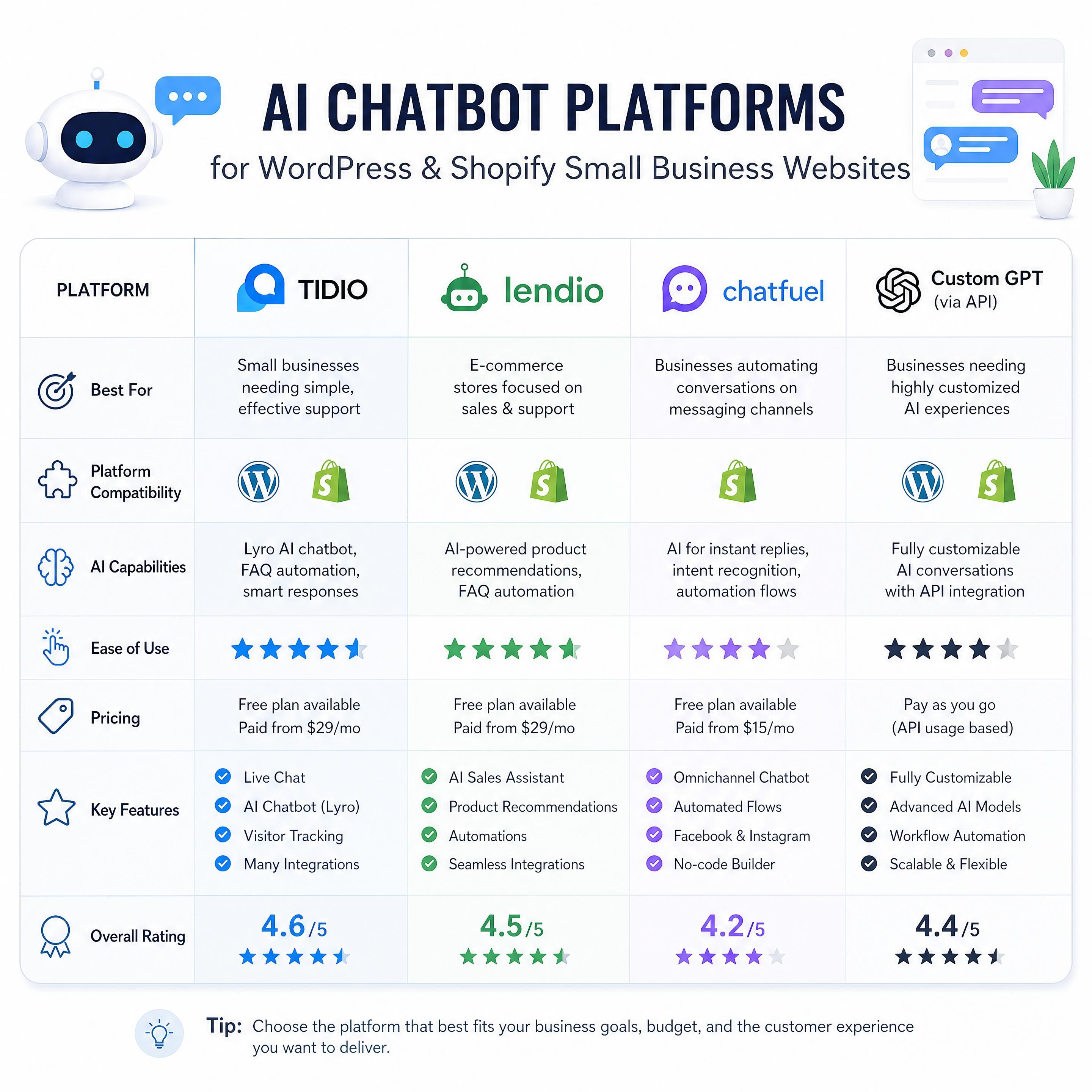
Not all chatbot tools are built the same, and the right choice depends entirely on what your website runs on.
WordPress chatbots
If your site runs on WordPress (and roughly 43% of all websites do), you have a huge range of options. Here's how they stack up:
| Tool | Best For | Starting Price | Setup Time |
|---|---|---|---|
| Tidio | Service businesses, lead gen | $29/month | ~15 min |
| WPBot (AI ChatBot) | Budget-conscious SMBs | Free + add-ons | ~30 min |
| Intercom (Fin AI) | Growing teams, complex flows | ~$39/month | ~45 min |
| YourGPT | Custom AI, knowledge base | $49/month | ~20 min |
| Jotform AI Chatbot | No-code, form-heavy sites | Free tier available | ~10 min |
| MxChat | WordPress + WooCommerce | $29/month | ~15 min |
Recommendation for most Atlanta small businesses: Start with Tidio if you need live chat + AI hybrid, or WPBot if you're budget-tight and comfortable with a plugin ecosystem.
Shopify chatbots
Ecommerce chatbots don't stop helping once a sale is made — they act as your 24/7 concierge for everything that happens after checkout, handling order tracking, returns and exchanges, and product support.
For Shopify stores, your top options are:
| Tool | Best For | Starting Price | Key Feature |
|---|---|---|---|
| Shopify Inbox | Basic chat + automation | Free | Native Shopify integration |
| Tidio | E-commerce + lead gen | $29/month | 67% AI resolution rate |
| Zowie | High-volume stores | Custom | Auto-learns from your data |
| Botsonic | AI-first, custom training | $49/month | GPT-powered responses |
Shopify merchants can now sell products directly through AI chatbots, making the case for a properly configured bot even stronger for Atlanta retail and e-commerce businesses.
Step 3: install your chatbot in under 10 minutes
Here's the step-by-step for WordPress (the most common setup). No developer needed.
WordPress installation (tidio example)
- Log into your WordPress dashboard → Go to Plugins → Add New
- Search for your chosen plugin (e.g., "Tidio Live Chat")
- Click "Install Now" → then "Activate"
- Create your account in the plugin's setup wizard (usually takes 2 minutes)
- Paste your API key if prompted — the plugin will walk you through it
- Choose your widget position — bottom-right is the industry standard
- Set your brand colors and avatar to match your business
Because chatbot plugins are listed in the official WordPress Plugin Directory, you know they've been reviewed and vetted by the WordPress team — no downloading zip files from random websites, no trust issues.
Shopify installation
- Go to your Shopify Admin → Apps → App Store
- Search for your chosen chatbot (e.g., "Tidio" or "Zowie")
- Click "Add App" → authorize permissions
- Complete the setup wizard — most tools auto-import your product catalog
- Enable the chat widget from the app's dashboard
Most WordPress chatbots and Shopify chatbots are live in under 15 minutes. The real work starts in Step 4.
Step 4: train your bot on your business
Installation is the easy part. Training is where the magic — and the money — happens.
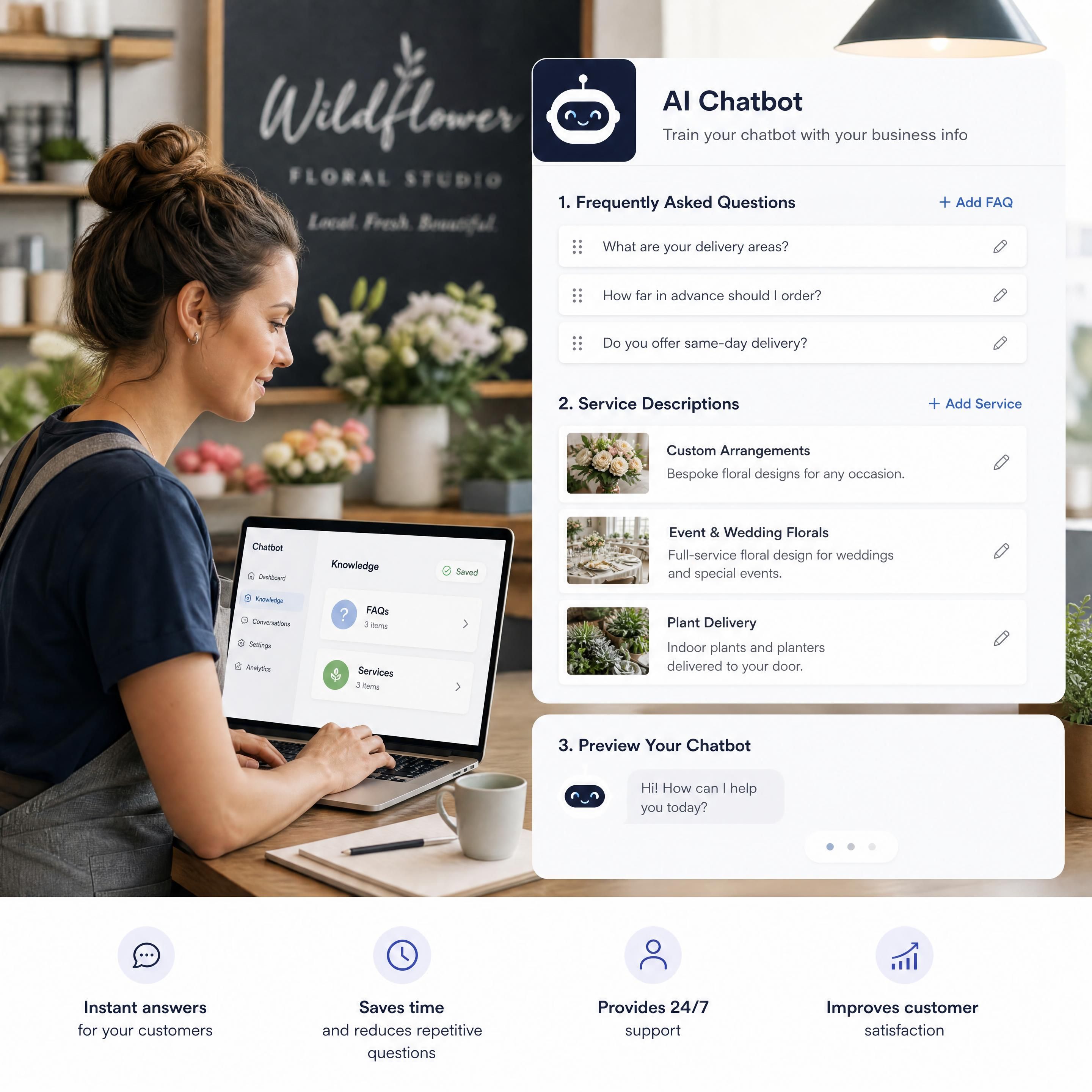
A generic chatbot that says "How can I help you today?" and then fumbles basic questions about your services will hurt your brand. Here's how to train it properly:
Feed it your core content
Most modern AI chatbots can crawl your website automatically. Let them. Then supplement with:
- Your service/product list with descriptions and pricing ranges
- Your top 10–15 FAQs (pull these from your actual emails and calls)
- Your service area — be specific. "We serve Buckhead, Midtown, Sandy Springs, and Decatur" beats "Atlanta metro area"
- Your hours and contact info
- Your booking/quote process — step by step
Map real customer intent
Good chatbot conversations do not feel like forms disguised as chat — they understand what users are trying to achieve and guide them efficiently. Conversation design should include intent mapping, fallback responses, escalation rules, lead capture flows, confirmation messages, and clear handoff points.
Think about the three types of visitors landing on your site:
- Ready to buy — they need a fast path to book or contact
- Comparing options — they need pricing, proof, and reassurance
- Just browsing — they need a gentle nudge and a reason to stay
Build conversation flows for each. Don't treat every visitor the same.
Set up human handoff rules
Your bot should know when to step aside. Configure escalation triggers for:
- Specific keywords ("lawsuit," "emergency," "complaint")
- Conversations that exceed 5 exchanges without resolution
- Any visitor who explicitly asks to speak to a person
Step 5: build a lead capture flow that actually converts
This is the section most guides skip. Here's a proven lead capture flow structure for a small business chatbot:
Trigger: Visitor spends 15+ seconds on a service page

Bot: "Hey! Looking for [service] in Atlanta? I can help you
     get a quick quote — takes about 60 seconds. Want to try?"

[Yes] → "Great! What's your first name?"
      → "And the best number to reach you?"
      → "What's the main issue you're dealing with?"
      → "Perfect. Our team will call you within [X hours].
         Want to schedule a specific time?"

[No thanks] → "No problem! Feel free to browse.
               I'm here if you have questions."
Key rules for high-converting flows:
- Ask for phone before email — phone numbers close deals; emails get ignored
- Keep it under 4 questions for initial capture — you can get more info on the call
- Confirm the next step — "You'll hear from us by 5 PM today" builds trust
- Use the visitor's name after they give it — personalization increases completion rates by ~25%
According to recent lead generation statistics, 64% of companies report that AI chatbots help them generate more qualified leads, not just more leads — and the shift toward AI-powered customer interactions is accelerating.
📊 64% of companies report more qualified leads with AI chatbots – Chatbot Lead Generation Impact
Step 6: understand chatbot pricing and real ROI
Let's talk real numbers. Here's what small business chatbot solutions actually cost in 2026:
| Tier | Monthly Cost | What You Get | Best For |
|---|---|---|---|
| Free / Starter | $0–$29/mo | Basic chat widget, limited AI responses | Testing, micro-businesses |
| Growth | $50–$150/mo | Full AI, lead capture, CRM integration | Most Atlanta SMBs |
| Pro | $150–$400/mo | Multi-channel, advanced flows, analytics | Service businesses with volume |
| Enterprise | $500+/mo | Custom AI, dedicated support, full automation | Agencies, multi-location |
Tidio pricing in 2026 starts at $29/month, but the real monthly bill for a small business using the AI chatbot (Lyro) runs $150–$350 once conversation volume, operator seats, and add-ons are included.
The ROI math is simple. If your average client is worth $1,500 and your chatbot captures even two extra leads per month that convert at a 30% rate — that's $900/month in new revenue from a tool that costs $100–$150/month.
McKinsey's 2026 research reports an average 3.7x ROI on AI tool investment for small businesses — and small businesses using AI are 2.3x more likely to report revenue growth than those not using AI.
For Atlanta businesses competing in high-value service industries — legal, medical, home services — the ROI case is even stronger.
📊 3.7x for small businesses – Average ROI on AI Investment
Step 7: measure, optimize, and scale
Most businesses install a chatbot and never look at the data. That's leaving money on the table.
The 4 metrics that matter
| Metric | What It Tells You | Target Benchmark |
|---|---|---|
| Engagement Rate | % of visitors who interact with the bot | 15–30% |
| Lead Capture Rate | % of conversations that yield contact info | 20–40% |
| Resolution Rate | % of questions answered without human help | 50–70% |
| Handoff Rate | % escalated to human agent | 10–25% |
Monthly optimization checklist
- ✅ Review the top 10 questions your bot received — add any gaps to training
- ✅ Check which pages have the highest bot engagement — optimize flows there
- ✅ Look at where visitors drop off in conversations — simplify those steps
- ✅ A/B test your opening message (e.g., "Can I help?" vs. "Get a free quote in 60 seconds")
- ✅ Update pricing, hours, and services every time they change
Conversation design should include intent mapping, fallback responses, escalation rules, lead capture flows, confirmation messages, and clear handoff points — and these should be revisited regularly based on real user behavior.
When to scale up
You're ready to invest in a more advanced setup when:
- Your bot is handling 100+ conversations per month
- You're consistently hitting your lead capture rate targets
- You want to add voice chatbot capabilities or multi-channel support (SMS, Instagram DMs, WhatsApp)
Related services
Looking to go further with your digital strategy? These services work hand-in-hand with your AI chatbot:
- AI-Powered Lead Generation for Atlanta Businesses — Turn website traffic into booked appointments automatically
- WordPress Website Design & Optimization — Build the foundation your chatbot needs to perform
- Local SEO for Atlanta Small Businesses — Drive the right traffic that your chatbot can convert
- Shopify Store Setup & Automation — Launch or optimize your e-commerce presence with AI built in
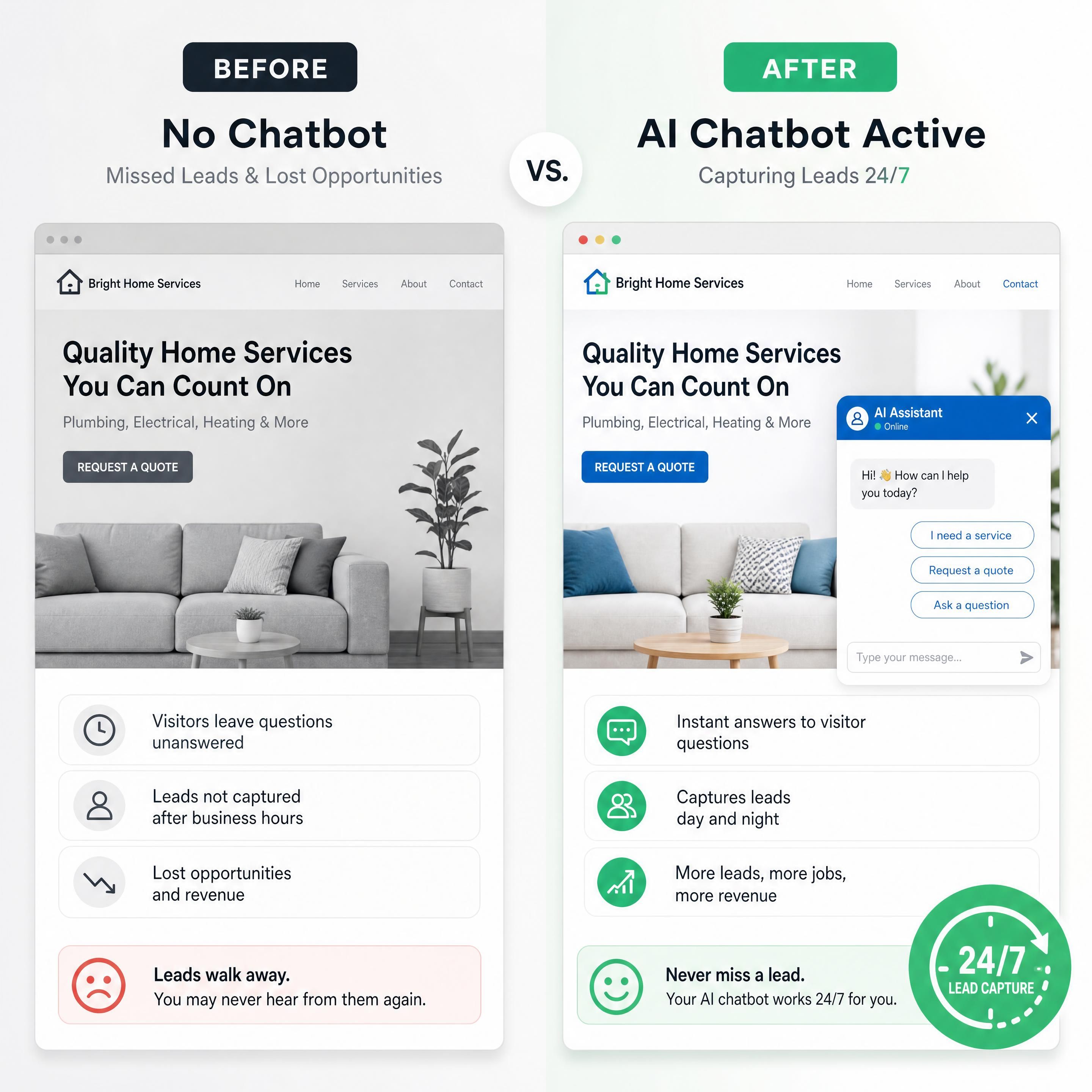
Before vs. after: a real-world scenario
The Business: A Midtown Atlanta personal injury law firm with a WordPress site averaging 800 monthly visitors.
| Metric | Before Chatbot | After Chatbot (90 Days) |
|---|---|---|
| Monthly leads captured | 12 (contact form only) | 34 (chatbot + form) |
| After-hours leads | 0 | 11 |
| Average response time | 4–6 hours | Instant |
| Lead-to-consult rate | 22% | 38% |
| Estimated new monthly revenue | $3,600 | ~$10,200 |
The chatbot didn't replace the intake team. It made the intake team's job easier — by handing them warm, pre-qualified leads instead of cold form submissions.
Questions fréquentes (FAQ)
What is the best AI chatbot for a small business in atlanta?
The best chatbot depends on your website platform and primary goal. For WordPress-based service businesses (HVAC, law, dental), Tidio or WPBot are the most practical starting points. For Shopify stores, Shopify Inbox (free) or Tidio offer the fastest setup with strong e-commerce features. If you want a fully customized solution trained specifically on your business, a managed AI chatbot service will deliver better results than a DIY plugin.
How long does it take to set up a small business chatbot?
Basic installation takes 10–15 minutes for most WordPress chatbots and Shopify chatbots. However, proper training — feeding the bot your services, FAQs, pricing, and building out conversation flows — typically takes 2–4 hours to do right. Budget a full afternoon for your first setup, and plan to optimize monthly as you gather real conversation data.
How much does a chatbot cost for a small business?
In 2026, small business chatbots range from free (basic widget only) to $400+/month for advanced AI with full automation. Most Atlanta service businesses will find the $50–$150/month range covers their needs — that includes AI-powered responses, lead capture, and basic CRM integration. The ROI typically justifies the cost within the first month if your average customer value is over $500.
Can a chatbot work on both wordpress and shopify?
Yes. Tools like Tidio and Intercom support both platforms with native plugins. If you run a WordPress website for your brand and a separate Shopify store, you can often use the same chatbot account across both with different configurations for each — one optimized for lead capture, one for e-commerce support.
Will customers know they're talking to a chatbot?
Modern AI chatbots are significantly more conversational than older rule-based bots, but transparency is still best practice. Most businesses introduce the bot with a name (e.g., "Hi, I'm Aria, your virtual assistant") and include a clear option to connect with a human. Customers generally accept chatbots when they're fast, helpful, and honest — and they lose patience when a bot pretends to be human and fails to deliver.
Chiffres clés
📊 89% of small businesses now use AI in some capacity — up from just 36% in 2023 (Source: U.S. Chamber of Commerce, 2026)
💡 3.7x average ROI on AI tool investment for small businesses (Source: McKinsey, 2026)
🤖 64% of companies using AI chatbots report generating more qualified leads (Source: TailorTalk Research, 2026)
📈 91% of small businesses using AI report measurable revenue increases (Source: Salesforce SMB Study, 2026)
Conclusion: stop waiting — atlanta won't wait for you
The businesses winning in Buckhead, Midtown, and across metro Atlanta right now aren't the ones with the biggest teams or the biggest budgets. They're the ones who respond first, qualify faster, and never let a lead go cold at midnight.
An AI chatbot isn't a luxury anymore. For a small business competing in 2026, it's table stakes.
You now have the exact steps: define your bot's job, pick the right platform for your WordPress or Shopify site, install it in minutes, train it on your real business, build a lead capture flow that converts, understand what it actually costs, and optimize it every month.
The setup takes an afternoon. The results compound for years.
Ready to turn your Atlanta website into a 24/7 lead generation machine? Contact our team today and we'll help you launch your first AI chatbot — configured, trained, and ready to convert — in less than a week.